Smartphones and the internet offer many conveniences today. Many people find it hard to spend even a few minutes without a Wi-Fi connection. Some say we have become slaves to internet signals, but it is hard to deny that the internet offers many things that were unimaginable a few decades ago.
We fill in countless forms in our daily lives, so many that we lose count. The delivery order form is one that we often come across.
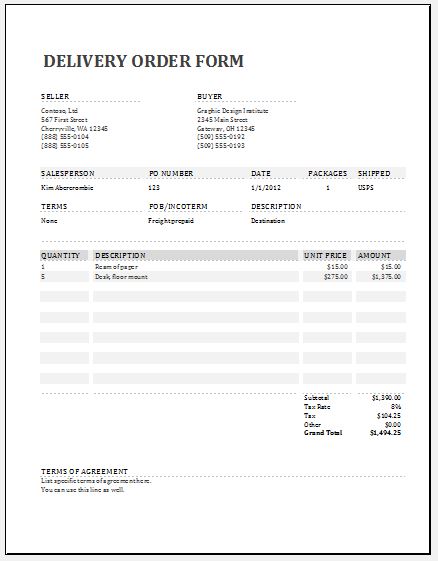
What is a delivery order form? In simple terms, it is a document that records the goods to be delivered from one place to another, along with the details of the delivery.
Delivery order forms are customised and usually differ from case to case, but a standard form has many things in common. The form is easy to prepare and has the following details:
- Customer name
- Contact number
- Delivery address
- Items ordered and their quantities
- Order date and delivery date
- Name of the person delivering the goods and the vehicle number
- Notes or delivery instructions
Some forms also include a receipt checklist, which is ticked when the goods arrive, and signature lines for the person delivering the goods and the person receiving them. The expected delivery date is also mentioned, so that the customer has a date in mind.
Anything you are looking for can easily be found on the internet, and delivery forms are no exception. If you need a delivery order form, you can use our online generator below. The standard layout can be used as it is, but if you want extra details or want to remove some options, you can customise your own.
The Delivery Order Form generator lets you enter the company, customer and delivery details, list the items with quantities and remarks, and add a receipt checklist, notes and signature lines. You can then print the form or save it as a PDF, or download it as an editable Word document. It is a sample prepared for help and guidance only, and it is not intended for legal or any other official purpose.
Delivery Order Form
Enter the company, customer and delivery details, list the items, add a receipt checklist, check the one-page form on the preview, then print it or save it as a PDF, or download it as an editable Word document. Anything you leave empty stays as a blank line to write on. Your details stay in your browser and are not sent anywhere. This form is a sample prepared for help and guidance only. It is not intended for legal or any other official purpose.
Company
Delivery Details (optional, leave empty to write by hand)
Items
Receipt Checklist and Notes
Sections on the Form
Signature Lines
Page & Style
Preview & Details of other MS Word & Excel Templates

File: Word (.docx) 2003+ and iPad
Size 28 KB
File: Excel (.xls)
Size 28 KB

File: Excel (.xls)
Size 28 KB