Meetings are important and take place in every workplace. There are meetings of teachers, meetings in offices and many others. It is necessary to keep a record of a meeting so that people can see what it covered.
A meeting record form is a form that records the details of a meeting clearly. It allows anyone to see what the meeting involved.
If you need to make a meeting record form, consider the following details.
Application: A meeting record form can be made in Microsoft Word or Excel, which gives it a professional look.
Name of the meeting: Give the document a heading. This can be the name of the meeting.
Date and time: Include a space that clearly states the date and time of the meeting. Both are important because it should be known when the meeting was held.
Meeting location: State where the meeting was held.
Led by: State the name of the person or organisation that led the meeting.
Subject of the meeting: State the subject of the meeting.
Participant names and signatures: Provide an area for those who took part in the meeting, with their names and signatures. Leave enough space for everyone involved to fill in their name.
Purpose of the meeting: State the purpose of the meeting.
Items discussed: Clearly state what was discussed at the meeting. If many items were discussed, they can be written in point form, or they can be described in detail.
Problems identified: State any problems or issues that were identified and the areas they concern. This helps the reader know what needs to be handled.
Members’ suggestions: This is another important part of the meeting. Record the useful suggestions on the form so that they can be looked into and considered.
Plans: These can be stated in point form. Everything on the form should be clear and easy for all involved to understand.
Advantages of meeting record forms
The advantages of a meeting record form are the following:
- It gives the organisation a document stating what a particular meeting covered.
- It contains the important points that were discussed and any suggestions that were made.
- It shows the areas where work needs to be done.
- It records who took part in the meeting.
A meeting record form is a professional document. It should be prepared carefully so that all details are stated clearly. Anyone who needs to read the form later, or check what happened in the meeting, should be able to do so easily.
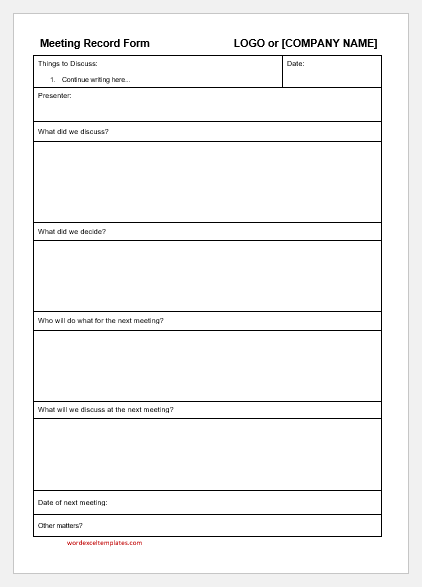
Create a sample meeting record form below:
Meeting Record Form
Enter the company and meeting details, list the attendees, set the agenda and action items, check the one-page form on the preview, then print it or save it as a PDF, or download it as an editable Word document. Anything you leave empty stays as a blank line to write on. Your details stay in your browser and are not sent anywhere. This form is a sample prepared for help and guidance only. It is not intended for legal or any other official purpose.
Company
Meeting Details (optional, leave empty to write by hand)
Attendance
Tick the attendees who were present:
Agenda
Action Items
Sections on the Form
Signature Lines
Page & Style
Our Meeting Record Form generator lets you enter the meeting details, list the attendees and tick who was present, and set the agenda, action items and notes. You can then add signature lines, print the form or save it as a PDF, or download it as an editable Word document. It is a sample prepared for help and guidance only, and it is not intended for legal or any other official purpose.
File: Word (.docx)
Size 32 KB

File: Word (.docx)
Size 32 KB