Invoices play a critical role in maintaining the financial stability of any business. Companies rely on invoice records not only to monitor sales but also to track outstanding payments from customers and clients. One of the most important aspects of invoice management is understanding the age of unpaid invoices. Invoice aging refers to the length of time an invoice has remained unpaid after it has been issued. Monitoring this information helps businesses prioritize collection efforts, maintain healthy cash flow, and reduce the risk of bad debts.
To simplify this process, businesses can now use our Invoice Aging Report Generator, an online tool designed to automatically organize outstanding invoices into aging categories and generate professional reports instantly.
What is an Invoice Aging Report Generator?
An Invoice Aging Report Generator is an online tool that helps businesses analyze their accounts receivable by categorizing unpaid invoices based on the number of days they have remained outstanding. Instead of manually preparing reports or using complicated formulas, users simply enter invoice details such as invoice numbers, customer names, invoice dates, due dates, and outstanding balances. The generator then automatically calculates the aging period and organizes invoices into categories such as:
- Current (Not Yet Due)
- 1–30 Days Overdue
- 31–60 Days Overdue
- 61–90 Days Overdue
- More than 90 Days Overdue
This AI-powered online generator enables businesses to identify overdue accounts quickly and take appropriate action to improve collections and maintain financial control.
Why is an Invoice Aging Report Important?
Businesses often deal with multiple customers and numerous invoices simultaneously. Without proper monitoring, overdue payments can accumulate and negatively affect cash flow. An invoice aging report provides valuable insights into outstanding receivables and highlights accounts that require immediate attention.
By reviewing the aging report regularly, businesses can develop more effective collection strategies, reduce payment delays, and minimize the risk of financial losses resulting from unpaid invoices.
Benefits of Using the Invoice Aging Report Generator
Faster Identification of Overdue Accounts
The generator automatically classifies invoices according to their aging status, making it easier to identify customers with late payments. This allows businesses to prioritize collection efforts and follow up with the appropriate clients before outstanding balances become unmanageable.
Improved Cash Flow Management
Healthy cash flow is essential for the smooth operation of any business. Late payments can create an imbalance between incoming and outgoing funds. By providing a clear overview of outstanding invoices, the generator helps businesses anticipate cash shortages and take proactive steps to recover unpaid amounts.
Better Decision-Making
Invoice aging reports provide valuable data that can influence credit policies and customer relationships. Businesses can identify payment trends, evaluate customer reliability, and determine whether stricter payment terms or revised credit limits may be necessary.
Reduced Manual Work
Preparing aging reports manually can be time-consuming and prone to errors. The online generator automates calculations and classifications, saving time while improving accuracy. This allows accounting teams and small business owners to focus on more strategic financial tasks.
Professional Reporting
The generated report presents invoice information in a clear and organized format that can be reviewed internally or shared with management teams. The report can be printed, downloaded, or used during financial meetings and collection reviews.
AI-Powered Online Functionality
Our online Invoice Aging Report Generator has been designed to provide a user-friendly experience directly from your web browser. There is no need to install specialized accounting software or perform complex spreadsheet calculations.
Users can:
- Enter customer and invoice details online.
- Automatically calculate invoice aging periods.
- View categorized aging summaries instantly.
- Monitor total outstanding balances.
- Generate clear and professional reports.
- Print or download the report for recordkeeping purposes.
- Access the tool from desktops, tablets, or mobile devices.
This modern approach makes invoice tracking faster, simpler, and more accessible for businesses of all sizes.
Prefer Using Excel? The Traditional Worksheet Is Still Available
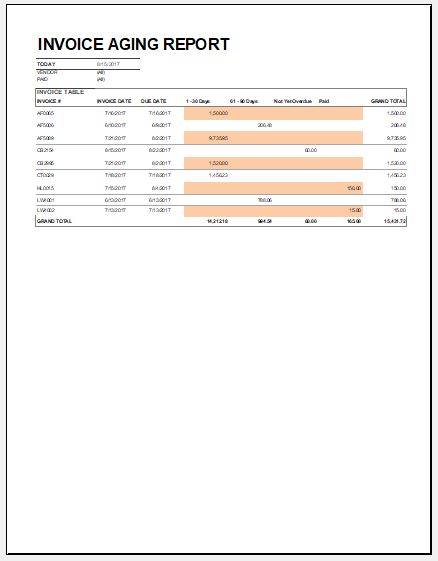
While our online Invoice Aging Report Generator offers instant calculations and enhanced convenience, we understand that many professionals still prefer working with spreadsheets. For this reason, we continue to offer the Invoice Aging Report Template for MS Excel.
The Excel worksheet provides a structured format for recording invoice information and preparing aging reports offline. It is particularly useful for users who wish to maintain their records locally, customize formulas, or integrate the worksheet into their existing accounting workflows.
Whether you choose the online generator for its automation and accessibility or the Excel template for its familiarity and flexibility, both options are designed to help businesses monitor outstanding invoices effectively and make informed financial decisions.
By regularly reviewing invoice aging reports, businesses can strengthen their collection processes, improve cash flow management, and maintain healthier customer accounts.
File: Excel (.xls) and iPad
Size: 31 KB
- Quotation Register
- Customer Order Tracker
- Inventory Dashboard Generator
- Sales Dashboard Generator
- SWOT Analysis Generator
- KPI Scorecard Generator
- Warehouse Bin Location Generator
- Dispatch Slip Generator
- Universal Work Order Generator
- Office Asset Transfer Form Generator
- Summer Holiday Assignment Cover Page Generator
- Salary and Overtime Calculator Template
- Summer Vacation Planner Generator
- Outlet Mall Shopping Planner
- Customer Information and Ranking Sheet