Our Balance Sheet with Financial Ratio Calculator is a powerful online financial reporting tool designed to help business owners, accountants, students, startups, and financial professionals prepare a professional balance sheet while instantly calculating important financial ratios. Instead of using complicated spreadsheet formulas, you simply enter your financial information, and the calculator performs all calculations automatically in real time.
Whether you are preparing financial statements for internal analysis, loan applications, investors, business planning, or educational purposes, this tool provides a fast, accurate, and user-friendly solution.
Balance Sheet with Financial Ratio Calculator
Create an editable balance sheet, calculate totals, check whether assets equal liabilities plus equity, analyze key financial ratios, print the report, or download it as HTML/CSV.
FAQs
What does balanced mean?
Can I print only the balance sheet?
How are financial ratios calculated?
Can negative profit or drawings be entered?
Enter Complete Business Information
Start by entering your company’s basic details, including the business name, address, reporting date, currency symbol, and the name of the person preparing the statement. These details are automatically displayed on the printable balance sheet, giving your report a professional appearance.
Record All Business Assets
The calculator provides dedicated sections for entering both current and non-current assets. You can record cash, bank balances, accounts receivable, inventory, prepaid expenses, investments, property, equipment, vehicles, furniture, and other long-term assets. Accumulated depreciation can also be entered so that your net asset values are calculated correctly.
As you enter values, the generator automatically calculates:
- Total Current Assets
- Total Non-Current Assets
- Total Assets
No manual calculations are required.
Enter Business Liabilities
Separate sections are available for current liabilities and long-term liabilities. Record accounts payable, taxes payable, accrued expenses, loans, mortgages, bonds payable, and other financial obligations.
The calculator instantly determines:
- Total Current Liabilities
- Total Long-Term Liabilities
- Total Liabilities
This allows you to maintain a complete and accurate picture of your company’s financial obligations.
Calculate Owner’s Equity Automatically
Enter owner capital, retained earnings, current-year profit or loss, drawings, and other equity balances. The calculator automatically adjusts equity values and determines the total owner’s equity without requiring manual formulas.
Automatic Balance Sheet Verification
One of the most useful features of this generator is its automatic balance verification.
Every time you edit a value, the calculator compares:
Total Assets
with
Total Liabilities + Owner’s Equity
If both sides match, the balance sheet is marked as Balanced. If they do not match, the tool immediately displays the difference and highlights the imbalance so you can identify errors before printing your report.
Instant Financial Ratio Analysis
Beyond preparing a balance sheet, this tool performs comprehensive financial analysis by calculating important financial ratios automatically.
These include:
- Current Ratio
- Quick Ratio
- Working Capital
- Debt-to-Equity Ratio
- Debt Ratio
- Equity Ratio
- Gross Profit Margin
- Net Profit Margin
- Return on Assets (ROA)
- Return on Equity (ROE)
- Inventory Turnover
- Accounts Receivable Turnover
- Interest Coverage Ratio
Each ratio includes a clear interpretation that helps users understand the financial health of the business. This makes the tool useful not only for preparing statements but also for evaluating liquidity, profitability, efficiency, and long-term solvency.
Live Calculations
Every calculation updates instantly while you type. There is no need to refresh the page or press a calculate button. The calculator automatically updates totals, balance status, financial ratios, and analysis in real time.
Professional Printable Report
A professionally formatted balance sheet preview is generated automatically beside the data entry form. The preview displays all business information, assets, liabilities, equity, calculated totals, financial ratios, and balance status.
When you select Print, only the completed balance sheet and financial ratio report are printed, ensuring a clean, professional document without unnecessary webpage content.
Download and Export Options
Once your balance sheet is complete, you can:
- Print the report
- Download the completed report as an HTML file
- Export all entered data and calculated financial ratios as a CSV file
- Reset the form to prepare another balance sheet
These features make it easy to save, share, or maintain financial records.
Mobile-Friendly Design
The calculator is fully responsive and works smoothly on desktop computers, tablets, and smartphones. Its clean layout and intuitive interface allow users to prepare financial statements from virtually any device.
Sample Data Included
To help new users understand how the calculator works, the generator includes editable sample values that can be modified or replaced with actual business figures. This allows users to explore the tool before preparing their own financial reports.
Why Use This Balance Sheet with Financial Ratio Calculator?
- Create professional balance sheets online
- Automatically calculate financial totals
- Verify that your balance sheet balances correctly
- Generate essential financial ratios instantly
- Analyze business liquidity and profitability
- Print professional reports
- Export financial data
- Save time by eliminating manual calculations
- Reduce calculation errors
- Suitable for businesses of all sizes, accountants, students, consultants, and financial analysts
Our online Balance Sheet with Financial Ratio Calculator combines financial statement preparation and ratio analysis into one easy-to-use tool, making it an efficient solution for creating accurate, professional, and printable financial reports within minutes.
MS Excel Template:
If you prefer working offline, you can also download our professionally designed Balance Sheet with Financial Ratio Excel Template. It features built-in formulas that automatically calculate totals, verify whether the balance sheet is balanced, and generate key financial ratios, making financial reporting faster, more accurate, and easier to manage.
Preview and Details of Template
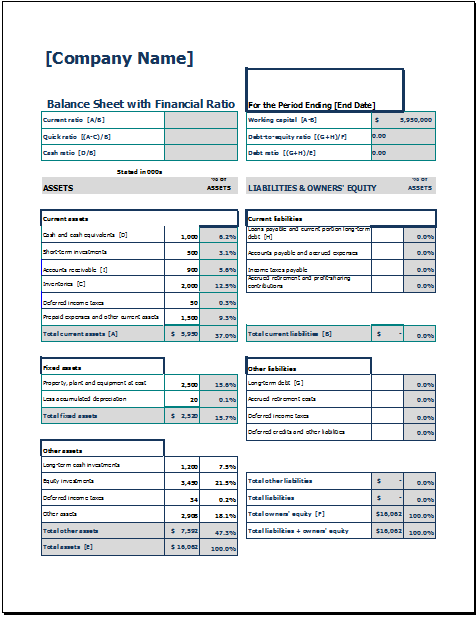
File: Excel (.xls) and iPad
Size 36 KB
- Office Asset Transfer Form Generator
- Summer Holiday Assignment Cover Page Generator
- Salary and Overtime Calculator Template
- Summer Vacation Planner Generator
- Outlet Mall Shopping Planner
- Customer Information and Ranking Sheet
- Small Family Kitchen Design Planning Sheet
- Summer Party Budget Sheet Generator
- Payroll Register & Salary Sheet Generator
- Employee Skill Development Tracker
- HR Budget & Expense Tracker
- Leave & Vacation Tracker
- Exit/Off-boarding Checklist
- Performance Evaluation Sheet
- New Year Goal Setting Worksheet