An accounts payable ledger records purchases made on credit and tracks the amounts owed to suppliers. It can be maintained in a spreadsheet and provides a useful reference for checking unpaid invoices and their due dates.
The accounts payable ledger helps you manage records for multiple vendors. It keeps track of opening balances, purchases, payments, adjustments, and closing balances, showing how much remains payable to each vendor and the total amount outstanding.
Accounts Payable Ledger Worksheet Generator
The Accounts Payable Ledger Worksheet Generator is a professional online tool designed to help businesses accurately record, organize, and monitor their outstanding supplier invoices and payment obligations. Whether you operate a small business, manage a growing company, or work in an accounting department, this generator simplifies the process of maintaining a clear and up-to-date accounts payable ledger.
The worksheet allows you to enter essential information such as vendor details, invoice numbers, invoice and due dates, purchase order references, expense categories, payment methods, taxes, discounts, adjustments, and payment status. As you add multiple ledger entries, the generator automatically calculates invoice totals, payments made, outstanding balances, tax amounts, discounts, and overall payable summaries, reducing manual calculations and improving accuracy.
A dynamic live preview updates instantly as information is entered, allowing you to review the completed worksheet before printing. The generator also includes summary cards that display total invoices, total payments, outstanding balances, paid invoices, unpaid invoices, and overdue invoices. An aging analysis categorizes outstanding balances into different time periods, helping businesses identify overdue payments and manage cash flow more effectively.
Accounts Payable Ledger Worksheet
Track supplier invoices, payments, outstanding balances and overdue payables.
Ledger Details
Vendor Invoices
Record each supplier invoice, due date and opening paid amount. Enter subsequent payments in the Payments tab.
Payments Made
Link payments to invoice references. Unmatched references are excluded from invoice balances and flagged for review.
Review & Sign-off
For convenience, users can add or remove unlimited ledger entries, print a professionally formatted A4 worksheet, or download the completed ledger as an HTML report for future reference. The responsive design works smoothly on desktops, tablets, and mobile devices.
Whether you are tracking monthly supplier payments, preparing accounting records, or reviewing outstanding liabilities, this Accounts Payable Ledger Worksheet Generator provides an efficient, organized, and user-friendly solution for maintaining accurate financial records and improving accounts payable management.
MS Excel Template
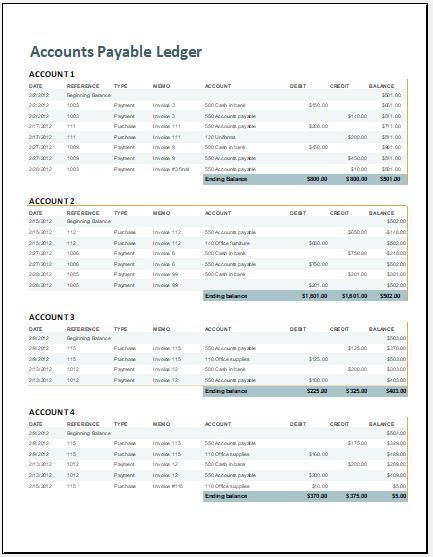
You can use an accounts payable ledger template to organize vendor accounts, record credit purchases, and track outstanding payments. The template provided on this website offers a ready-made layout that can save time and keep your records consistent and professional. Check all entries and formulas carefully to ensure the information is accurate.
The template is easy to use and customize. To record additional information specific to your business, you can add a column to the spreadsheet and adjust the layout or formulas as needed.
Elements of the spreadsheet:
The main contents of this spreadsheet are:
- Invoice Date: Enter the date shown on the invoice.
- Invoice Number: Enter the invoice’s unique reference number for identification.
- Supplier Name: Enter the name of the supplier.
- Invoice Total: Record the total amount payable, as shown on the invoice.
- Payment Due Date: Enter the date by which payment must be made.
- Balance Due: Record the outstanding amount after accounting for payments and any adjustments.
- Payments: Record each payment made to the supplier, including the amount and payment date.
- Current Date: Include the current date to help identify overdue invoices.
Additional columns can be added to meet your business’s requirements.
Preview and Details of Template
File: Excel (.xls)
Size 45 KB