Managing daily cash transactions accurately is essential for every business, regardless of its size. Our Daily Cash Report Generator helps business owners, cashiers, accountants, store managers, and administrative staff create professional cash reports quickly and efficiently. Whether you operate a retail store, restaurant, office, school, clinic, warehouse, or service business, this tool simplifies daily cash reconciliation and reporting.
The generator is designed to eliminate manual calculations and reduce reporting errors. Users can enter their daily cash activities, and the system automatically performs all required calculations to produce a professional Daily Cash Report ready for printing or saving.
How the Daily Cash Report Generator Works
The generator begins with a section for entering basic report information. Users can enter the business name, branch or department, report date, cashier name, report number, and work shift. This information helps identify and organize daily reports for future reference.
The next section allows users to enter the opening cash balance. This is the amount of cash available at the beginning of the business day or shift. The opening balance serves as the starting point for all subsequent calculations.
Daily Cash Report Generator
Create a professional daily cash report with receipts, payments, adjustments, variance tracking, and print-ready preview.
Report Information
Cash Receipts
| # | Description | Reference | Amount |
|---|
Cash Payments
| # | Description | Voucher | Amount |
|---|
Other Adjustments
| # | Description | Amount (+ / -) |
|---|
Payment Method Summary
Notes & Authorization
Blue Harbor Retail Store
Daily Cash Report
Main Branch
Cash Position Summary
Cash Receipts
| # | Description | Reference | Amount |
|---|
Cash Payments
| # | Description | Voucher | Amount |
|---|
Other Adjustments
| # | Description | Amount |
|---|
Payment Method Summary
Notes
Prepared By
Verified By
Approved By
Record Daily Cash Receipts
The Cash Receipts section allows users to record all incoming cash transactions throughout the day. Multiple receipt entries can be added as needed. For each transaction, users can enter:
- Receipt description
- Reference number
- Amount received
The generator automatically totals all receipt entries and displays the Total Cash Receipts amount without requiring any manual calculations.
Record Cash Payments and Expenses
Businesses often make various cash payments during the day. The Cash Payments section enables users to enter all outgoing cash transactions including expenses, reimbursements, purchases, and petty cash payments.
For each payment entry, users can specify:
- Expense description
- Voucher number
- Amount paid
The system automatically calculates the Total Cash Payments and updates the report instantly.
Add Financial Adjustments
The generator also includes an Adjustments section for recording any positive or negative adjustments. These may include corrections, refunds, shortages, overages, or miscellaneous accounting entries.
Users can add multiple adjustment records and the system automatically calculates the total adjustment amount.
Automatic Cash Reconciliation
One of the most powerful features of this generator is its automatic reconciliation capability.
Based on the information entered, the system automatically calculates:
- Opening Balance
- Total Cash Receipts
- Total Cash Payments
- Total Adjustments
- Expected Closing Balance
Users then enter the Actual Cash Counted at the end of the day. The generator compares the actual cash against the expected balance and instantly identifies any difference.
If there is no difference, the report indicates that the cash drawer is balanced. If a shortage or excess exists, the generator clearly highlights the variance to help management investigate discrepancies.
Track Multiple Payment Methods
Modern businesses receive payments through various channels. The Payment Summary section allows users to record sales received through:
- Cash
- Credit or Debit Cards
- Bank Transfers
- Mobile Wallets
- Other Payment Methods
The generator automatically calculates the Total Daily Sales from all payment methods and displays the results in the report.
Professional Report Preview
As information is entered, a professional Daily Cash Report preview is generated automatically alongside the form. Users can instantly see how the final report will appear before printing.
The preview updates in real time and displays all calculations, totals, payment summaries, notes, and authorization details in a professional accounting format.
Authorization and Approval Section
To improve accountability and internal control, the report includes an authorization section where users can enter:
- Prepared By
- Verified By
- Approved By
- Cashier Name
- Manager Name
- Signature Fields
- Approval Date
These fields help create an official record for audit and compliance purposes.
Print and Download Features
Once the report is complete, users can print a clean professional copy directly from the generator. The print function is configured to print only the report preview area, ensuring that menus, buttons, and webpage content are excluded from the final printout.
Users can also download or save the report for recordkeeping and future reference.
Advanced Features
Our Daily Cash Report Generator includes several advanced capabilities designed to improve productivity and accuracy:
- Automatic calculations
- Auto-generated report IDs
- Currency selection
- Real-time dashboard summaries
- Dark mode option
- Mobile-friendly design
- Data validation
- Automatic local saving
- Restore previously entered reports
- Unlimited receipt and payment entries
- Responsive layout for desktop and mobile devices
Why Use This Generator?
This Daily Cash Report Generator helps businesses maintain accurate financial records while significantly reducing the time required to prepare daily reports. Instead of manually creating reports and performing calculations, users can focus on reviewing results and managing cash operations more effectively.
Whether you need a report for a retail cash register, office petty cash fund, restaurant cash drawer, school collection account, or any other cash-handling operation, this generator provides a fast, reliable, and professional solution.
Daily Cash Report Excel Template
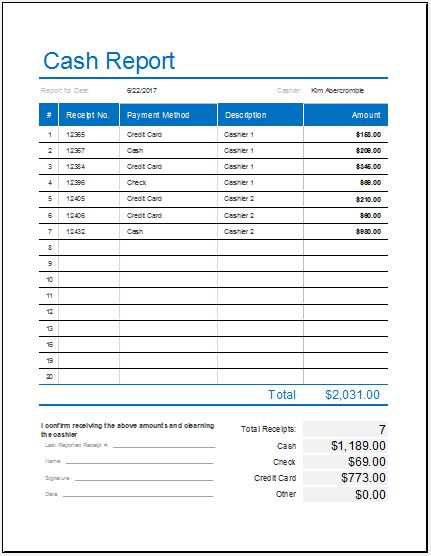
In addition to the online Daily Cash Report Generator, we also offer a professionally designed Daily Cash Report Excel Template for users who prefer working with spreadsheets. The Excel version includes preformatted sections for recording opening cash balances, daily receipts, payments, adjustments, and closing cash totals. Built-in formulas automatically calculate totals, cash differences, and ending balances, helping reduce manual work and calculation errors.
Simply download the template, enter your daily transaction details, and customize it according to your business requirements. The spreadsheet can be saved for recordkeeping, shared with management, or printed for accounting and audit purposes. This makes it an excellent option for businesses that prefer maintaining offline financial records while still benefiting from automated calculations and professional reporting.
File: Excel (.xls) 2003+
- Universal Work Order Generator
- Office Asset Transfer Form Generator
- Summer Holiday Assignment Cover Page Generator
- Salary and Overtime Calculator Template
- Summer Vacation Planner Generator
- Outlet Mall Shopping Planner
- Customer Information and Ranking Sheet
- Small Family Kitchen Design Planning Sheet
- Summer Party Budget Sheet Generator
- Payroll Register & Salary Sheet Generator
- Employee Skill Development Tracker
- HR Budget & Expense Tracker
- Leave & Vacation Tracker
- Exit/Off-boarding Checklist
- Performance Evaluation Sheet