An Office Asset Transfer Form documents the movement of company-owned equipment or other assets from one employee, department, branch, or location to another. It provides a record of which assets were transferred, who released and received them, their condition, and when the transfer took effect.
The form can be used for items such as computers, laptops, mobile devices, printers, furniture, tools, and other organizational property. Recording asset IDs, serial numbers, quantities, locations, and authorization details can help organizations keep their asset register and custody records consistent with the physical movement of equipment.
Before completing a transfer, verify the asset information and condition against the organization’s existing records. The completed form should also follow any internal approval, asset-control, security, or inventory procedures that apply to the transfer.
What Does This Generator Do?
The Office Asset Transfer Form Generator creates a structured record of assets being moved between employees, departments, branches, or office locations. It can be used for both temporary and permanent transfers, depending on the organization’s asset-management procedures.
The form records the parties involved in the transfer together with asset identification, quantity, condition, location, value, transfer dates, and authorization details where applicable. This makes it easier to compare the physical transfer with the organization’s asset register or inventory records.
After the form is completed, the relevant asset register, custody record, or inventory system should also be updated where required. The transfer form documents the transaction, but it should not be treated as a substitute for maintaining the organization’s underlying asset records.
Office Asset Transfer Form Generator
Create a professional office asset transfer form with a side-by-side input panel and live printable preview. Add assets, calculate totals, print, download, export, copy, and save your form locally.
Organization Information
Transfer Information
Transfer From
Transfer To
Asset Details
| Asset ID | Barcode | Category | Asset Name | Brand | Model | Serial Number | Condition | Qty | Unit | Purchase Date | Current Value | Location | Remarks | Actions |
|---|
Authorization Section
Additional Notes & Terms
FAQs
Can this generator work inside WordPress?
Yes. Paste this complete HTML into a WordPress Custom HTML block. All styling and JavaScript are scoped inside the generator.
Does the print button print only the form preview?
Yes. The print button prints only the generated Office Asset Transfer Form preview, not the input fields or webpage content.
Can I add unlimited asset rows?
Yes. You can add, duplicate, remove, sort, search, and filter asset rows directly in the browser.
Is asset data sent to a server?
No. All calculations, previews, imports, exports, and auto-save actions happen locally in the browser.
Before Completing an Asset Transfer
Before transferring an office asset, verify its asset ID, serial number, description, quantity, current location, and condition against the organization’s existing records. This helps prevent discrepancies between the transfer form and the asset register.
The form should clearly identify the person, department, branch, or location releasing the asset and the party receiving it. Where the organization requires authorization, obtain the appropriate approval before completing the transfer.
After the physical transfer takes place, update the relevant asset register, inventory system, or custody record. For valuable or sensitive equipment, organizations may also need to confirm receipt, record the new custodian, and retain supporting documentation according to their internal procedures.
For temporary transfers, record the expected return date and check the asset again when it is returned.
Office Asset Transfer Form Preview
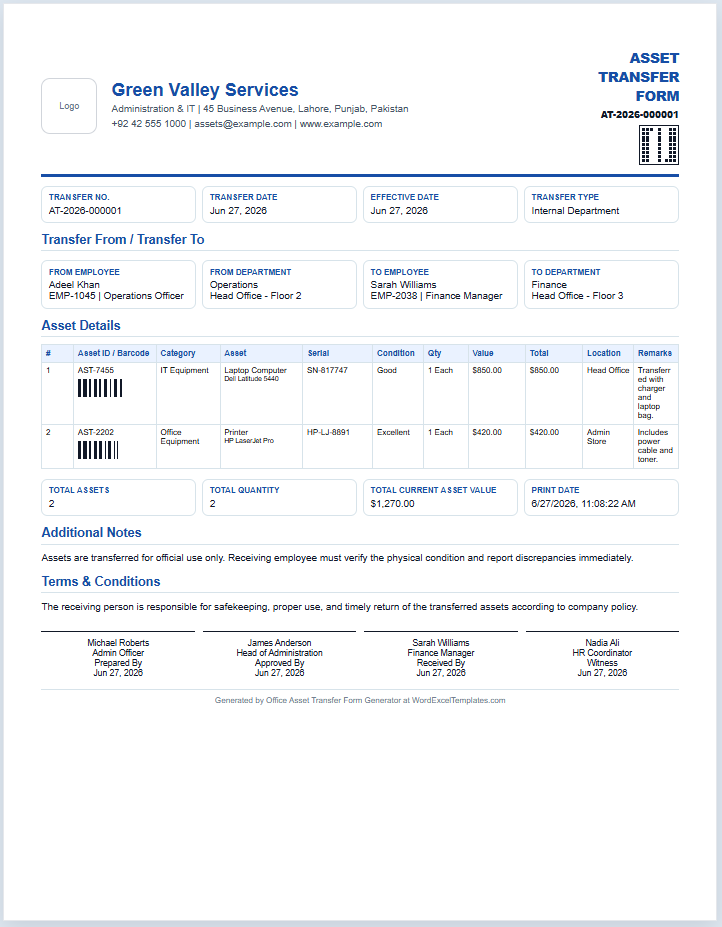
The image below shows an example of a completed Office Asset Transfer Form created with the generator above. It demonstrates how organization details, transfer information, employee or department details, individual asset records, totals, notes, terms, and authorization information are organized in the final document.
The actual generator is interactive, so the information shown in the form will change according to the details entered for each asset transfer. Review the completed form and verify asset IDs, serial numbers, quantities, condition, locations, values, and authorization details before using it as part of your organization’s records.