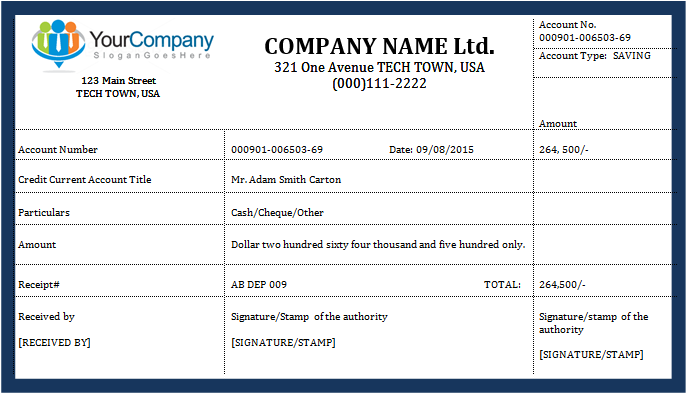
Our Online Deposit Receipt Generator helps individuals, businesses, landlords, contractors, retailers, service providers, schools, and organizations create professional deposit receipts in just a few minutes. Whether you are receiving a security deposit, advance payment, booking fee, rental deposit, project deposit, or any other type of payment, this free online tool allows you to generate an accurate, print-ready receipt directly from your browser without installing any software.
The generator has been designed to simplify receipt creation while maintaining a professional appearance. Simply fill in the required information, and the receipt preview updates instantly as you type. Once completed, you can print, download, or save your receipt for future reference.
Deposit Receipt Generator
Create a professional business deposit receipt with live preview, automatic totals, QR code, barcode, print, download, copy, email, and save options.
FAQs
Can I print only the receipt?
Can I download the receipt as PDF?
Can I customize the QR code and barcode?
Does this use external libraries?
Complete Business Information
Start by entering your business details, including your company name, logo, address, phone number, email address, website, and business tagline. These details automatically appear in the receipt preview, giving every receipt a polished and professional look that reflects your business identity.
Customer Details
Record complete customer information, including the customer’s name, company name, address, phone number, email address, and contact person. Maintaining accurate customer records makes future communication and record keeping much easier.
Flexible Deposit Information
The generator supports many different types of deposits, including:
- Security Deposit
- Advance Payment
- Booking Deposit
- Rental Deposit
- Reservation Deposit
- Earnest Money
- Project Deposit
- Custom Deposit
You can also enter the purpose of the deposit, invoice number, contract number, project name, order number, and reference number to keep every transaction properly documented.
Automatic Payment Calculations
Instead of calculating totals manually, the generator performs all calculations instantly. It automatically calculates:
- Deposit Amount
- Tax
- Discount
- Processing Fee
- Other Charges
- Grand Total
- Amount Received
- Remaining Balance
These automatic calculations reduce errors and save valuable time.
Multiple Payment Methods
The generator supports a variety of payment methods, including cash, cheque, credit card, debit card, bank transfer, PayPal, Stripe, online payment services, mobile wallets, cryptocurrency, and other payment options. Additional transaction details such as bank name, cheque number, authorization code, account number, and transaction ID can also be recorded.
Multiple Currency Support
Create receipts in your preferred currency. The generator supports several commonly used currencies, including USD, EUR, GBP, CAD, AUD, PKR, INR, AED, SAR, along with a custom currency option. The selected currency symbol is automatically displayed throughout the receipt.
Professional Live Preview
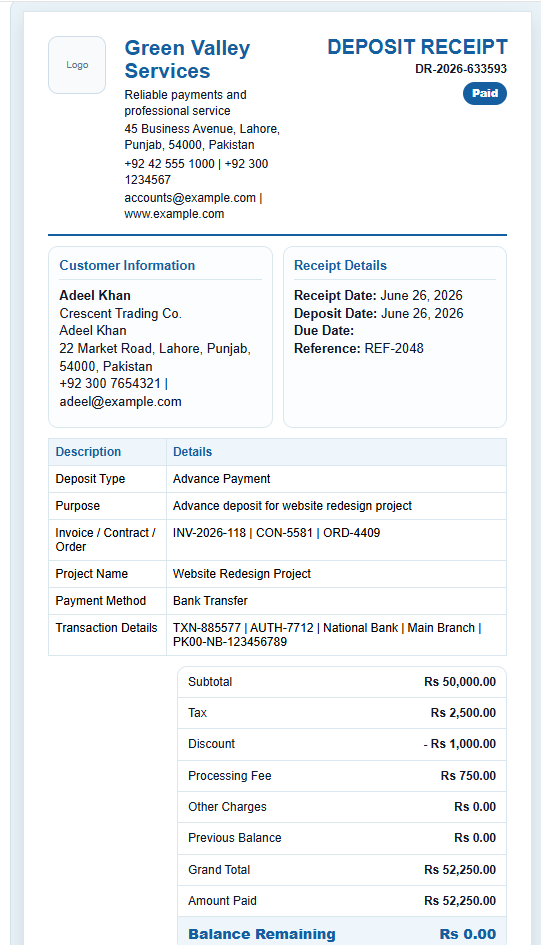
As you complete the form, the receipt preview updates instantly without refreshing the page. This allows you to review every detail before printing or downloading. The preview includes your company branding, customer information, payment details, totals, payment status, signatures, and receipt footer in a clean, professional layout.
QR Code and Barcode Generation
Each receipt automatically includes a QR Code containing important receipt information such as the receipt number, customer name, deposit amount, and reference number. A printable barcode is also generated to simplify document management and future verification.
Signature Section
The receipt includes dedicated fields for the person receiving the payment, the authorized representative, customer signature, company stamp, and digital signature upload. These features make the receipt suitable for both personal and commercial transactions.
Customizable Receipt Footer
Add a personalized thank-you message along with your business terms and conditions, refund policy, registration number, tax number, or license number. This allows every receipt to reflect your organization’s policies and branding.
Multiple Color Themes
Choose from several professionally designed color themes to match your company branding. The appearance of the receipt can be changed instantly without affecting the receipt data.
Print, Download, and Save
Once your receipt is complete, you can:
- Print only the receipt in a clean A4 format.
- Download the receipt as a PDF.
- Save it as a high-quality JPG image.
- Copy the receipt content.
- Email the receipt.
- Generate a new receipt number.
- Reset the form for another transaction.
Everything is processed directly in your browser for a fast and convenient experience.
Automatic Data Saving
To prevent accidental data loss, the generator automatically saves your work using your browser’s local storage. If you refresh the page or return later, your previously entered information can be restored automatically.
Fully Responsive Design
The Deposit Receipt Generator works smoothly on desktop computers, laptops, tablets, and mobile devices. The responsive interface automatically adjusts to different screen sizes, allowing you to create professional receipts from virtually anywhere.
Why Use Our Deposit Receipt Generator?
Our online Deposit Receipt Generator eliminates the need for complicated spreadsheet templates or expensive software. It combines automatic calculations, professional formatting, real-time preview, QR code generation, multiple payment options, customizable branding, and convenient download features into one easy-to-use tool. Whether you create one receipt occasionally or hundreds each month, this generator helps you produce accurate, professional, and printable deposit receipts in just a few clicks.
- Cash Receipts
- Cash Payment Receipts
- Auto Repair Receipt
- Security Receipt Template
- Daycare Receipt Template
- Auto Repair Receipt
- Lawn Care Receipt
- Home Repair Receipt
- Handyman Receipt
- Towing Receipt Generator
- Puppy Deposit Receipt Generator
- Deposit Receipt Generator
- Medical Receipt Generator
- Psychologist Receipt Generator
- Survey Services Receipt