Educators need to keep several points in mind for students to succeed. Certain standards must be met so that the educator can determine whether the student is on the right track. Skills are taught to students, and educators must ensure that each student develops them.
It can be difficult for an educator to remember the status of each student in the class. However, by tracking the details in a skill tracking sheet, this becomes manageable.
The tracker is important because it allows educators to monitor student progress in skills such as reading, writing, math, homework, and more. It enables tracking of skills set by professionals, the educators, or the school, making it easier to determine whether a student is progressing. Any issues can be identified promptly and addressed.
The worksheet aims to track student skills and therefore includes relevant details. It outlines the different skill metrics that need to be measured, as well as the student’s progress toward them, which can be recorded in the tracker.
Student Performance Tracker Benefits
- The tracker allows educators to monitor student skills, helping identify areas where improvement is needed.
- By tracking various metrics, educators can work more efficiently, focusing on areas that require attention.
- Both educators and school administration can understand how individual students and the class as a whole are performing and identify any issues that need to be addressed.
Effective Tracker Design for Educators
- If a tracker is difficult or confusing to fill in, educators may avoid using it.
- Complicated trackers can consume excessive time to understand and complete.
- The right metrics must be identified and recorded accurately.
- Proper measurement of metrics is essential for the tracker to be effective.
How to make a Skills Tracking sheet?
The following points can be considered when making a standards or skills tracker so that the above limitations can be avoided:
Defining Metrics for an Effective Tracker
It is important to identify which metrics need to be measured so they can be included in the tracker. For example, you may be measuring students’ reading, writing, and math skills. The specific goals associated with each of these areas can also be included. Separate sections for each metric help reduce confusion and improve clarity.
Skills Tracking
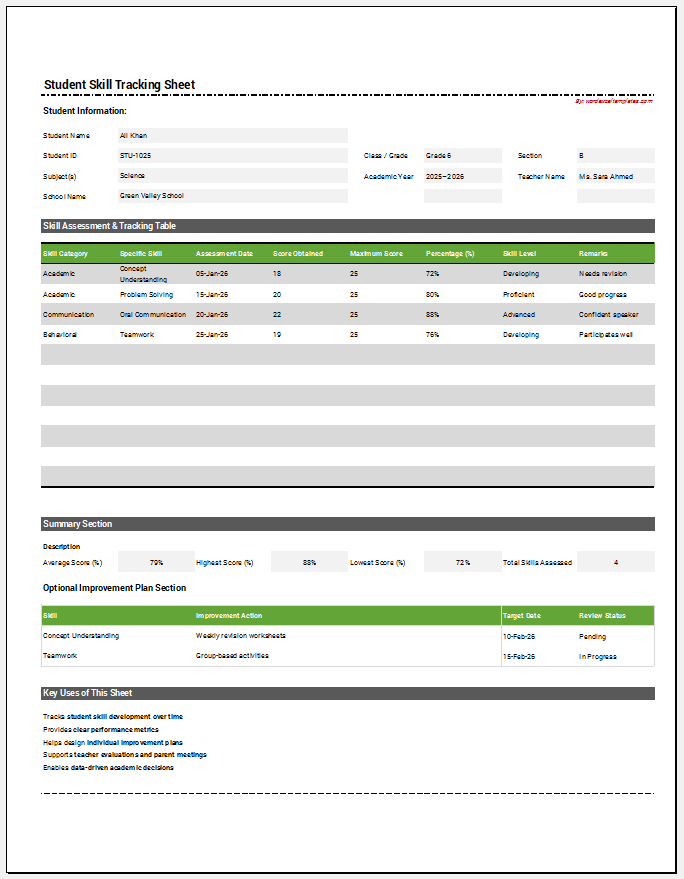
The metrics can be measured effectively using a table format. The sheet should include the name of the school and the class the student is in. The teacher’s name can also be mentioned. The table should have a column titled “Student”, where the names of the students are listed in rows.
Organizing Metrics with Main and Subheadings
- Include separate columns for different metrics.
- Under each main column, add relevant subheadings to break down the metric.
- Example:
- A main column titled “Reading”.
- Subheading columns under “Reading” could track measurable aspects such as:
- Reading comprehension
- Reading speed
- Accuracy or notes
Remember when making this tracker:
Keeping it Simple
It is important to avoid including unnecessary information in this tracker, as it can make it confusing to use.
Choosing the Right Application
You will need to select an application to create the tracker. Microsoft Excel is a useful option you can consider.
Skills Tracking Template
A skill tracking template is an essential tool for educators to record and monitor students’ progress. When designed effectively, it provides a simple and organized way to track how students are advancing toward various skills and standards.
- The template helps educators identify students who need extra support and those who are progressing well.
- By using this tool, educators can make informed decisions to guide instruction and ensure all students meet learning objectives.
Sample Student Skill Tracker for Excel
File Size: 192 KB
- Parent-Teacher Communication Log
- Behavior and Discipline Log Template
- Individualized Education Program (IEP) Tracker
- Student Skills Tracking Sheet
- Classroom Inventory Template
- Professional Development Tracker Template
- Field Trip Planner and Roster Template
- Student Roster and Information Sheet
- Tutoring & Support Services Log
- School Fees and Payments Tracker
- Scholarship and Financial Aid Tracker
- Teacher Performance Evaluation Tracker
- Counselling & Guidance Record Sheet
- Classroom Supplies & Budget Tracker
- Tuition and Fees Ledger Template