Field trips are an important part of school activities as they give students a unique learning experience that cannot be found in a classroom. Students can enjoy themselves and engage with other class members. When educational field trips are planned, students can have hands-on experiences.
An educational institution needs to plan these trips carefully so that everything goes well. Issues can occur during the field trip, such as a student being left behind, so it is important to avoid them. A field trip planner and roster is helpful here. This tool organises field trip details such as dates, locations, participating students, chaperones and emergency contacts.
The document will allow the school administration to organise field trips efficiently. Trips to various locations can be arranged and noted down. The roster will let one arrange for the correct number of chaperones so that no issue occurs. If there is a problem, the students’ guardians can be contacted.
The document will note down all needed field trip information. It will mention the day and date of the field trip, the location of all field trips, the students participating in the field trip, emergency contact numbers and the chaperones who will help.
Create a sample planner below:
Field Trip Planner and Roster Template
Plan a school field trip in five steps. Enter the school, class, date, location and the teacher in charge. Add the chaperones, the itinerary, and the students with their emergency contacts, permission slips and payments. The tool counts the adults and warns you if you do not have enough for the number of students. It also warns you about missing emergency numbers, permission slips and payments. Check the live preview, then print the roster, save it as a PDF, or download it as a Word or Excel file. The Excel file keeps the formulas, so the counts update when you change the roster. Your entries stay in your browser and are not sent anywhere.
Field Trip Details
Set Students for Each Adult to the ratio your school requires. The tool counts the teacher in charge and the chaperones as adults. Leave it at 0 to switch the check off.
Chaperones
Student Roster
Hide the payment column if students do not pay for the trip.
Itinerary
Print Settings
Benefits of a Field Trip Planner and Roster
Below are some advantages of a field trip planner and roster:
- The document will ensure that the field trip is planned carefully and executed correctly.
- It will ensure that all students’ safety and well-being are protected.
- The school administration can use the document to arrange field trips, including their dates and locations.
- The students involved in the field trip will be known.
- It will be possible to arrange the right chaperones as well.
The following are some limitations that a field trip planner and roster may have:
- If the document is not flexible, it will be difficult to include any changes.
- When the document is complex to fill in, it may not be used.
How to make a Field Trip Planner and Roster
Make a field trip planner and roster to address the above limitations. The following are some points that can help you make this document:
Format of the roster
The heading can be “Field Trip Planner and Roster”. Include the name of the school on the document. The name of the class and subject can be mentioned. You can then include the other details in a table and sections.
Details of the field trip
There can be a section that notes down the field trip details. There will be a place where the date of the trip is mentioned. The name of the teacher will be mentioned. A place to mention the names of the chaperones will be present. There can be a place where the contact details of those concerned can be mentioned.
Student details
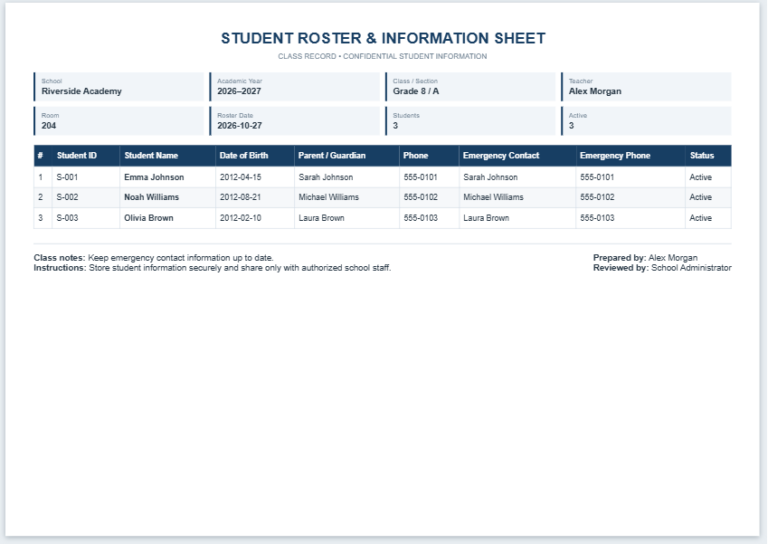
Another section can include details about the students participating in the field trip. There can be a column for “Name”, where the student’s name is mentioned. An “Emergency Contacts” column will note the contact details here. If students must pay for the trip, a column can mention this.
Tips to make a good planner
The following are some tips that can help you make this document:
Simple to use
The roster should be easy to use and fill in so that the relevant details can be accessed. Include only what is necessary so that there is no confusion.
Select an application
You can make this roster in an application such as Microsoft Excel to include the information quickly.
Conclusion
An educational institution that wants to arrange safe and productive field trips requires a field trip planner and roster.