Creating a professional project front page is one of the most important steps when preparing an academic, engineering, business, or research project. A well-designed cover page creates a positive first impression and presents essential information in a clean and organized format. Our Project Front Page Generator makes this process quick and effortless by allowing you to design a professional title page online without requiring any design or formatting skills.
Whether you are a student preparing a university project, a researcher submitting a thesis, an engineer completing a technical report, or a professional creating a business proposal, this online generator helps you create a polished front page within minutes.
Create Your Project Front Page Online
Instead of downloading templates and manually editing them in different software, you can use our online generator directly from your browser. Simply enter the required information, customize the design, and watch your project front page update instantly through the live preview.
Once your design is complete, you can print it immediately or download it for future use.
Project Front Page Generator
Create a professional project title page online. Edit, preview, print, or download instantly.
Institution Information
Project Details
Student Information
Supervisor Details
Submission and Footer Information
Design Options
FAQs
What is a project front page?
A project front page is the title page of an academic, research, business, or technical report. It usually includes the institution name, project title, student information, supervisor details, submission date, and footer notes.
Can I print only the front page?
Yes. The print stylesheet hides the input form, buttons, website content, sidebars, and ads so only the generated front page is printed.
Does this tool require a plugin or external library?
No. It uses only HTML, CSS, and Vanilla JavaScript and works directly inside a WordPress Custom HTML block.
Can I upload a university logo?
Yes. You can upload PNG, JPG, JPEG, or SVG logos. The logo appears instantly in the preview and is preserved for printing during the same browser session.
Information You Can Include
The generator provides dedicated sections for all the information typically required on a professional project cover page, including:
- Institution or university name
- Faculty and department
- Project title
- Project subtitle
- Research area
- Project code
- Course name and course code
- Semester and academic session
- Student name
- Registration number
- Roll number
- Class and section
- Batch information
- Email address and phone number
- Supervisor name
- Co-supervisor
- Project coordinator
- Submission date
- Completion date
- Academic year
- Remarks
- Copyright statement
- Confidential project notice
Every field updates automatically in the preview, allowing you to see exactly how your finished cover page will appear.
Upload Your Institution Logo
The generator allows you to upload your university, college, school, or company logo directly onto the cover page. Once uploaded, the logo appears instantly in the preview. You can resize or replace the logo at any time without affecting the rest of the design.
Multiple Professional Designs
Every institution follows different formatting requirements. To accommodate these needs, the generator includes several professionally designed cover page layouts.
Users can choose from styles such as:
- Classic Academic
- Modern University
- Corporate Project
- Research Thesis
- Engineering Project
- Business Report
- Minimal
- Professional Blue
- Dark Elegant
- Creative Layout
Switching between templates instantly changes the appearance of the cover page without requiring you to re-enter your information.
Customize the Appearance
Our Project Front Page Generator also includes several design customization options. You can personalize the appearance by changing:
- Primary and secondary colors
- Text colors
- Font family
- Font size
- Border style
- Border thickness
- Rounded corners
- Header background
- Logo size
- Page margins
- Text alignment
These customization options allow you to create a front page that matches your institution’s branding or your personal preferences.
Live Preview While You Edit
One of the most useful features of this generator is the real-time preview. Every change you make is reflected immediately, helping you check formatting, spacing, colors, and alignment before printing or downloading the document.
Long project titles are wrapped automatically to maintain a neat layout, while empty fields remain hidden to produce a clean and professional appearance.
Ready for Printing
The completed project front page is formatted specifically for A4 paper size. When you click the Print button, only the cover page is printed, ensuring a clean document without menus, advertisements, or other webpage content.
The generator preserves margins, spacing, borders, typography, and alignment to produce a professional printed result.
Download Your Finished Front Page
After completing your design, you can download or save the generated front page for future editing and printing. This allows you to keep a digital copy of your work for submissions, presentations, or project documentation.
Easy to Use
The Project Front Page Generator has been designed for users of all experience levels. Simply follow these steps:
- Enter your project and institution details.
- Upload your logo if required.
- Select your preferred cover page design.
- Customize colors and formatting.
- Review the live preview.
- Print or download the completed front page.
The entire process takes only a few minutes.
Why Use Our Project Front Page Generator?
Our generator eliminates the need to spend hours formatting documents in word processors or graphic design software. It helps ensure that every project front page looks professional, consistent, and ready for submission.
Whether you are preparing a school assignment, college project, university dissertation, engineering report, research thesis, internship report, business proposal, or technical documentation, this online tool provides a fast, accurate, and user-friendly solution.
With its professional templates, live preview, logo upload, extensive customization options, and print-ready layout, the Project Front Page Generator enables you to create an impressive cover page quickly and efficiently—all from your web browser, without installing any additional software.
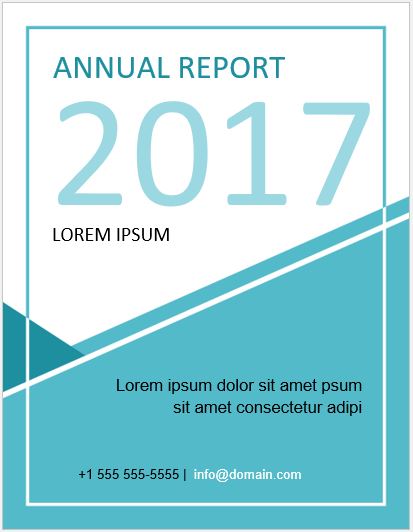
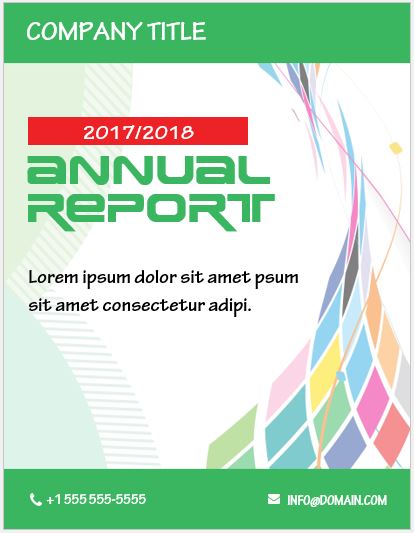
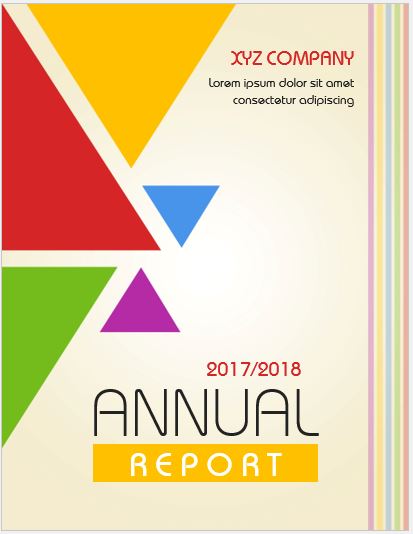
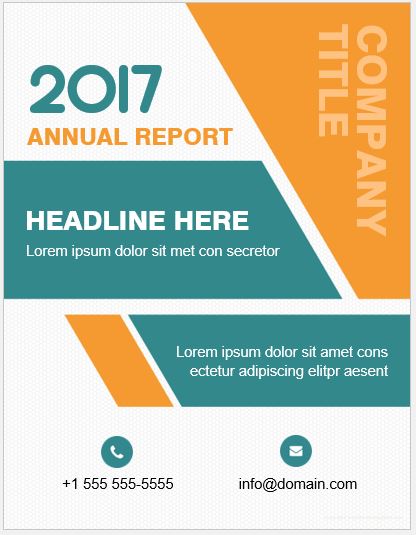
Project Front Page Designs in MS Word Format:
Looking for the perfect front page designs to galvanize the viewers? If yes, then congratulations, you are ultimately at the right spot. Get your hands on the fantastic project front page designs by downloading them. Key features of the pages are
- MS Word format: Fill in all the mandatory details such as the title of the project etc. in the Microsoft Word files.
- Printable: fill out all the slots per your project requirement and get the print instantly.
- Blank sample: Fill in your project’s relevant details.
- Professional design: All the pages have a professional format for personal & official use.
- Customizable: All the pages are completely customizable. However, we recommend not to alter any design as it will change the page’s look. Edit only text to personalize.
Preview and Details of Templates
#1

File: Word (.doc)
Size 33 KB
[Personal Use Only]
#2

File: Word (.doc)
Size 45 KB
[Personal Use Only]
#3

File: Word (.doc)
Size 102 KB
[Personal Use Only]
#4
File: Word (.doc)
Size 98 KB
[Personal Use Only]
#5

File: Word (.doc)
Size 33 KB
[Personal Use Only]
#6
File: Word (.doc)
Size 76 KB
[Personal Use Only]
#7

File: Word (.doc)
Size 83 KB
[Personal Use Only]
#8
File: Word (.doc)
Size 89 KB
[Personal Use Only]
#9

File: Word (.doc)
Size 92 KB
[Personal Use Only]
#10

File: Word (.doc)
Size 86 KB
[Personal Use Only]
#11
File: Word (.doc)
Size 33 KB
[Personal Use Only]
- Summer Holiday Assignment Cover Page Generator
- Salary and Overtime Calculator Template
- Summer Vacation Planner Generator
- Outlet Mall Shopping Planner
- Customer Information and Ranking Sheet
- Small Family Kitchen Design Planning Sheet
- Summer Party Budget Sheet Generator
- Payroll Register & Salary Sheet Generator
- Employee Skill Development Tracker
- HR Budget & Expense Tracker
- Leave & Vacation Tracker
- Exit/Off-boarding Checklist
- Performance Evaluation Sheet
- New Year Goal Setting Worksheet
- Workforce Planning & Headcount Forecast Sheet
- Christmas Countdown Calendar
- Year-End Financial Summary Template
- Compliance & Policy Acknowledgement Sheet