Running a successful marketing campaign requires more than creative ideas and promotional content. Every campaign involves multiple activities that must be completed at the right time to achieve the desired results. Without a structured schedule, important tasks can be delayed, deadlines may be missed, and team members may lose track of their responsibilities. A Marketing Campaign Timeline Template helps solve these challenges by organizing all campaign activities into a clear and manageable schedule.
What is a Marketing Campaign Timeline?
A marketing campaign timeline is a planning tool used to organize and schedule all activities associated with a marketing campaign. It provides a chronological roadmap that outlines what tasks need to be completed, when they should be performed, and how they contribute to the overall campaign objectives.
The timeline serves as a central reference point for marketing teams, project managers, content creators, designers, advertisers, and other stakeholders involved in the campaign. By following a structured timeline, organizations can ensure that all campaign activities remain aligned with their goals and deadlines.
Why is a Marketing Campaign Timeline Important?
Marketing campaigns often involve numerous moving parts, including market research, content creation, advertising, email marketing, social media promotion, analytics tracking, and performance evaluation. Managing these activities without a timeline can lead to confusion and inefficiencies.
A marketing campaign timeline helps organizations:
- Plan campaign activities in advance
- Coordinate tasks among team members
- Monitor progress throughout the campaign
- Meet important deadlines
- Allocate resources efficiently
- Reduce last-minute work and delays
- Improve communication across departments
- Measure campaign performance effectively
By providing a structured schedule, the timeline keeps everyone focused on campaign objectives and ensures that activities are completed in the correct sequence.
How to Use a Marketing Campaign Timeline
1. Plan the Campaign Strategy
Begin by defining campaign goals, target audience, budget, and key messages. These activities form the foundation of the entire campaign and should be completed during the planning phase.
2. Prepare Marketing Assets
Develop all required materials before launch, including:
- Marketing copy
- Social media content
- Graphics and videos
- Landing pages
- Email templates
- Tracking and analytics tools
Preparing these assets early helps avoid delays during the campaign launch.
3. Schedule Promotional Activities
Use the timeline to organize pre-launch promotional activities such as:
- Social media teasers
- Email countdown campaigns
- Influencer outreach
- SEO implementation
- Press release preparation
- Paid advertising setup
Scheduling these tasks helps build audience awareness before the official launch.
4. Manage Campaign Execution
During the active campaign period, the timeline serves as a checklist for ongoing activities. Teams can monitor engagement, publish content, manage advertising campaigns, and track performance metrics according to schedule.
5. Evaluate Campaign Results
After the campaign ends, the timeline guides users through evaluation activities such as:
- Performance analysis
- Customer feedback collection
- ROI measurement
- Reporting
- Future campaign planning
This ensures that valuable insights are captured for future marketing efforts.
Benefits of Using a Marketing Campaign Timeline Template
A well-designed timeline template offers several advantages:
- Improves campaign organization
- Enhances team collaboration
- Helps prioritize tasks
- Provides clear deadlines
- Increases accountability
- Reduces project delays
- Supports better resource planning
- Simplifies campaign monitoring
- Encourages data-driven decision making
The template allows marketers to focus on achieving campaign goals rather than managing scattered schedules and task lists.
About This Marketing Campaign Timeline Template
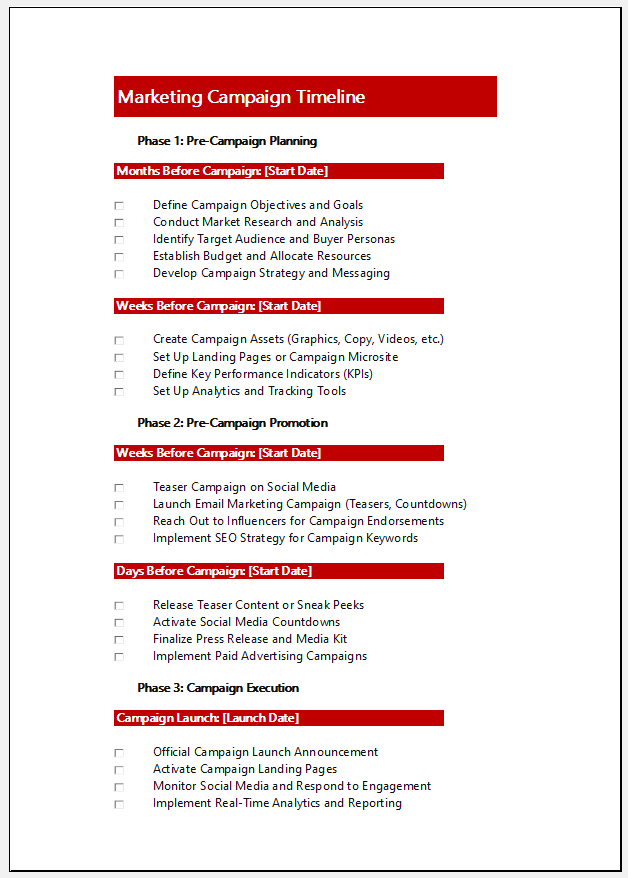
Our team has created a professional Marketing Campaign Timeline Template in Excel to help marketing teams plan, execute, and evaluate campaigns efficiently.
The template is organized into four major phases:
Phase 1: Pre-Campaign Planning
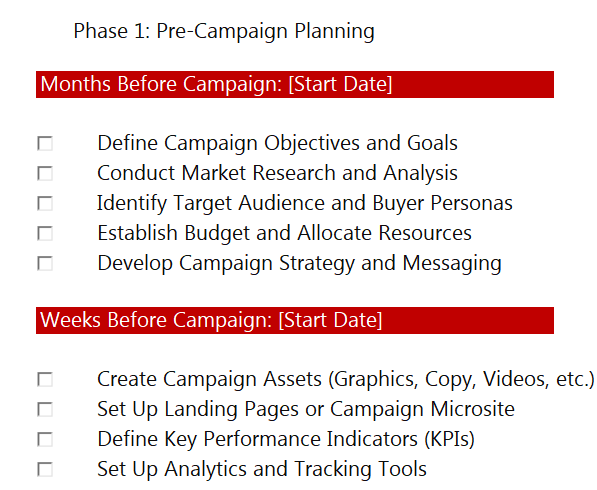
This section includes activities such as:
- Defining campaign objectives
- Conducting market research
- Identifying target audiences
- Establishing budgets
- Developing campaign strategies
Phase 2: Pre-Campaign Promotion
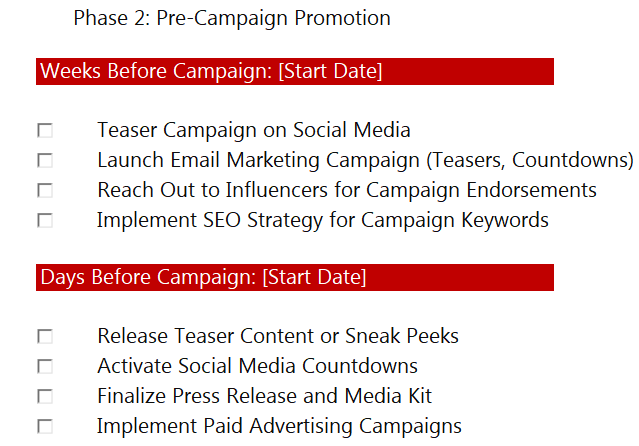
This phase focuses on building awareness before launch through:
- Social media teaser campaigns
- Email marketing countdowns
- Influencer outreach
- SEO preparation
- Paid advertising setup
Phase 3: Campaign Execution
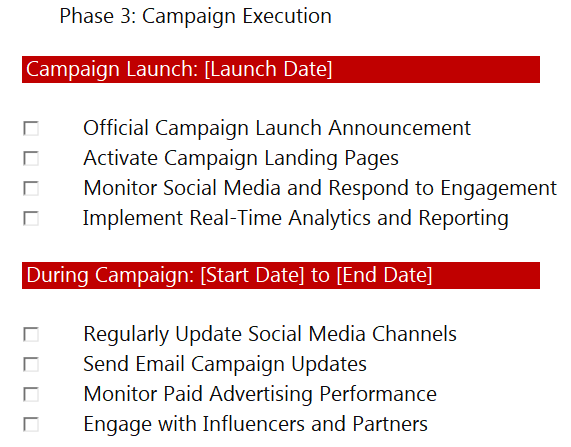
The execution section tracks activities during the live campaign, including:
- Official launch announcements
- Landing page activation
- Social media engagement
- Analytics monitoring
- Ongoing campaign updates
Phase 4: Post-Campaign Evaluation
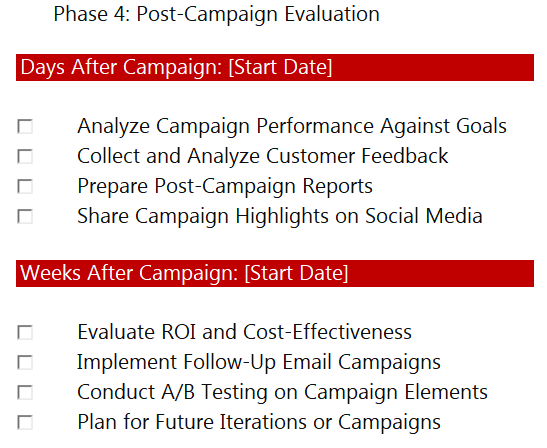
This section helps teams review campaign performance through:
- Goal achievement analysis
- Customer feedback collection
- ROI evaluation
- Campaign reporting
- Future campaign planning
The template follows a clear timeline format with milestones organized by months, weeks, and days before and after the campaign. This makes it easy to visualize campaign progress, assign responsibilities, and ensure that every marketing activity is completed on time.
Making Campaign Management More Organized
A successful marketing campaign requires careful planning, timely execution, and thorough evaluation. Using a structured timeline helps teams stay organized, coordinate activities efficiently, and measure campaign success more effectively. This Marketing Campaign Timeline Template provides a practical framework for managing every stage of a campaign, from initial planning to post-campaign analysis, ensuring that marketing efforts remain focused, organized, and results-driven.
- Universal Work Order Generator
- Office Asset Transfer Form Generator
- Summer Holiday Assignment Cover Page Generator
- Salary and Overtime Calculator Template
- Summer Vacation Planner Generator
- Outlet Mall Shopping Planner
- Customer Information and Ranking Sheet
- Small Family Kitchen Design Planning Sheet
- Summer Party Budget Sheet Generator
- Payroll Register & Salary Sheet Generator
- Employee Skill Development Tracker
- HR Budget & Expense Tracker
- Leave & Vacation Tracker
- Exit/Off-boarding Checklist
- Performance Evaluation Sheet