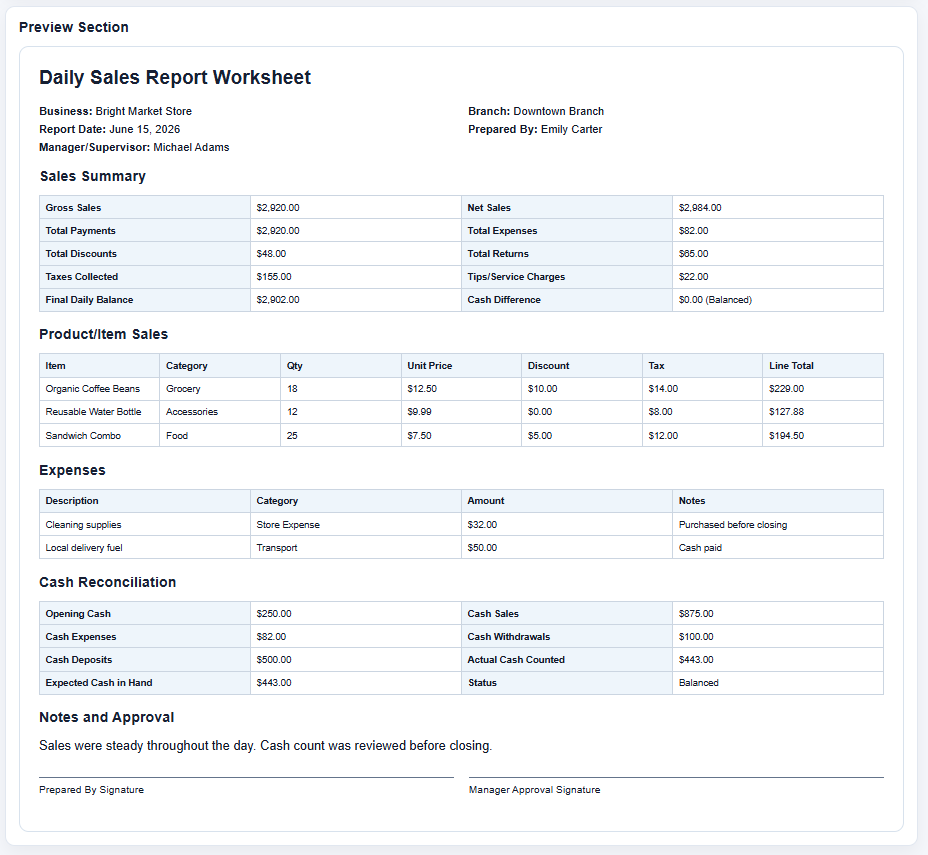
The purpose of maintaining a daily sales report is to gain deeper insight into the sales activities of a business and identify opportunities for improvement. Whether you operate a restaurant, retail store, grocery shop, or any other type of business that handles daily transactions, tracking sales performance is essential for making informed decisions. To simplify this process, we now offer a Daily Sales Report Worksheet Generator that allows users to create professional sales reports online in just a few minutes.
A business cannot succeed without paying close attention to its sales performance. Sales directly influence revenue, profitability, and overall business growth. Monitoring daily sales figures helps business owners understand trends, evaluate performance, and make strategic decisions that support long-term success.
What is a Daily Sales Report Worksheet Generator?
A Daily Sales Report Worksheet Generator is an online tool designed to help businesses record, organize, and analyze sales data generated within a single day. Instead of manually creating reports from scratch, users can enter their sales information into the generator and instantly obtain a well-structured report ready for printing or downloading.
The generator summarizes important sales-related details in an easy-to-understand format, enabling managers and business owners to evaluate performance quickly and efficiently.
Daily Sales Report Worksheet Generator
Create a professional daily sales report with transactions, payment summaries, cash reconciliation, expenses, targets, salesperson rankings, category performance, charts, and print-ready A4 output.
Report Settings and Business Information
Daily Sales Entry Table
| Select | # | Time | Invoice | Customer | Product / Service | Category | Qty | Unit Price | Gross | Disc. Type | Disc. Value | Disc. Amt | Tax % | Tax | Net Sale | Cost / Unit | Total Cost | Profit | Margin % | Payment | Salesperson | Status | Notes | Action |
|---|
Payment Method Summary and Cash Reconciliation
Expenses, Returns, Discounts, and Adjustments
| Date/Time | Reference | Category | Description | Payment | Amount | Approved By | Notes | Remove |
|---|
Sales Targets and Performance
Notes, Observations, and Follow-up Actions
Daily Sales Report
Brightstone Retail Store
Sales Target Analysis
Charts and Visual Summary
Sales Transaction Table
| Invoice | Customer | Product | Qty | Gross | Discount | Tax | Net Sale | Payment | Salesperson |
|---|
Payment Method Summary
| Payment Method | Transactions | Total Net Sales |
|---|
Cash Reconciliation
Expenses and Adjustments
| Reference | Category | Description | Payment | Amount | Approved By |
|---|
Product and Category Performance
| Category | Units | Gross Sales | Discounts | Net Sales | Cost | Profit | Margin | Share |
|---|
Salesperson Performance
| Rank | Salesperson | Transactions | Units | Net Sales | Profit | Average Sale | Target | Achievement |
|---|
Notes and Management Review
Saved Reports
Frequently Asked Questions
What is a Daily Sales Report Worksheet?
It is a business document used to summarize daily sales, payments, expenses, returns, targets, and sales performance.
Who can use this generator?
Retail stores, restaurants, distributors, offices, sales teams, branch managers, and small businesses can use it.
How are daily sales totals calculated?
Gross sales are quantity multiplied by unit price. Discounts, taxes, returns, refunds, and cancelled transactions are handled separately.
Can I add unlimited sales transactions?
Yes. You can add, duplicate, save, print, and remove transaction rows.
How are discounts and taxes calculated?
The generator supports fixed and percentage discounts plus tax added, tax included, or tax exempt settings.
Can I track cash, card, and online payments separately?
Yes. Payment method totals are calculated automatically from transaction rows.
How does cash reconciliation work?
Expected closing cash equals opening cash plus cash sales and collections, less cash expenses and refunds. The actual closing cash is compared to show over or short status.
Can I track salesperson performance?
Yes. The report ranks salespeople by net sales and shows transactions, units, profit, average sale, target, and achievement percentage.
Can I save reports for later?
Yes. Saved reports are stored locally in your browser using localStorage.
How do I download the report as a PDF?
Click Download as PDF, then choose Save as PDF in the browser print dialog.
Does the generator store data securely?
Data remains in your browser unless you print or clear it. It is not uploaded to a server.
Will the report print correctly on A4 paper?
Yes. The print CSS prints only the report preview and uses A4-friendly spacing and repeating table headers.
Can I use the generator on a mobile device?
Yes. The layout stacks vertically on smaller screens, and wide tables scroll inside their own containers.
Information Included in the Daily Sales Report
Sales Volume Information
One of the primary functions of the generator is to track the volume of sales made during the day. It provides a clear picture of the number of transactions completed and helps businesses identify busy periods, sales trends, and overall customer activity.
New Accounts or Customers
For businesses that register new customers or open new accounts, the generator can be used to record this information as part of the daily report. An increase in new customers often reflects business growth and expanding market reach.
Total Revenue Generated
The Daily Sales Report Worksheet Generator automatically calculates the total revenue generated from daily sales entries. This allows businesses to monitor their earnings and determine whether current strategies are producing the desired financial outcomes.
Total Costs and Expenses
Understanding revenue alone is not enough. Businesses must also consider operational costs associated with generating those sales. Recording daily expenses alongside revenue helps determine profitability and provides a more realistic view of business performance.
Sales Performance Analysis
The generator provides an organized summary of daily sales data, making it easier to analyze business progress. By reviewing the generated reports regularly, businesses can identify strengths, address weaknesses, and improve their sales strategies.
Benefits of Using the Daily Sales Report Worksheet Generator
Evaluate Team Performance
Sales reports can help businesses assess the effectiveness of their sales staff. If sales targets are consistently achieved, teams can be recognized for their efforts. If performance declines, management can investigate potential causes and implement improvements.
Support Future Forecasting
Although the generator focuses on daily data, the reports produced can be used over time to identify trends and forecast future sales. Historical sales information enables businesses to estimate demand, set realistic goals, and prepare for seasonal fluctuations.
Encourage Continuous Improvement
Daily sales reports provide valuable insights that motivate businesses to enhance their operations. If reports reveal declining sales, corrective actions can be taken promptly. Likewise, positive results encourage teams to maintain successful practices.
Save Time and Reduce Manual Work
Creating sales reports manually can be time-consuming, especially for busy businesses that process numerous transactions each day. The online generator simplifies the reporting process by automating calculations and organizing data efficiently.
Improve Accuracy
Since the generator automatically performs calculations, the likelihood of mathematical errors is significantly reduced. Accurate reports lead to better decision-making and more reliable financial analysis.
Why Use Our Online Generator?
Our Daily Sales Report Worksheet Generator offers a convenient way to prepare professional reports without requiring advanced spreadsheet skills. Users simply enter their daily sales information, and the system generates a clear and organized worksheet that can be printed or downloaded for recordkeeping purposes.
The tool is ideal for small businesses, retail shops, restaurants, service providers, and independent entrepreneurs who need a practical solution for monitoring daily sales activities.
Prefer Using Excel?
While our online Daily Sales Report Worksheet Generator provides a fast and user-friendly experience, we understand that some users prefer working with traditional spreadsheets. For this reason, we also continue to offer the Daily Sales Report Worksheet Template for Microsoft Excel. The Excel version includes predefined formulas and editable fields, allowing users to maintain their reports offline using familiar spreadsheet functionality.
Whether you choose the online generator for convenience or the Excel template for offline use, both options are designed to help you track sales efficiently and gain valuable insights into your business performance.
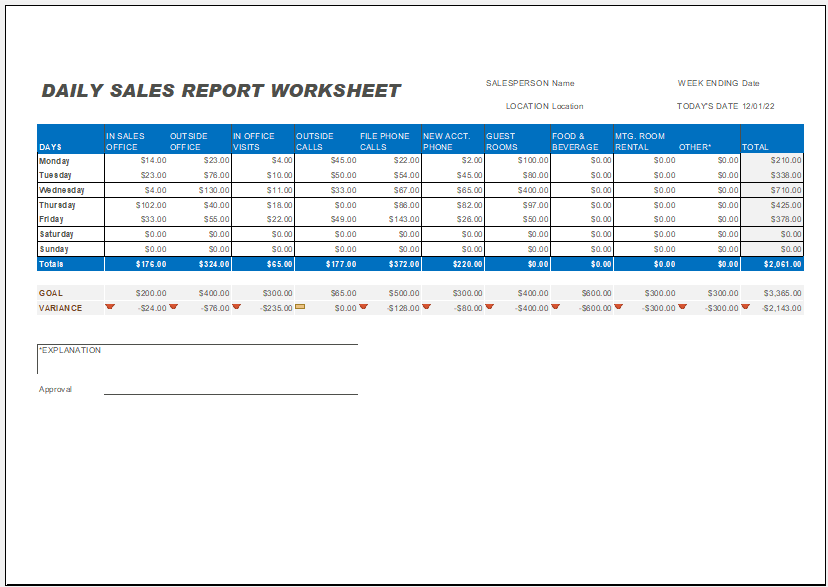
Required Software: MS Excel
Size: 95 KB
More Templates
- Universal Work Order Generator
- Office Asset Transfer Form Generator
- Summer Holiday Assignment Cover Page Generator
- Salary and Overtime Calculator Template
- Summer Vacation Planner Generator
- Outlet Mall Shopping Planner
- Customer Information and Ranking Sheet
- Small Family Kitchen Design Planning Sheet
- Summer Party Budget Sheet Generator
- Payroll Register & Salary Sheet Generator
- Employee Skill Development Tracker
- HR Budget & Expense Tracker
- Leave & Vacation Tracker
- Exit/Off-boarding Checklist
- Performance Evaluation Sheet