Managing company tools and equipment is essential for maintaining accountability, reducing losses, and ensuring that valuable assets are returned on time. Our online Tools Sign Out Sheet Generator provides a simple yet powerful way to track tools issued to employees, contractors, technicians, maintenance staff, students, and other authorized users.
This tool allows you to create professional tool sign-out records directly from your browser without requiring spreadsheet software or special applications. Simply enter the required information, and the generator will automatically create a well-organized sign-out sheet that can be printed or saved for future reference.
What Does This Generator Do?
The generator helps organizations maintain accurate records of tools that are issued and returned. It records who received the tool, when it was issued, where it will be used, and when it is expected to be returned.
The system also tracks returned tools, identifies overdue items, records damaged equipment, and helps supervisors monitor outstanding assets.
Tools Sign Out Sheet Generator
Track tools issued to employees, contractors, technicians, students, or workers with a printable sign-out sheet.
Company Information
Tool, Employee & Sign Out Details
Search & Filter
Dynamic Tool Table
| # | Tool ID | Tool Name | Category | Employee | Department | Qty | Condition | Return Status | Notes | Actions |
|---|
The sheet consists of the following important sections.
Company and Department Information
The form includes dedicated fields for company information such as:
- Company Name
- Department
- Work Location
- Supervisor Name
This information ensures that each sign-out record is properly identified and associated with the correct department or project.
Employee Information Tracking
The generator records complete employee details, including:
- Employee Name
- Employee ID
- Department
- Contact Number
This makes it easy to identify who is responsible for each issued tool and simplifies follow-up when tools are overdue or missing.
Tool Information Management
Users can enter detailed information about each tool, including:
- Tool Name
- Tool Category
- Asset Number or Tool ID
- Serial Number
- Quantity Issued
- Tool Condition
Multiple tools can be added to a single sign-out sheet, making the generator ideal for workshops, maintenance teams, construction sites, schools, warehouses, and manufacturing facilities.
Sign-Out and Return Tracking
The generator records:
- Date Issued
- Time Out
- Expected Return Date
- Expected Return Time
- Job Site or Work Location
- Purpose of Use
When tools are returned, users can enter:
- Actual Return Date
- Actual Return Time
- Return Condition
- Damage Reports
- Missing Parts Information
- Additional Notes
This creates a complete history of every tool transaction.
Automatic Tracking Features
The generator includes several automatic features that improve recordkeeping and reduce manual work.
These include:
- Automatic row numbering
- Outstanding tool tracking
- Late return indicators
- Damaged tool alerts
- Missing parts tracking
- Tool quantity monitoring
- Real-time statistics
These features help supervisors quickly identify issues that require attention.
Live Summary Dashboard
As information is entered, the generator automatically updates a summary dashboard showing:
- Total Tools Issued
- Total Tools Returned
- Outstanding Tools
- Damaged Tools
- Missing Tools
- Late Returns
This provides an instant overview of tool activity and asset status.
Real-Time Preview
A live preview is displayed alongside the form so users can immediately see how the final sign-out sheet will appear.
The preview automatically updates whenever information changes and includes:
- Company Information
- Employee Details
- Tool List
- Signatures
- Summary Statistics
This eliminates the need to repeatedly generate reports while editing.
Professional Signatures Section
The generator includes signature fields for:
- Employee Signature
- Supervisor Signature
- Storekeeper Signature
- Return Verification Signature
These signatures help maintain accountability and provide authorization records for issued tools.
Search and Filtering Tools
Organizations handling large numbers of tools can quickly locate records using built-in search and filtering options.
Users can search by:
- Tool Name
- Employee Name
- Asset Number
- Department
- Status
This makes finding specific records fast and efficient.
Save, Print, and Download
After completing the form, users can:
- Save records locally
- Load previously saved information
- Print professional sign-out sheets
- Download records for documentation
- Generate PDF copies using browser print options
The tool is optimized for clean A4 printing and professional recordkeeping.
Who Can Use This Generator?
This generator is ideal for:
- Construction Companies
- Maintenance Departments
- Manufacturing Facilities
- Schools and Colleges
- Workshops
- Warehouses
- Equipment Rental Businesses
- Field Service Teams
- Government Departments
Whether you need to track a few hand tools or manage hundreds of company assets, this generator provides a reliable and professional solution for tool accountability and inventory control.
MS Excel Template
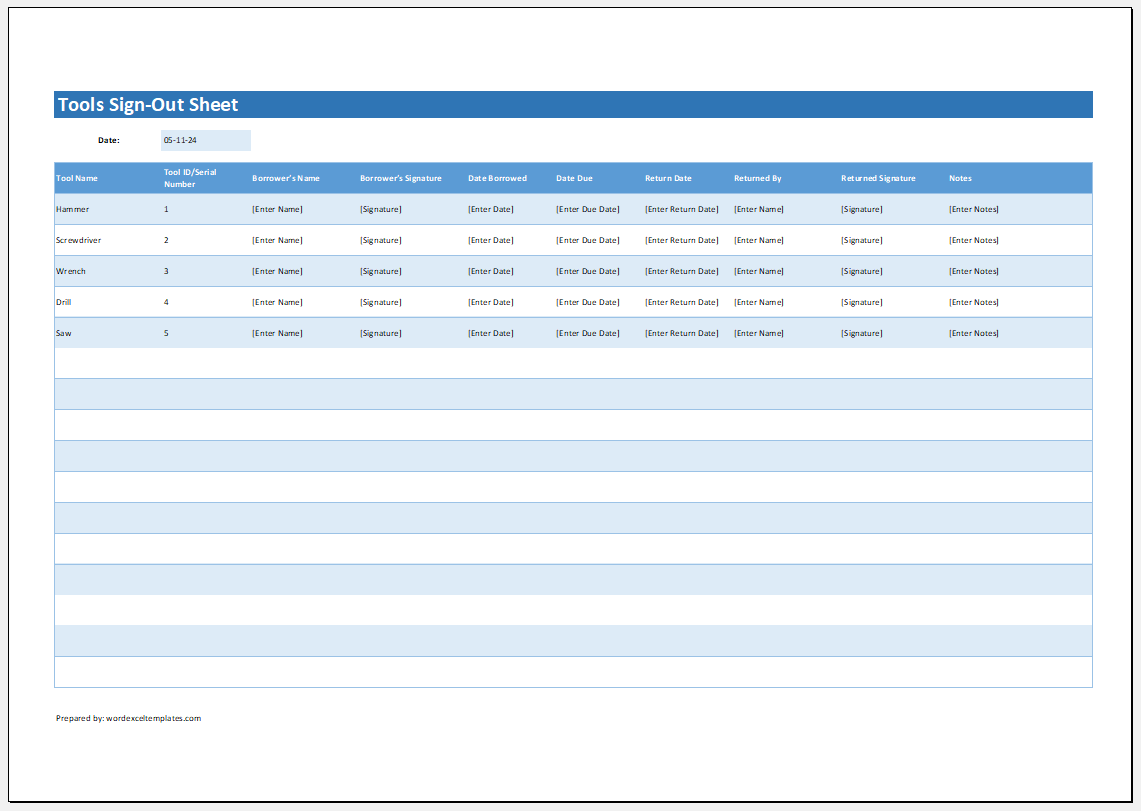
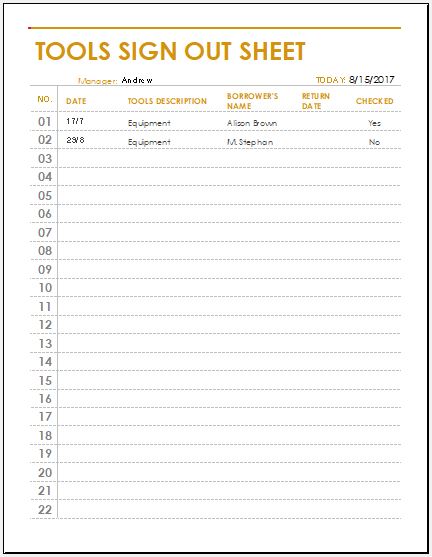
If you prefer working offline, you can download our editable MS Excel Tools Sign Out Sheet Template. The spreadsheet format is ideal for maintaining organized records of issued and returned tools while allowing easy updates whenever needed.
Simply download the template, enter your company details, employee information, and tool records, then save the file for future reference. The structured layout makes it easy to track multiple tools, monitor returns, and maintain accurate equipment logs.
Once completed, the spreadsheet can be printed, shared electronically, or stored as part of your organization’s asset management records. The Excel template provides a flexible and professional solution for businesses, workshops, schools, warehouses, and maintenance departments that need reliable tool tracking documentation.
#1
#2

#3
Preview and Details of Template
File: Excel (.xls) and iPad
Size 17 Kb
#4

File: Excel (.xls) and iPad
Size 17 Kb
- Customer Order Tracker
- Inventory Dashboard Generator
- Sales Dashboard Generator
- SWOT Analysis Generator
- KPI Scorecard Generator
- Warehouse Bin Location Generator
- Dispatch Slip Generator
- Office Asset Transfer Form Generator
- Summer Holiday Assignment Cover Page Generator
- Salary and Overtime Calculator Template
- Summer Vacation Planner Generator
- Outlet Mall Shopping Planner
- Customer Information and Ranking Sheet
- Small Family Kitchen Design Planning Sheet
- Summer Party Budget Sheet Generator