A company needs to manage its financial resources carefully to support its operations and goals. A clear budget helps it estimate income, plan expenses, and decide how much funding is available for different activities.
The different departments in a company have different funding requirements based on their responsibilities and planned work. A departmental budget allocation sheet helps organize these requirements and distribute available resources among departments.
The sheet supports funding decisions by comparing departmental needs with company priorities and financial limits. It provides a clear record of approved allocations, although it cannot guarantee that every department will receive all the funding it requests.
Each department’s budget should reflect expected costs, operational needs, and agreed priorities. Departments can then monitor their spending against the approved amounts and request adjustments when circumstances change.
(Sample Sheet)
Departmental Budget Allocation Sheet
Allocate budgets and monitor departmental spending.
Budget Details
Department Allocations
Expand a department to edit its allocated budget, actual expenses, and committed funds.
Budget Settings & Reconciliation
Review & Authorization
Benefits of a Departmental Budget Allocation Sheet
The following are some advantages of a departmental budget allocation sheet:
- It provides a structured way to distribute available funds among departments.
- It helps align planned spending with organizational goals.
- It allows managers to compare actual spending with approved budgets.
- It helps identify potential funding gaps, overspending, and areas requiring review.
Consider the following limitations:
- Inaccurate estimates or inconsistent allocation criteria can result in some departments receiving too much or too little funding.
- Changing costs or priorities may require adjustments to departmental budgets.
- Allocations must be reviewed against the company’s overall financial position to avoid committing more funds than are available.
How to Create a Departmental Budget Allocation Sheet
Consider the following points when preparing the sheet:
Format the budget allocation sheet:
Use the heading “Departmental Budget Allocation Sheet.” Include the company’s name and the budget period.
Available funding:
Record the funds available for allocation. If the sheet includes an income section, list each source in a separate row and provide columns for planned income, actual income, and the difference. Calculate the totals at the bottom.
Keep expected income separate from cash already available, and account for existing commitments when determining how much can be allocated.
Department details:
Create a section for each department and list its expense categories in a table. Include columns for the requested budget, approved allocation, actual spending, and remaining balance or variance. Define how the variance is calculated so the figures are interpreted consistently.
Calculate totals for each department and add a summary comparing total allocations with the overall budget. This makes it easier to identify funding gaps and review proposed changes.
Include relevant costs and funding assumptions without adding unnecessary detail. Check entries and formulas, and update the sheet when allocations are revised.
A well-prepared departmental budget allocation sheet helps a company make informed funding decisions and monitor spending across departments. Regular reviews help managers respond to changing needs while keeping the overall budget in view.
(Excel Template)
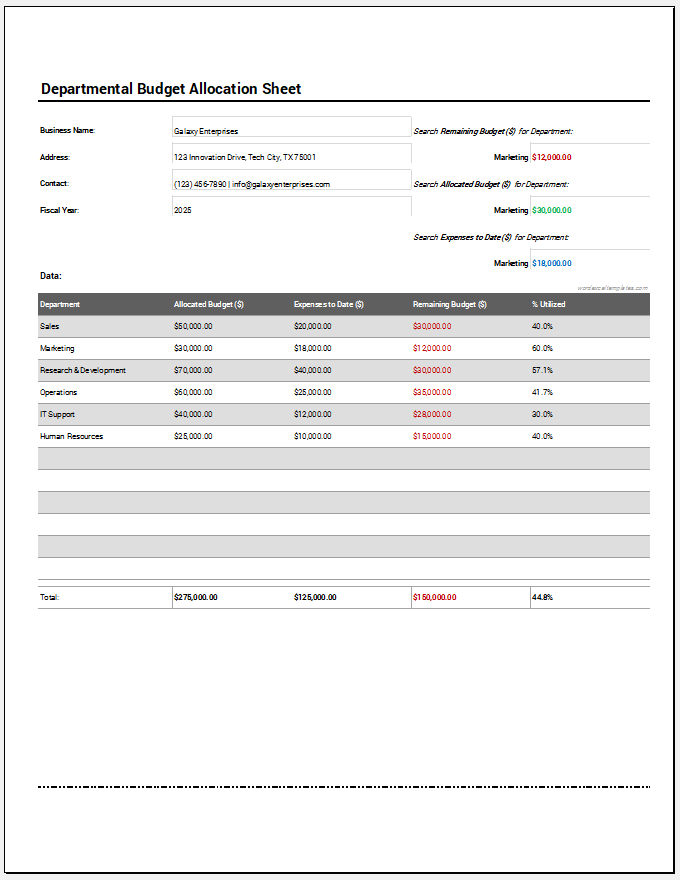
Excel Worksheet Template