Managing student tuition and fee records is one of the most important administrative tasks for schools, colleges, universities, and training institutions. Educational organizations need an efficient way to track tuition charges, additional fees, payments received, discounts, scholarships, and outstanding balances for every student. Accurate financial records help institutions maintain smooth operations while ensuring transparency for students and their guardians.
To simplify this process, we now offer an online Tuition and Fees Ledger Generator that allows administrators, accountants, and school staff to create professional student fee ledgers instantly. Instead of manually preparing records, users can enter student and fee information into the generator and automatically produce a structured tuition ledger that can be printed, downloaded, or saved for future reference.
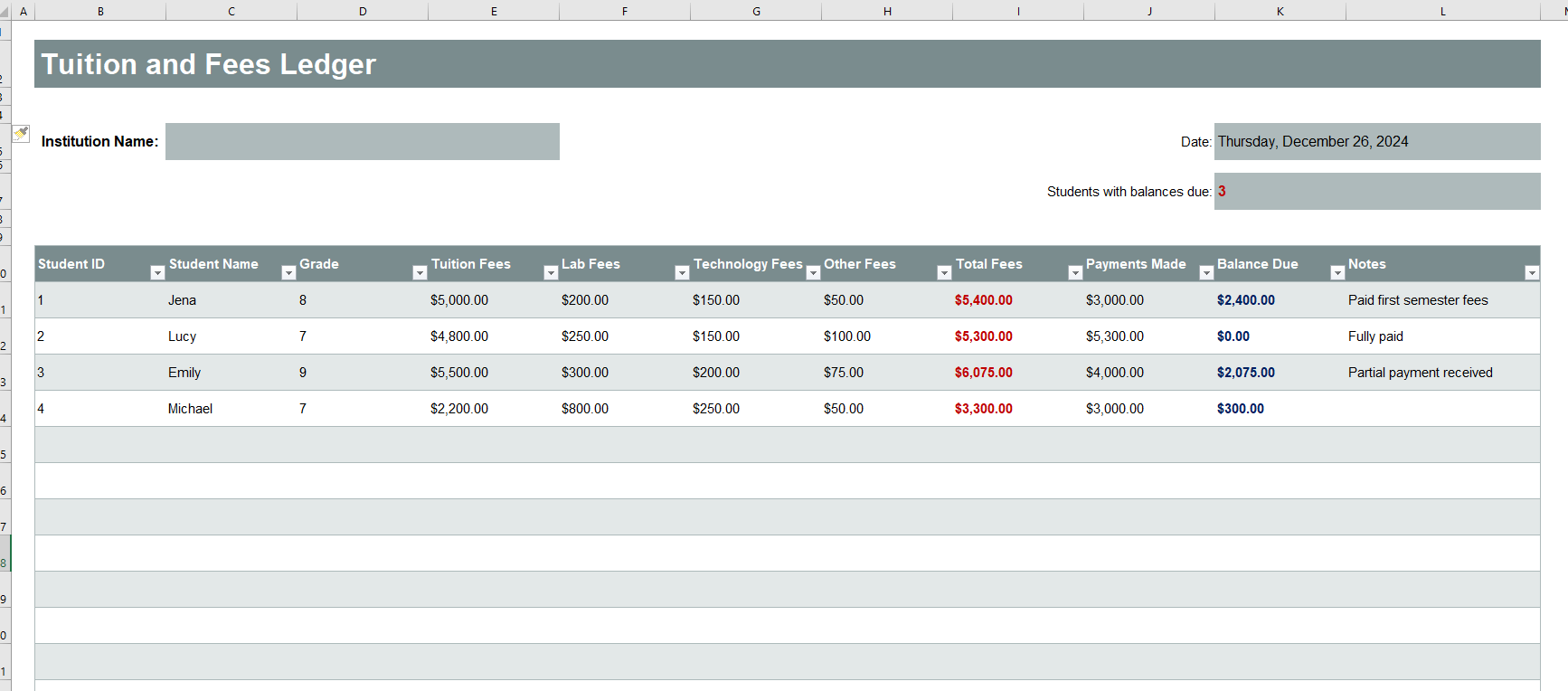
For users who prefer traditional spreadsheets, our original Tuition and Fees Ledger Template for Microsoft Excel is still available and can be downloaded separately.
What is a Tuition and Fees Ledger Generator?
A Tuition and Fees Ledger Generator is an online tool designed to create detailed financial records for students. The generator helps educational institutions maintain accurate records of tuition charges, fee payments, balances due, and other financial transactions associated with a student’s enrollment.
The generated ledger provides a complete overview of a student’s financial standing and serves as an important reference for school administrators, accounting departments, students, and parents.
Why Use an Online Tuition and Fees Ledger Generator?
Managing student fee records manually can be time-consuming and prone to errors. The online generator automates much of the process, making it easier to create organized and accurate ledgers within minutes.
Some key benefits include:
- Quickly generate professional tuition fee ledgers.
- Maintain accurate records of student payments.
- Track outstanding balances automatically.
- Reduce manual calculation errors.
- Create printable and downloadable reports.
- Improve financial transparency between institutions and families.
- Save time for administrative and accounting staff.
The generator helps educational institutions keep financial records organized while ensuring that all transactions are properly documented.
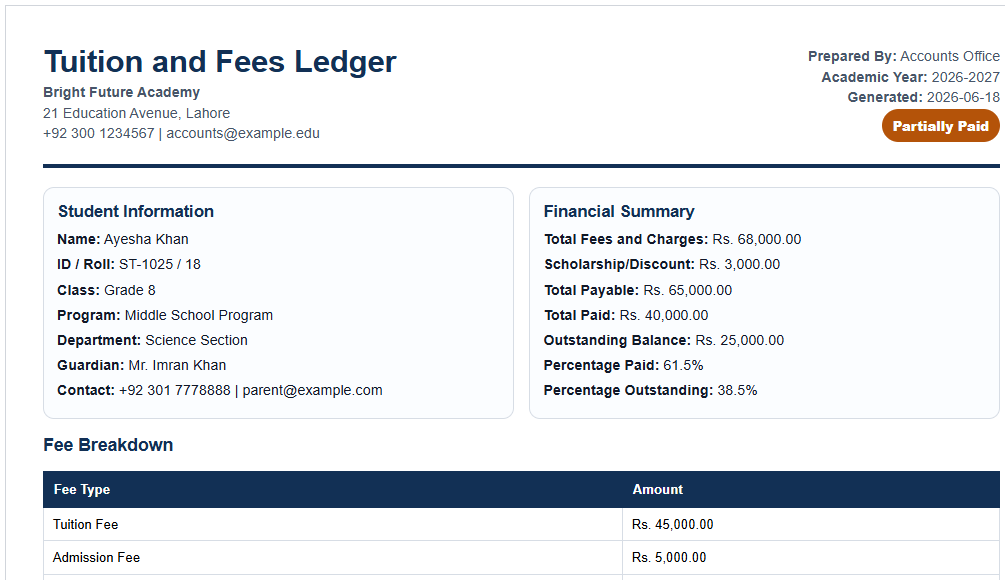
Information Included in the Ledger
The Tuition and Fees Ledger Generator allows users to record important student and financial information, including:
Student Information
- Student name
- Student ID
- Class or grade
- Course or program
- Academic session
- Contact information
- Parent or guardian details
Fee Information
- Tuition fees
- Registration fees
- Laboratory fees
- Examination fees
- Activity fees
- Transportation fees
- Library fees
- Other miscellaneous charges
Transaction Details
The ledger records every financial transaction related to the student account, including:
- Transaction date
- Receipt number
- Description
- Charges
- Payments received
- Scholarships or discounts
- Previous balance
- Current balance
This creates a complete financial history that can be reviewed whenever needed.
Features of the Online Generator
The Tuition and Fees Ledger Generator offers several features that make recordkeeping more efficient:
Automatic Calculations
The tool automatically calculates:
- Total charges
- Total payments received
- Remaining balance
- Outstanding fees
This eliminates the need for manual calculations and reduces errors.
Professional Ledger Format
The generated report follows a clean and professional layout suitable for educational institutions of all sizes.
Print and Download Options
Users can instantly print the completed ledger or download it for recordkeeping purposes.
Easy Editing
Information can be updated quickly whenever new payments or charges are recorded.
Centralized Recordkeeping
All student financial information is organized in a structured format that is easy to review and maintain.
How to Use the Tuition and Fees Ledger Generator
Using the generator is simple:
- Enter the institution and student information.
- Add tuition and fee details.
- Record payments, discounts, or additional charges.
- Review the automatically calculated balances.
- Generate the ledger instantly.
- Print or download the completed report.
The entire process takes only a few minutes and helps maintain accurate financial records.
Availability of the Excel Template
In addition to this online Tuition and Fees Ledger Generator, we continue to offer our traditional Microsoft Excel Tuition and Fees Ledger Template. The Excel version is ideal for users who prefer working offline or need to maintain large collections of student financial records within spreadsheet software.
Whether you choose the online generator or the Excel worksheet, both options provide reliable solutions for tracking tuition fees, recording payments, monitoring balances, and maintaining organized student financial records.
The Tuition and Fees Ledger Generator provides a modern and efficient way for educational institutions to manage student fee information, improve recordkeeping accuracy, and simplify financial administration.
- Parent-Teacher Communication Log
- Behavior and Discipline Log Template
- Individualized Education Program (IEP) Tracker
- Student Skills Tracking Sheet
- Classroom Inventory
- Professional Development Tracker Template
- Field Trip Planner and Roster
- Student Roster and Information Sheet
- Tutoring & Support Services Log
- School Fees and Payments Tracker
- Scholarship and Financial Aid Tracker
- Teacher Performance Evaluation Tracker
- Counselling & Guidance Record Sheet
- Classroom Supplies Budget Tracker
- Tuition and Fees Ledger