Vehicle Booking Sheet

Vehicle Booking Sheet Online Form

Create, calculate, save, print, and download a professional vehicle booking sheet directly from your browser.

Main Form Details

Vehicle Details

Booking Details

Cost & Payment Section

Approval Section

Cost Summary

Subtotal$0.00
Tax Amount$0.00
Grand Total$0.00
Amount Paid$0.00
Balance Due$0.00

Vehicle Booking Sheet

Company Name

Booking No: -

Booking Date: -

Status: -

Requested By-Department / Branch-
Contact-Email-
Vehicle Type-Registration No.-
Driver-Driver Contact-
Passenger / Customer-No. of Passengers-
Pickup Location-Drop-off Location-
Travel Date & Time-Return Date & Time-
Trip Type-Purpose-
Instructions-

Charges

Base Fare$0.00
Driver Charges$0.00
Fuel Charges$0.00
Toll / Parking Charges$0.00
Extra Charges$0.00
Discount$0.00
Subtotal$0.00
Tax Amount$0.00
Grand Total$0.00
Amount Paid$0.00
Balance Due$0.00

Approval Notes

-

Prepared By: -
Approved By: -
Signature: -

Organizations that manage a fleet of vehicles need an efficient way to handle reservations and track vehicle availability. Whether the vehicles are used by employees for official duties or rented out to customers, maintaining accurate booking records is essential for avoiding conflicts and ensuring smooth operations. A Vehicle Booking Sheet provides a modern solution that simplifies this process.

Our Online Vehicle Booking Sheet allows users to record, manage, and organize vehicle reservations directly from their web browser. Instead of manually filling out paper forms or updating spreadsheets, users can enter booking details online, generate professional booking records instantly, and print or download them whenever required. This makes the entire booking process faster, more accurate, and easier to manage.

The online tool is designed to help businesses monitor vehicle usage effectively. Car rental companies can quickly determine which vehicles are currently booked and which are available for future reservations. Similarly, organizations that maintain company vehicles for employee use can keep track of who has booked a vehicle, when it is needed, and when it is expected to be returned. This improved visibility helps businesses make informed decisions regarding fleet utilization and future vehicle requirements.

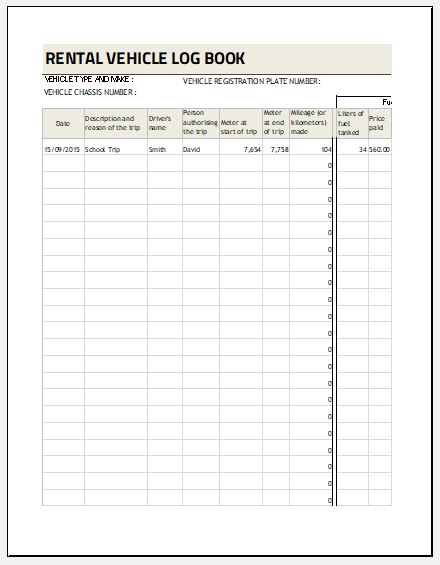
The Vehicle Booking Sheet Online captures all the essential details required for effective vehicle management. Users can record information such as the renter’s name, contact details, vehicle name, vehicle model, pickup date and time, return date and time, booking status, and additional notes if necessary. Since the tool automatically organizes the entered information, it minimizes the chances of missing important details.

Some key advantages of using the Vehicle Booking Sheet Online include:

  • It streamlines and simplifies the vehicle reservation process.
  • It reduces the risk of scheduling conflicts and double bookings.
  • It improves the management of company-owned or rental vehicles.
  • It provides a clear record of who has booked a vehicle and for what period.
  • It allows users to generate professional booking reports instantly.
  • It enables printing and downloading of completed booking sheets for recordkeeping purposes.
  • It can be accessed from any device with an internet connection, making it convenient for modern workplaces.

Unlike traditional manual methods, the online tool is designed to improve efficiency and reduce administrative work. Built-in calculations, organized layouts, and automated features help users save time while maintaining accurate records.

For users who prefer conventional formats, we continue to offer the Vehicle Booking Sheet Template in Microsoft Excel. The Excel version remains an excellent option for those who wish to work offline, customize formulas, or integrate the worksheet into their existing spreadsheet systems. Both versions are designed to help organizations maintain complete control over their vehicle booking processes.

Information Included in the Vehicle Booking Sheet Online

The online booking sheet typically includes the following sections:

  • Renter Information: Name and contact details of the person requesting the vehicle.
  • Vehicle Details: Vehicle name, registration number, and model.
  • Booking Schedule: Pickup date and time along with the expected return date and time.
  • Booking Status: To indicate whether the vehicle is booked, in use, returned, or cancelled.
  • Additional Notes: Special instructions or remarks related to the booking.
  • Authorization Details: Signature or approval information, where applicable.

How to Use the Vehicle Booking Sheet Online

Using the online tool is simple and user-friendly:

  1. Enter the booking request details in the provided fields.
  2. Select or type the relevant vehicle information.
  3. Specify the pickup and return schedule.
  4. Review the booking status and any special requirements.
  5. Generate the completed booking sheet instantly.
  6. Print or download the report for future reference.

A Vehicle Booking Sheet is an important administrative document that helps organizations maintain accountability and transparency in vehicle usage. Whether you choose the AI-powered online version for convenience or the downloadable Excel template for offline use, both solutions provide an effective way to organize and monitor vehicle reservations.

By keeping accurate booking records, organizations can improve fleet management, prevent misunderstandings, and ensure that vehicles remain available when they are needed most.

Vehicle Booking Sheet Template for Excel