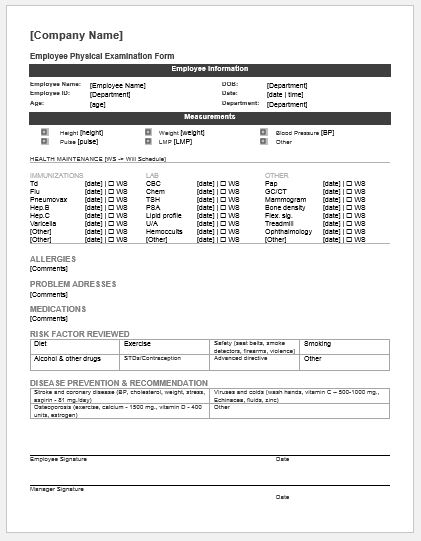
An annual physical examination provides an opportunity to review a person’s overall health, discuss concerns, and identify issues that may require further assessment. The findings are recorded on a physical examination form.
A well-designed yearly physical examination form helps doctors organize patient information clearly. The form commonly includes the following details:
- Patient information: Basic information appears at the top of the form. This section is usually completed by the patient and includes their name, date of birth, gender, contact number, and address. The examination date, emergency contact details, and date of the previous examination may also be included.
- Medical history: The patient records existing or previous medical conditions, such as diabetes, high blood pressure, or asthma. Allergies and any relevant reactions should also be noted.
- Medications: This section lists current medications and supplements, including their doses and how often they are taken.
- Vaccination history: Record relevant vaccinations and the dates they were administered. This section can be used for both children and adults.
- Surgical history: Include previous surgical procedures and their dates, where known.
- Family health history: Record relevant medical conditions affecting close relatives and any updates since the previous examination.
- Lifestyle information: Include questions about diet, physical activity, smoking, alcohol consumption, and other substance use.
- Examination findings: The physician records vital signs and findings from the physical examination. Checkboxes can be used alongside space for observations and comments.
- Assessment and follow-up: Provide space for the physician’s assessment, any recommended tests, and follow-up instructions.
- Physician information: Include the physician’s name, contact details, signature, and the date the form was completed. A recommended follow-up date may also be recorded.
These sections provide a useful starting point. Hospitals and clinics can adapt the form to suit their patients and services. Pre-designed templates can be customized and printed for use.
Use the tool below to create a sample YPEF for your personal use.
Yearly Physical Examination Form
Document an annual physical examination, recorded measurements and follow-up recommendations.
Patient & Visit Information
Vitals & Examination Findings
Body System Observations
Add or edit observations. These entries document findings; they do not automatically determine medical fitness.
Clinical Assessment & Follow-up
Review & Authorization
This form is a recordkeeping aid for qualified healthcare professionals, not an automated diagnosis or medical clearance.
Follow these steps to create a yearly physical examination form:
- Browse the available physical examination form templates.
- Choose a template with the sections and space needed for your practice.
- Use the provided editing tools to customize the form. Add, remove, or revise sections as appropriate. Adjust the font style and size for readability, and include your hospital’s or clinic’s name at the top.
- Review the form for clarity and completeness before downloading and printing it.
A physical examination form is a formal medical document. Its design should be simple, clear, and easy to complete. Decorative images and borders are generally unnecessary; readable text, clear headings, and sufficient writing space are more useful.
A yearly physical examination does not have to take place at the end of the calendar year. It is a scheduled health review that allows patients and doctors to discuss current concerns, review medical history, and consider appropriate preventive care.
The form supports this review by bringing previous and current health information together. It may include relevant test results, past illnesses, ongoing conditions, and changes in medication. Comparing these records over time can help the physician identify changes that need attention.
Once the information has been reviewed and the examination completed, the physician can document their findings and recommend any further assessment or follow-up.
The form should capture relevant medical history and current health information without becoming unnecessarily difficult to complete. Accurate dates, patient details, and clear examination notes help make the record useful for future care.
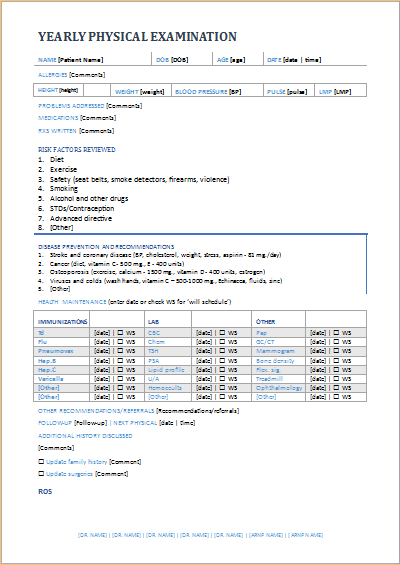
(Sample Form)
File: Word (.docx)
Size 68 KB