Value added tax (VAT) is an indirect tax imposed on the consumption of goods and services. It is applied at different stages of the supply chain where value is added. VAT-registered businesses generally charge VAT on taxable sales and may recover eligible VAT paid on business purchases, subject to the applicable rules.
In simple terms, VAT is collected by businesses on behalf of the government. Businesses selling taxable goods or services may need to register for VAT and meet reporting requirements, depending on the jurisdiction and their circumstances.
A VAT log helps businesses organize and track VAT-related transactions in one place.
What is a VAT Log?
A VAT log is a structured record-keeping document used to track VAT charged on sales and VAT paid on purchases. It helps businesses maintain organized records and supports the preparation of VAT returns.
This log provides an overview of relevant transactions, making it easier to calculate VAT due and identify any recoverable balance.
A VAT log can include both cash and credit transactions, recorded according to the business’s applicable accounting method. It helps businesses distinguish between net amounts and VAT components for reporting purposes.
(Create a VAT log below.)
Value Added Tax (VAT) Log
Record taxable sales and purchases, calculate VAT, and reconcile your tax period.
VAT Log Details
VAT Transactions
Record sales (output VAT) and purchases (input VAT). Enter amounts excluding VAT; choose a rate or override it for each transaction.
VAT Settings
VAT Review
Importance of a VAT Log
A VAT log can support financial management and tax reporting by helping businesses:
- Calculate output VAT and eligible recoverable input VAT
- Maintain records of relevant transactions
- Make tax calculations easier to review
- Prepare VAT returns more efficiently
- Identify missing information or calculation errors
- Organize records needed to meet applicable reporting requirements
Limitations of a VAT Log
While a VAT log is useful, it has some limitations:
- Maintaining detailed records can be time-consuming.
- Incomplete or incorrect entries may lead to reporting errors.
- Poorly designed logs can be confusing and difficult to use.
- The log requires regular updates and checks to remain reliable.
- A log alone does not establish whether VAT is recoverable or ensure compliance with tax requirements.
How to Create a VAT Log
Use a clear layout and adapt the fields to your business’s transactions and reporting needs.
1. Professional Layout
Start with a heading such as “VAT Log.” Include the business name, VAT registration number where applicable, and the reporting period, such as a month or quarter.
2. Create a Structured Table
Use a table to make entries easy to record and review. Common fields include:
- Date of transaction
- Invoice number
- Customer or supplier name
- Transaction type: sale, purchase, or adjustment
- Description of goods or services
- Quantity and unit price, where needed
- Total value excluding VAT
- VAT rate (%)
- VAT amount
- Total amount including VAT
- VAT treatment, such as standard-rated, reduced-rated, zero-rated, or exempt, where applicable
- Recoverable input VAT, where relevant
3. Calculation Section
At the bottom of the table, include separate totals for:
- Net sales and purchases, grouped by VAT treatment where needed
- Output VAT charged on sales
- Eligible recoverable input VAT on purchases
- Relevant adjustments
- The resulting VAT balance for the reporting period
A credit balance may be carried forward or refunded, depending on the applicable rules.
4. Keep It Simple and Clear
Avoid unnecessary complexity. Use consistent labels, check formulas, and reconcile entries with invoices and other supporting records.
A VAT log helps businesses track VAT-related transactions and prepare information for tax reporting. Keeping it accurate and up to date can reduce preparation time and make discrepancies easier to investigate.
About Our Template
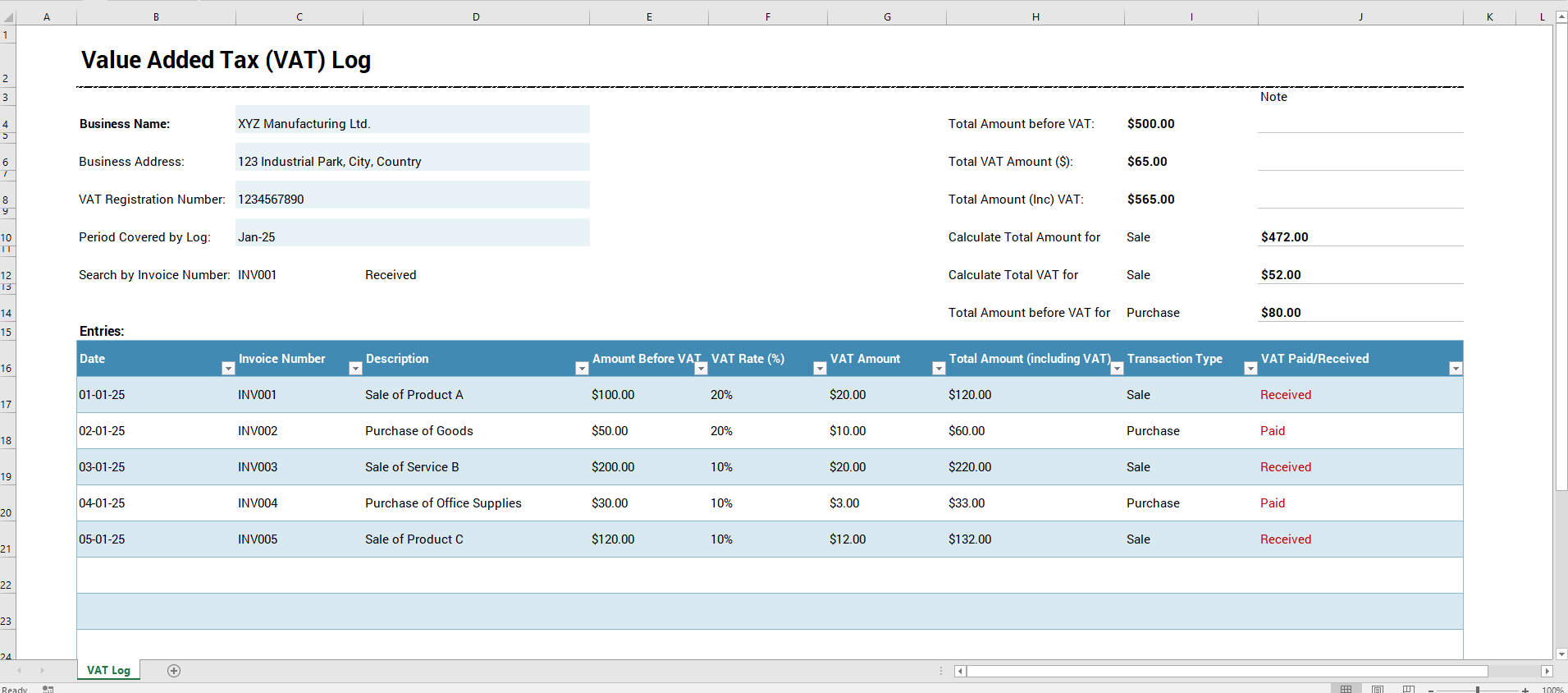
Our VAT Log Template provides a structured format for recording sales, purchases, VAT rates, and tax amounts.
The template is fully editable in Excel, making it easy to customize to suit your business needs. Review its fields and formulas against your applicable VAT rules before using it for reporting. The template supports record-keeping but does not replace the checks needed to prepare an accurate VAT return.