A Shareholders’ Equity Report Worksheet is a practical financial tool for recording and summarizing changes in a company’s equity during a reporting period. It can be used to organize common stock, additional paid-in capital, retained earnings, treasury stock, reserves, accumulated results, and other relevant equity components in one structured report.
The worksheet below helps accountants, finance teams, business owners, auditors, corporate secretaries, and accounting students document the movement from opening to closing shareholders’ equity. It provides separate fields for other equity increases and decreases, profit/loss allocations, OCI or reserve movements, and dividends or distributions, making different types of equity movements easier to identify and review.
To prepare the report, enter the company and reporting-period information and add the required equity components. For each component, enter its opening balance and applicable movements during the period. The worksheet automatically calculates the closing balance for each component, total shareholders’ equity, and net movement. Notes, disclosures, and approval details can also be included before using Print / Save PDF to produce the completed A4 report.
Report Information
Equity Components
Use negative opening balances for contra-equity accounts such as treasury stock when appropriate. Profit/loss allocations and dividends/distributions are normally recorded against retained earnings or another applicable equity account.
Additional Information
Shareholders’ Equity Report
Company Name
| Equity Component | Opening | Other Equity Increases | Other Equity Decreases | Profit / Loss Allocation | OCI / Reserve Movement | Dividends / Distributions | Closing |
|---|---|---|---|---|---|---|---|
| Total Shareholders’ Equity |
Notes and Disclosures
Frequently Asked Questions
What is a Shareholders’ Equity Report Worksheet?
It is a worksheet for recording opening equity balances, movements during a reporting period, and resulting closing balances across different shareholders’ equity components.
What equity components can I include?
You can add components appropriate to the entity, such as common stock, preferred stock, additional paid-in capital, retained earnings or accumulated deficit, treasury stock, and applicable reserves.
How is the closing balance calculated?
For each component, the worksheet uses opening balance + other equity increases − other equity decreases + profit/loss allocation + OCI/reserve movement − dividends/distributions.
Where should profit or loss be entered?
Profit or loss is normally allocated to retained earnings or another applicable accumulated-results account. The appropriate treatment should follow the entity’s accounting policies and reporting framework.
How should dividends or distributions be entered?
They are generally recorded against retained earnings or another applicable distributable equity account. They should not automatically be assigned to every equity component.
How should treasury stock be entered?
Treasury stock is generally a contra-equity account and can therefore be entered as a negative balance. Subsequent movements should be entered according to whether they increase or decrease total equity.
What is OCI / Reserve Movement?
This field provides a separate place for applicable other comprehensive income or reserve movements. Positive or negative values can be entered depending on the nature of the movement.
Can I add more equity components?
Yes. Use Add Equity Component to create additional rows for the equity accounts required for the report.
Can this worksheet replace an official statement of changes in equity?
No. It is a calculation and reporting aid. Formal financial statements and the classification of equity transactions should follow the applicable accounting standards, reporting requirements, and professional accounting judgment.
Can I print or save the completed report as a PDF?
Yes. Use Print / Save PDF in the Live Preview section to open the browser's print workflow and print the A4 report or save it as a PDF.
Online Shareholders’ Equity Worksheet
The online worksheet above provides an interactive way to record equity components and calculate changes during the reporting period. It automatically determines closing balances and total shareholders’ equity while allowing you to include profit/loss allocations, OCI or reserve movements, dividends or distributions, notes, and approval details.
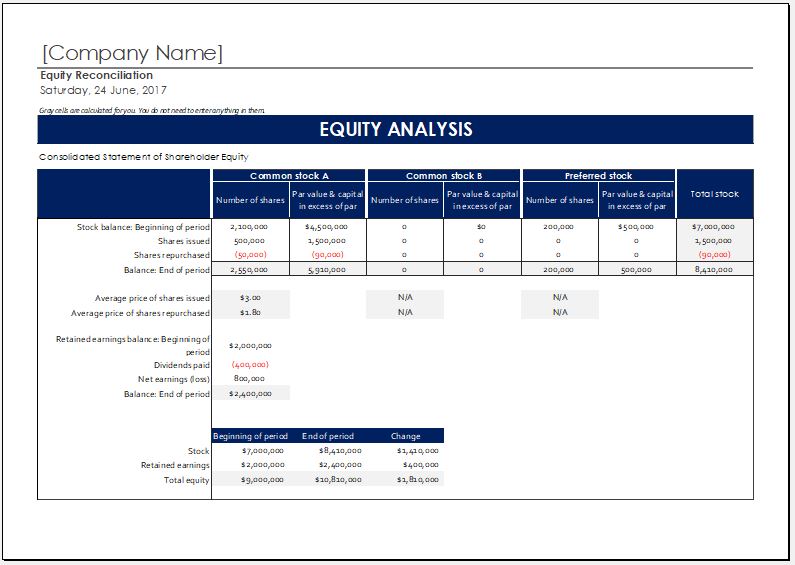
If you prefer to maintain the equity reconciliation in a spreadsheet, the downloadable MS Excel template below provides an alternative format for preparing and retaining the report.
MS Excel Template
Preview and Details of MS Excel (.xlsx) Template
File: Excel (.xls)
Size 23 KB