Negotiating salary is an important part of career growth and professional development. Whether you are applying for a new position, requesting a raise, discussing a promotion, or reviewing a compensation package, documenting your salary expectations in a structured manner helps create a more productive conversation between employees and employers. Our Salary Negotiation Form Generator is designed to simplify this process by allowing users to create a professional salary negotiation document in just a few minutes.
This online tool helps employees present their salary requests clearly and professionally while giving HR departments and managers a standardized format for reviewing compensation discussions. Instead of creating documents manually, users can complete the form, review the generated negotiation summary, and print or download it instantly.
What Is a Salary Negotiation Form?
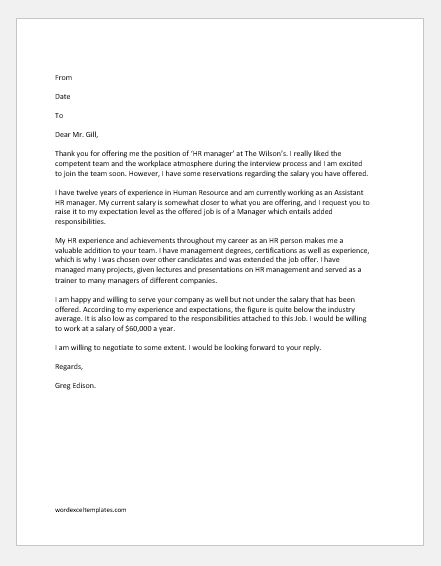
A Salary Negotiation Form is a professional document used to communicate salary expectations, compensation adjustments, and related employment benefits. It records important details such as the employee’s current salary, requested salary, justification for the increase, achievements, market salary comparisons, and management responses.
The form creates a documented record of the negotiation process and helps both parties understand the reasoning behind compensation requests.
Salary Negotiation Form
Create a professional salary negotiation request with automatic salary increase calculations and a print-ready HR preview.
Employee and Company Details
Salary Request
Negotiation Details
Guidance and Privacy
Use clear facts, measurable achievements, market comparison, and respectful wording. Salary information is confidential and should only be shared with authorized HR or management personnel.
Salary Negotiation Form
NorthBridge Consulting Ltd.
Professional HR Review Document
Employee Information
Salary Comparison
| Current Salary | |
| Requested Salary | |
| Salary Increase Amount | |
| Salary Increase Percentage |
Negotiation Reason
Key Achievements
Market Salary Comparison
Additional Benefits Requested
Employee Comments
HR / Manager Response
Employee Signature
HR / Manager Signature
How This Generator Works
The Salary Negotiation Form Generator is designed to be simple, fast, and user-friendly. Users enter their information into the form fields, and the system automatically creates a professional salary negotiation document in real time.
As information is entered, the live preview updates instantly, allowing users to review the final document before printing or downloading it.
The generated form can be used for:
- Salary increase requests
- Promotion-related salary discussions
- Annual performance review negotiations
- Internal job transfers
- Job offer negotiations
- Compensation adjustment requests
- Market-based salary reviews
- Employee retention discussions
Information Included in the Form
This generator provides dedicated fields for all important salary negotiation details, including:
Employee Information
- Employee name
- Employee ID
- Job title
- Department
- Company name
Salary Details
- Current salary
- Requested salary
- Salary increase amount
- Salary increase percentage
Negotiation Details
- Reason for salary adjustment
- Professional achievements
- Performance contributions
- Market salary comparisons
- Additional benefits requested
- Preferred implementation date
Approval Information
- Manager or HR representative name
- HR comments and responses
- Approval status
- Employee signature
- HR signature
- Date of submission
Automatic Salary Calculations
One of the most useful features of this generator is its built-in calculation system.
After entering the current salary and requested salary, the tool automatically calculates:
- Salary increase amount
- Percentage increase
- Difference between current and proposed salary
These calculations help employees and HR professionals quickly evaluate compensation changes without performing manual calculations.
Live Preview Feature
The generator includes a real-time preview panel that displays the completed salary negotiation form as information is entered.
This feature allows users to:
- Review the document before printing
- Check calculations instantly
- Verify entered information
- Ensure professional formatting
- Reduce data entry errors
The live preview creates a document-ready version of the negotiation request that can be presented to management or HR departments.
Print and Download Options
Once the form is completed, users can:
- Print the salary negotiation form
- Save the form as a PDF
- Download a copy for personal records
- Share the document during salary discussions
The print feature is optimized to print only the generated negotiation document, eliminating unnecessary website content and ensuring a clean professional layout.
Sample Data Function
For first-time users, the generator includes a sample data feature that automatically fills the form with example information.
This allows users to:
- Understand how the form works
- See a completed example
- Learn what information should be provided
- Quickly test all generator features
Professional and Confidential Design
Salary discussions involve sensitive financial information. This generator has been designed with professionalism and confidentiality in mind.
The generated document uses a clean business-style layout suitable for corporate environments, HR departments, government organizations, educational institutions, and private companies.
A confidentiality notice is also included to remind users that salary information should be handled responsibly and shared only with authorized personnel.
Benefits of Using This Generator
- No software installation required
- Works directly in your browser
- Automatic salary calculations
- Real-time document preview
- Professional formatting
- Mobile-friendly design
- Print-ready output
- PDF-friendly layout
- Saves time during compensation discussions
- Helps create clear and documented salary requests
Final Notes
Our Salary Negotiation Form Generator provides a simple and professional way to prepare compensation discussions. Whether you are requesting a raise, negotiating a job offer, or documenting a salary review meeting, this tool helps you create a well-structured and professional salary negotiation document that can be printed, saved, or shared instantly.
Salary Negotiation Templates (MS Word & Excel)
For users who prefer traditional document formats, we also provide downloadable MS Word and MS Excel versions of the Salary Negotiation Form.
The MS Word template is ideal for creating formal salary negotiation requests, editing content manually, and printing professional documents for meetings or HR submissions. The MS Excel template offers a structured format with organized salary data and may include automatic calculations for salary increases, percentage adjustments, and compensation comparisons. Both templates can be customized to meet individual or company requirements and serve as valuable records for future reference.
Whether you choose the online generator, the Word document, or the Excel spreadsheet, each option provides a professional and convenient way to prepare, document, and manage salary negotiation discussions.
Below are sample templates in MS Word and Excel formats to assist you in preparing a salary negotiation document. You can download and customize these templates to suit your specific requirements and draft a well-structured salary negotiation request.
(Template for MS Word)

Key features for MS Word (.docx)
- Structured table layout
- Checkbox options for justification
- Fillable fields
- Approval section for HR/Management
- Formatting and readability
(Template for MS Excel)

Key features for MS Word (.docx)
- Structured layout
- Auto calculations with Excel formulas
- Printable and professional format
- Comments/Notes section
- Summary sheet
- Reimbursement Management Forms
- Forms Used for Workplace Ethics and Policies
- Forms used for Operations in an Organization
- Procurement/Supply Chain Forms
- Downloadable Forms for Unprofessional Behavior
- Commonly Downloaded Office Forms
- Employee Dispute & Grievance Forms
- Insurance & Protection Benefit Forms
- Employee Retirement & Pension Forms
- Employee Service & Tenure Forms
- Employee Health & Well-being Forms
- Employee Scrutiny & Evaluation Forms
- Customer Service and Support Form Generator
- Commonly Used Forms for Payroll Correction
- Employee Exit Forms -Generate Online