Payroll Correction Request Form Generator
Create a professional payroll correction request form with live preview, print, and browser Save-as-PDF output.
Company Information
Employee Information
Payroll Correction Details
Signatures and Approval
Professional Form Preview
How to Use
- Fill in the company, employee, payroll issue, correction request, and approval details.
- The preview updates automatically as you type. Use Generate Form to check required fields.
- Click Print to print the completed form, or Download as PDF and choose Save as PDF in the browser print window.
- Use Reset to restore sample data and start a new correction request.
FAQs
Does this form save payroll data?
No. The form runs in the browser only and does not store data in WordPress or any external database.
How do I download the form as a PDF?
Click Download as PDF, then select Save as PDF in your browser print dialog.
Can the ticket or request details be edited after generating?
Yes. You can edit any field and the live preview will update automatically.
Which fields are required?
Employee name, employee ID, pay period affected, correction type, and issue description are checked before printing or downloading.
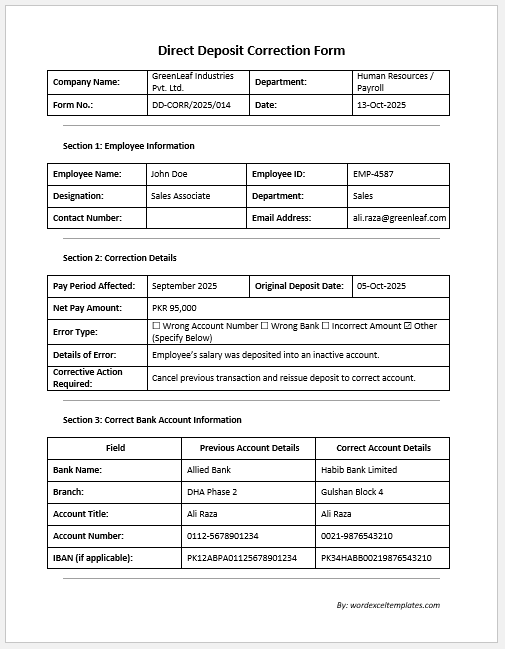
This form is used to request review and correction of payroll-related errors.
Companies need to ensure that employees receive accurate wages and benefits according to their employment agreements and payroll regulations. Even small payroll mistakes, such as incorrect working hours, missed bonuses, tax withholding errors, or inaccurate deductions, can create frustration among employees and may eventually lead to legal complications if they are not addressed promptly. To resolve such issues efficiently, organizations can use a Payroll Correction Request Form Generator.
A Payroll Correction Request Form Generator is an online tool designed to help employees, supervisors, and payroll departments create professional payroll correction requests quickly and accurately. Instead of manually preparing the form from scratch, users simply enter the required information into the generator, and it instantly produces a well-structured correction request form that can be printed or downloaded for recordkeeping.
This AI-powered online generator simplifies the entire process of reporting payroll discrepancies. It allows users to provide essential details regarding the payroll issue, ensuring that the payroll department receives all the information necessary to investigate and correct the error. Whether the problem involves miscalculated wages, unpaid overtime, incorrect tax deductions, missing commissions, or an inaccurate pay rate, the generator helps document the issue in a formal and organized manner.
The generator is important because it enables employees to communicate payroll concerns professionally and consistently. Employers and payroll officers can easily understand the nature of the error and take the appropriate corrective action. This contributes to timely payroll adjustments and helps ensure that employees receive the compensation they are entitled to according to company policies and applicable labor laws.
The Payroll Correction Request Form Generator typically includes fields for employee information, such as the employee’s name, identification number, department, and job title. Users can specify the affected pay period, payroll date, and the type of payroll issue being reported. The form also provides space to explain the error, describe the correct information, indicate the amount of adjustment required, and provide supporting comments if necessary.
Approval sections can also be included for supervisors, managers, or payroll personnel, ensuring that the correction request follows the organization’s internal review procedures. Once completed, the form can be printed or downloaded as a PDF for submission and future reference.
Benefits of Using an Online Payroll Correction Request Form Generator
- Enables payroll errors to be reported in a professional and standardized format.
- Saves time by automatically generating a completed form based on user input.
- Helps employers understand the exact nature of the payroll discrepancy.
- Provides employees with a formal method to request payroll adjustments.
- Creates documentation that may be useful for audits, compliance reviews, or dispute resolution.
- Reduces the likelihood of incomplete or unclear correction requests.
- Allows users to instantly print or download the finalized form for recordkeeping.
How the Payroll Correction Request Form Generator Works
Using the online generator is simple and user-friendly. Users only need to complete the required fields, including:
- Company information
- Employee details
- Employee ID and department
- Job title
- Pay period affected
- Payroll date
- Type of payroll error
- Description of the issue
- Correct information requested
- Adjustment amount, if applicable
- Supporting notes or comments
- Employee and supervisor acknowledgment details
After entering the information, the generator automatically creates a professional Payroll Correction Request Form. The completed form can then be reviewed, printed, or downloaded for submission to the payroll department.
Traditional Templates Are Still Available
Although the online Payroll Correction Request Form Generator provides a faster and more convenient way to prepare payroll correction requests, we understand that many organizations still prefer using traditional documents. Therefore, we continue to offer downloadable Payroll Correction Request Form Templates in both MS Word and MS Excel formats.
The Word version is ideal for organizations that prefer manual completion and customization, while the Excel version offers a structured layout that can be maintained electronically. Users can choose the format that best suits their workflow and organizational requirements.
Payroll errors can occur despite the best payroll practices. What matters most is ensuring that these discrepancies are identified and corrected quickly and professionally. A Payroll Correction Request Form Generator streamlines this process by helping employees and employers document payroll concerns accurately and efficiently. Whether you choose the online generator for instant form creation or the traditional MS Word and Excel templates for offline use, these tools help maintain transparency, support compliance, and ensure employees receive the compensation they rightfully deserve.

Key Features for Word File:
- Fillable table sections
- Check boxes for error type
- Signature lines
- Comments/Remarks Section
- Section heading for clarity
Form for MS Word (.docx)
Size: 352 KB
(Template for MS Excel)

Key Features for Excel File:
- Clear employee identification
- Pay period and error date tracking
- Error and correction details
- Automatic correction calculation
- Signature and authorization fields
- Comment Section
- Excel-friendly data entry
Form for MS Excel (.xlsx)
Size: 352 KB
- Reimbursement Management Forms
- Forms Used for Workplace Ethics and Policies
- Forms used for Operations in an Organization
- Procurement/Supply Chain Forms
- Downloadable Forms for Unprofessional Behavior
- Commonly Downloaded Office Forms
- Employee Dispute & Grievance Forms
- Insurance & Protection Benefit Forms
- Employee Retirement & Pension Forms
- Employee Service & Tenure Forms
- Employee Health & Well-being Forms
- Employee Scrutiny & Evaluation Forms
- Employee Training and Development Forms
- Customer Service and Support Form Generator
- Commonly Used Forms for Payroll Correction