Use the Employee Salary Revision & Increment Calculator to compare an employee’s current and revised compensation after a salary review, promotion, performance-based increment, or other approved pay adjustment. Enter the current basic salary and compensation components, choose how the basic salary will be revised, and review the calculated changes in the live summary.
The calculator can compare basic salary, allowances, other pay, deductions, and annual gross compensation based on the figures entered. It is intended for salary-review planning and documentation; it does not independently calculate payroll taxes, statutory deductions, benefits, or an employer’s complete payroll cost.
Employee Salary Revision & Increment Calculator
Calculate salary revisions, compare current and revised compensation, and prepare a clear salary revision summary.
Employee Salary Revision & Increment Calculator FAQs
What is an employee salary revision calculator?
It is a practical HR and payroll tool for comparing an employee's current compensation with a proposed revised salary and calculating the resulting monthly and annual changes.
How can I calculate a percentage salary increase?
Select Percentage Increase, enter the current basic salary and the proposed increment percentage. The calculator automatically determines the revised basic salary and the value of the increase.
Can I calculate a fixed salary increment?
Yes. Select Fixed Amount Increase and enter the amount to add to the employee's current basic salary.
Can I enter the new salary directly?
Yes. Select Set New Basic Salary and enter the proposed revised basic salary. The tool calculates the increase and percentage change from the current salary.
Does the calculator include allowances and deductions?
Yes. You can enter current and revised monthly allowances, other pay and deductions so that the comparison reflects more than the basic salary alone.
Can I include a one-time bonus or adjustment?
Yes. A one-time bonus or adjustment can be entered separately and is included in the revised annual gross compensation and annual employer cost impact.
What figures are calculated automatically?
The tool calculates the new basic salary, basic increase, percentage increase, current and revised monthly compensation, monthly change, annual gross compensation and annual employer cost increase.
Can I print or save the salary revision summary as a PDF?
Yes. Use the Print button in the Live Preview. Your browser's print dialog can also be used to save the formatted A4 salary revision summary as a PDF.
Does this tool support different currencies?
Yes. The calculator includes several commonly used currencies, including USD, PKR, GBP, EUR, AED, SAR, INR, CAD and AUD.
Is the calculated salary revision an official payroll record?
No. The calculator is intended for planning, comparison and documentation. HR, payroll and finance teams should verify compensation figures, deductions, taxes and organizational policies before approving a salary change.
How Salary Revision Is Calculated
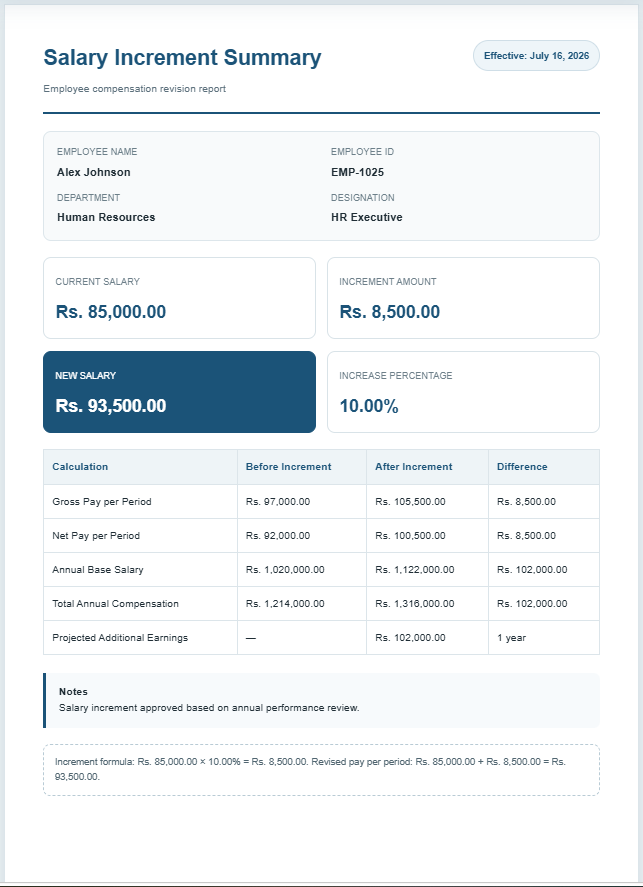
The calculation depends on the revision method selected in the calculator. A percentage increase applies the entered percentage to the current basic salary, while a fixed increase adds a specified amount. The Set New Basic Salary option allows the revised basic salary to be entered directly.
For a percentage-based revision:
Basic Salary Change = Current Basic Salary × Revision Percentage ÷ 100
Revised Basic Salary = Current Basic Salary + Basic Salary Change
The calculator then combines the applicable revised salary components to show the change in monthly and annual compensation. If revised allowances, other pay, or deductions are left blank, the calculator retains their current values.
What to Include in a Salary Revision Review
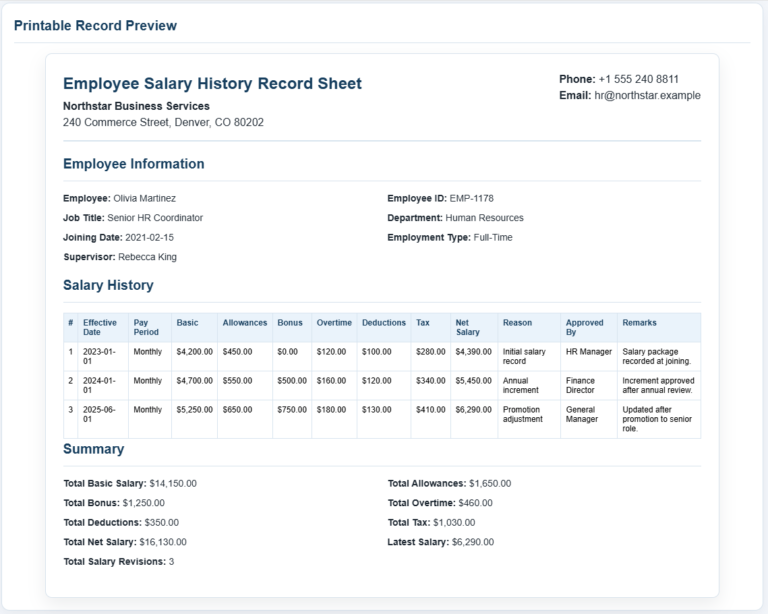
A salary revision record should identify the employee, current compensation, proposed or approved revision, effective date, and reason for the change. Depending on the organization’s compensation structure, the review may include basic salary, allowances, other recurring pay, deductions, and a one-time adjustment or bonus.
The figures entered should match the organization’s approved payroll or HR records. Salary structures, deductions, taxes, benefits, and statutory requirements vary by employer and jurisdiction, so the generated summary should be reviewed before it is used as an official compensation record.
When This Calculator Can Be Used
The calculator can support common HR salary-review situations such as annual increments, performance-based increases, promotions, market adjustments, compensation corrections, and other approved salary revisions. It can also provide a structured summary for internal review or discussion between HR, finance, management, and the employee.