Opinions matter. If you work for an institution or a company, your feedback can help it identify areas for improvement. Organizations that welcome employees’ views can use this input to improve their policies, practices, and presentations. Presentations are an important part of many workplaces and educational settings.
Whether an employee is presenting a proposal, a speaker is explaining a topic at an event, or a teacher is delivering a classroom lecture, the main aim is to communicate relevant information clearly to the audience.
What is a presentation evaluation form?
A presentation evaluation form is given to audience members to gather feedback on a presentation’s content and delivery. It helps assess whether the presentation was relevant to the topic and whether the speaker communicated the intended information effectively.
Create Presentation Audience Feedback Form given below.
Presentation Evaluation Form – Audience Feedback
Gather audience feedback on presentation relevance, clarity, delivery, and effectiveness.
Presentation & Audience Details
Evaluation Criteria
Rate each aspect of the presentation. A score of 0 means not applicable or not observed and is excluded from the average.
Use 0 for Not Applicable. Unrated criteria are excluded from the overall score.
Audience Feedback
Review & Export
Review the audience ratings and comments before downloading an editable Word form or printing.
Create Presentation Performance Evaluation Form given below.
Presentation Evaluation & Feedback Form
Evaluate a presentation using scored criteria and constructive feedback.
Presentation Details
Evaluation Criteria
Score each criterion using the selected scale. Ratings are automatically normalized to a percentage.
Use 0 for not demonstrated. All criteria have equal weight.
Written Feedback
Review & Export
Check the calculated score and feedback before downloading an editable Word form or printing.
Why do we need a presentation evaluation form?
This form helps determine whether a presentation met its objectives and addressed the audience’s needs. It also provides feedback on the speaker’s delivery, including clarity, organization, and engagement.
When information is not communicated effectively, the presentation may fall short of its goals. Feedback can help identify whether improvements are needed in the content, delivery, supporting materials, or event arrangements.
It is impossible to satisfy everyone, so you might receive mixed reviews about the presentation. Look for recurring themes and constructive suggestions, and use them to improve future presentations.
What should you ask in a presentation evaluation form?
- Were the timing and location of the event convenient?
- How would you rate the overall quality of the presentation?
- How clearly did the presenter communicate the information?
- Was the presentation relevant to the topic of discussion?
- Was the presenter able to answer your questions clearly and adequately?
- Were the audiovisual materials and handouts helpful?
- What could be improved in future presentations?
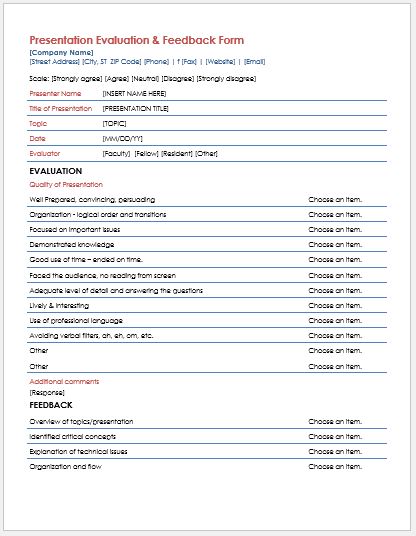
Here is a sample designed by our team that you can customize to suit your presentation and audience.
Preview & Details of Template
File: Word (.doc)
Size 46 KB

File: Word (.doc)
Size 46 KB