Businesses issue invoices regularly to collect payments for products sold or services provided. As the number of invoices increases, it becomes more difficult to monitor payment statuses, due dates, outstanding balances, and overdue accounts. Without a proper tracking system, invoices can be overlooked, payments may be delayed, and cash flow can become difficult to manage.
An Invoice Tracker Template helps businesses maintain an organized record of all invoices in one place. It allows users to monitor invoices from the date they are issued until full payment is received. By keeping invoice information updated, businesses can quickly identify overdue payments, follow up with customers, and maintain accurate financial records.
What is an Invoice Tracker?
An Invoice Tracker is a worksheet used to record and monitor invoice-related information. It provides a centralized location for tracking invoice numbers, customer details, invoice amounts, due dates, payments received, late fees, and outstanding balances.
The tracker helps businesses stay informed about the status of each invoice and ensures that payments are collected on time. It is a valuable tool for improving cash flow management and reducing the risk of unpaid invoices.
Why Use an Invoice Tracker?
An invoice tracker offers several advantages for businesses of all sizes:
- Helps monitor incoming payments.
- Identifies overdue invoices quickly.
- Improves cash flow management.
- Reduces the risk of missed payments.
- Provides an organized record of customer invoices.
- Minimizes manual tracking errors.
- Supports accurate accounting and reporting.
By having all invoice information available in a single worksheet, businesses can make informed financial decisions and improve payment collection processes.
Key Components of an Invoice Tracker
A well-designed invoice tracker generally includes:
- Invoice Number
- Invoice Date
- Payment Due Date
- Customer Name
- Invoice Amount
- Late Fee
- Total Paid
- Date Paid
- Outstanding Balance
These details provide a complete overview of each invoice and its payment status.
How to Use an Invoice Tracker
Using an invoice tracker is simple and effective:
Business Information Section
At the top of the template, users can enter important company details to identify the owner of the invoice records. This section may include:
- Company Name
- Contact Person
- Business Address
- Phone Number
- Email Address
- Website
- Tax Identification Number
Example:
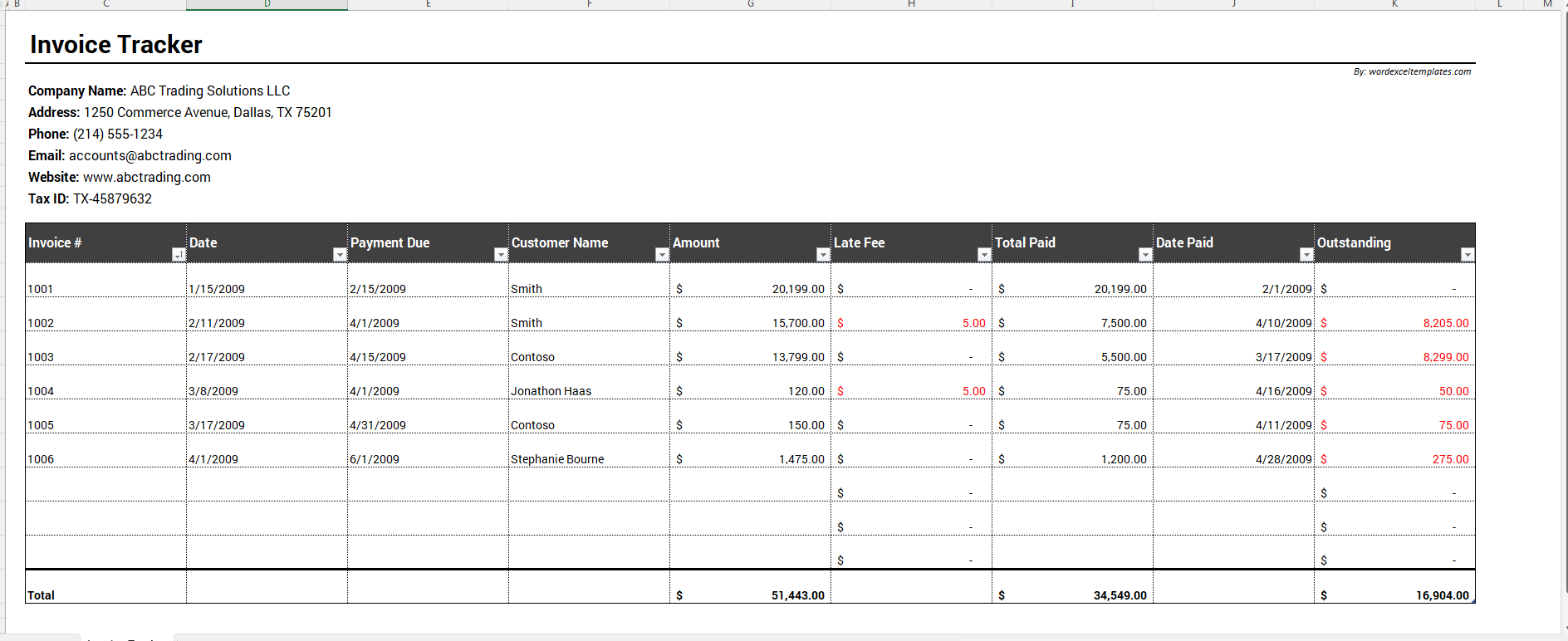
Company Name: ABC Trading Solutions LLC
Address: 1250 Commerce Avenue, Dallas, TX 75201
Phone: (214) 555-1234
Email: accounts@abctrading.com
Website: www.abctrading.com
Invoice Tracking Table
Below the business information area, the main invoice tracking table is used to record invoice activity.
For each invoice, users can enter:
- Invoice Number
- Invoice Date
- Customer Name
- Due Date
- Invoice Amount
As payments are received, the payment amount and payment date can be recorded to keep the invoice status current.
Monitor Payments and Outstanding Balances
The tracker allows users to update payment information whenever money is received from a customer. This makes it easy to determine whether an invoice has been paid in full, partially paid, or remains unpaid.
Outstanding balances can be reviewed regularly to identify customers who require payment reminders or follow-up communication.
Track Late Fees
When invoices remain unpaid beyond their due dates, late fees may apply. The template includes a dedicated Late Fee column that helps users monitor additional charges associated with overdue payments.
This feature helps businesses enforce payment terms while maintaining accurate records of outstanding amounts.
Benefits of Using an Invoice Tracker
Improves Cash Flow Management
Businesses can easily monitor expected payments and identify unpaid invoices before they become major financial issues.
Provides Better Financial Visibility
The tracker gives a clear picture of outstanding balances and payment activity, allowing managers to make informed decisions.
Reduces Administrative Work
Having all invoice records stored in a single worksheet saves time and eliminates the need to search through multiple documents.
Supports Accurate Recordkeeping
Invoice information remains organized and accessible, helping businesses maintain reliable financial records.
Enhances Customer Follow-Up
The tracker quickly identifies overdue accounts, making it easier to contact customers regarding outstanding payments.
Best Practices for Maintaining an Invoice Tracker
To get the most value from an invoice tracker:
- Enter invoices immediately after issuance.
- Record payments as soon as they are received.
- Review overdue invoices regularly.
- Verify invoice information before entering it.
- Monitor outstanding balances weekly.
- Keep customer records updated.
Regular maintenance ensures the tracker remains accurate and useful for financial management.
About This Invoice Tracker Template
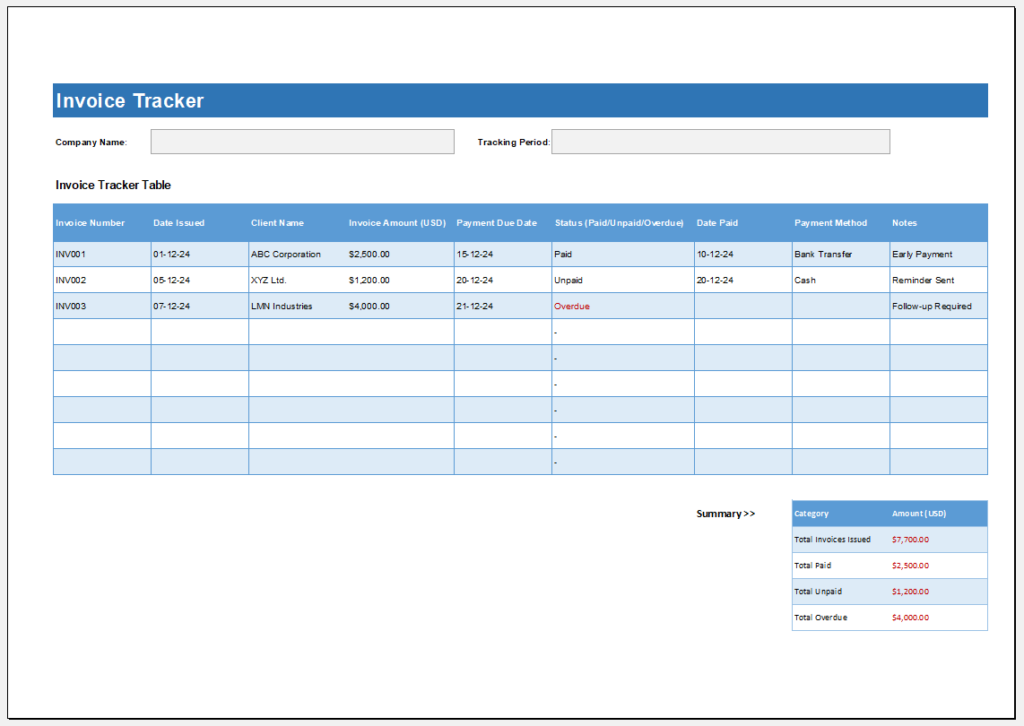
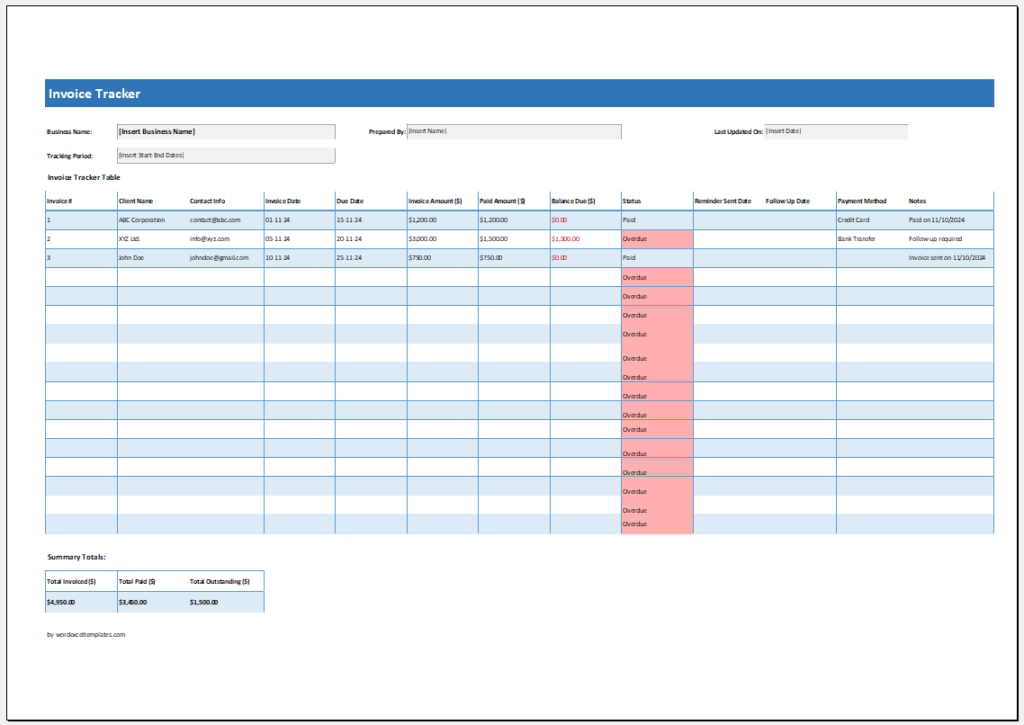
Our team has created a professional Invoice Tracker Template in Microsoft Excel to help businesses efficiently monitor customer invoices and payment activity. The template includes a Business Information section at the top, followed by a comprehensive invoice tracking table for recording invoice numbers, invoice dates, due dates, customer names, invoice amounts, late fees, payments received, payment dates, and outstanding balances.
The template is designed to simplify invoice management by automatically calculating important figures such as late fees and remaining balances. It enables businesses to track paid, partially paid, and overdue invoices from a single worksheet, improving organization, financial visibility, and cash flow management.
How This Template Helps Manage Business Payments
This Invoice Tracker Template provides a practical solution for monitoring invoices throughout their payment lifecycle. By organizing invoice records, tracking payments, calculating outstanding balances, and highlighting overdue accounts, the template helps businesses maintain accurate financial records, improve collection efforts, and manage cash flow more effectively.

File: Excel (.xlsx) and iPad
Size 28 KB
File: Excel (.xlsx) and iPad
Size 28 KB
- Universal Work Order Generator
- Office Asset Transfer Form Generator
- Summer Holiday Assignment Cover Page Generator
- Salary and Overtime Calculator Template
- Summer Vacation Planner Generator
- Outlet Mall Shopping Planner
- Customer Information and Ranking Sheet
- Small Family Kitchen Design Planning Sheet
- Summer Party Budget Sheet Generator
- Payroll Register & Salary Sheet Generator
- Employee Skill Development Tracker
- HR Budget & Expense Tracker
- Leave & Vacation Tracker
- Exit/Off-boarding Checklist
- Performance Evaluation Sheet