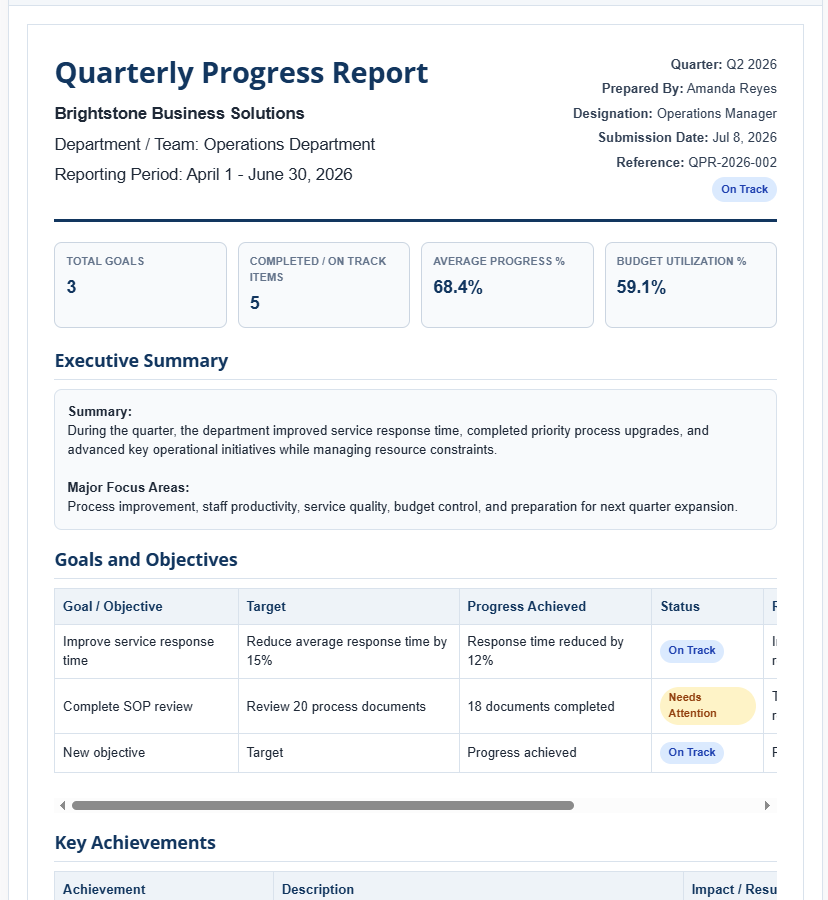
The Quarterly Progress Report Generator is a powerful online tool designed to help businesses, schools, government departments, nonprofit organizations, and project teams create professional quarterly reports quickly and accurately. Instead of building reports from scratch every three months, you can enter your data into easy-to-use fields and instantly generate a well-structured report that is ready to print or share. The live preview updates automatically as you type, allowing you to review the final document before printing.
The generator is ideal for tracking departmental performance, project milestones, employee achievements, financial progress, and organizational goals. Whether you are preparing reports for management meetings, board reviews, client presentations, or internal evaluations, this tool simplifies the entire reporting process while maintaining a professional appearance.
One of its standout features is the ability to manage multiple sections dynamically. You can add or remove goals, achievements, completed tasks, performance metrics, budget items, and challenges without any restrictions. Automatic calculations help determine progress percentages, budget utilization, remaining balances, and overall performance, reducing manual work and minimizing calculation errors.
Quarterly Progress Report Generator
Create a professional quarterly progress report with goals, achievements, metrics, budget progress, challenges, next quarter plans, print, and HTML download.
Report Inputs
Live Preview
Frequently Asked Questions
What is a quarterly progress report?
It is a formal report that summarizes progress, goals, achievements, metrics, budget usage, challenges, and plans for a three-month reporting period.
Can this generator be used for projects, HR, and education?
Yes. The report format is suitable for business teams, departments, HR reviews, school programs, and project reporting.
Does the generator calculate performance percentages?
Yes. It automatically calculates metric differences, progress percentages, budget remaining amounts, and utilization percentages.
Can I print only the report?
Yes. The print button prints only the live preview report area and hides the input panel and webpage controls.
Can I download the report as HTML?
Yes. The download button saves the generated report preview as a standalone HTML file with styling included.
The report includes dedicated sections for executive summaries, objectives, key achievements, financial performance, pending work, next-quarter planning, and approval signatures. Professional summary cards provide a quick overview of important statistics such as total goals, average progress, completed tasks, and budget utilization. Color-coded status indicators make it easy to identify projects that are on track, completed, delayed, or require additional attention.
Key Features
- Professional quarterly report layout with real-time live preview.
- Dynamic tables with unlimited add and remove row functionality.
- Automatic progress percentage and budget utilization calculations.
- Performance tracking with intelligent status indicators.
- Executive summary and detailed reporting sections.
- Goal, achievement, project, and challenge management.
- Financial and budget monitoring with automatic calculations.
- Quarterly planning section for upcoming objectives.
- Approval and signature section for official documentation.
- Responsive design that works smoothly on desktops, tablets, and mobile devices.
- Print-ready A4 formatting with a clean and professional layout.
- Download the completed report as an HTML file for future reference.
- Reset option to quickly start a new report using sample data.
Whether you are monitoring team performance, evaluating project outcomes, or presenting quarterly business results, the Quarterly Progress Report Generator helps you produce organized, accurate, and visually appealing reports in just a few minutes. Its combination of automation, flexibility, and professional formatting makes it a valuable productivity tool for organizations of all sizes.
MS Excel Template
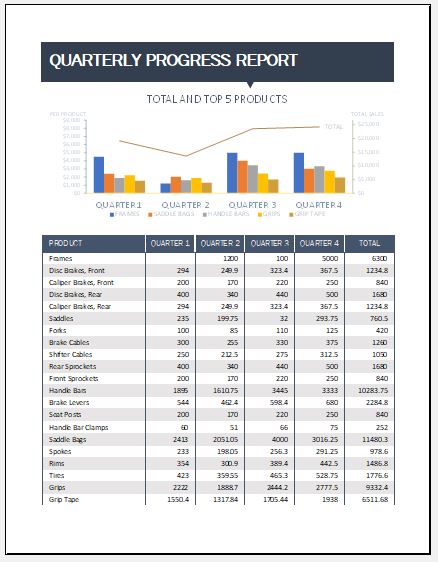
We also offer free MS Excel Quarterly Progress Report Templates for users who prefer working offline. These professionally designed spreadsheets help you track goals, project progress, budgets, KPIs, and quarterly achievements with built-in formulas for quick calculations. Simply enter your data, review the results, and print or share your completed report. They are ideal for businesses, schools, nonprofits, and project teams seeking an efficient reporting solution.
Preview and Details of Template
File: Excel (.xls
Size 40 KB
- Universal Work Order Generator
- Office Asset Transfer Form Generator
- Summer Holiday Assignment Cover Page Generator
- Salary and Overtime Calculator Template
- Summer Vacation Planner Generator
- Outlet Mall Shopping Planner
- Customer Information and Ranking Sheet
- Small Family Kitchen Design Planning Sheet
- Summer Party Budget Sheet Generator
- Payroll Register & Salary Sheet Generator
- Employee Skill Development Tracker
- HR Budget & Expense Tracker
- Leave & Vacation Tracker
- Exit/Off-boarding Checklist
- Performance Evaluation Sheet