A Car Deposit Receipt Generator is an online tool designed to help users prepare a receipt confirming that a deposit has been paid toward the purchase of a vehicle. Instead of drafting the receipt manually, users can simply enter the required information into the generator, and a professionally formatted receipt is created automatically.
The generated receipt serves as evidence that the seller has received a specified amount from the buyer and has agreed to reserve the vehicle according to the terms stated in the document.
Car Deposit Receipt Generator
Receipt Details
Vehicle & Transaction
Deposit & Terms
Review & Print
How Does the Generator Work?
The online generator guides users through a series of simple fields to collect all the necessary details. After entering the information, the receipt is generated instantly and can be printed or downloaded for recordkeeping purposes.
Typical information requested by the generator includes:
- Date of the transaction
- Buyer’s name and contact details
- Seller’s name and contact details
- Deposit amount paid
- Payment method used
- Remaining balance due
- Reservation period or payment deadline
- Terms related to deposit refunds or forfeiture
- Vehicle information
- Signatures of both parties
By automating the process, the generator helps users avoid formatting issues and ensures that no important information is overlooked.
How to Use the Generator
The generator helps you create a clear record of a deposit paid toward the purchase of a vehicle. Start with the Receipt Details section and enter the receipt number, date, seller or dealer information, and buyer details. Next, add the vehicle information, including its make, model, year, registration number, and VIN or chassis number, along with the agreed selling price.
In the Deposit & Terms section, enter the deposit amount and select the payment method. The generator automatically calculates the remaining balance from the agreed vehicle price and deposit paid. You can also specify the expected balance payment date, deposit or refund terms, purpose of the payment, and any additional conditions agreed between the buyer and seller.
Review the completed receipt in the live preview, then use Print / Save PDF to create a printable copy or Download Excel to save the transaction details for your records. Both the buyer and seller can sign the printed receipt as confirmation of the payment.
Online Generator and MS Word Template Available
To accommodate different user preferences, we offer both an online Car Deposit Receipt Generator and a downloadable MS Word template.
The online generator is ideal for users who want to create, edit, print, and download receipts instantly without requiring any additional software. It provides a convenient browser-based solution that works on desktops, tablets, and mobile devices.
For users who prefer offline editing or need a reusable document for future transactions, our fully editable MS Word Car Deposit Receipt Template is also available for free download. The template can be customized according to individual requirements and stored for repeated use.
Whether you choose the convenience of the online generator or the flexibility of the Word template, both options provide an efficient way to document vehicle deposit transactions accurately and professionally.
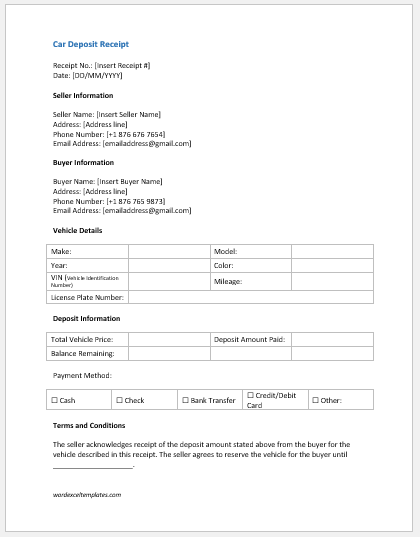
Receipt Template File for Word
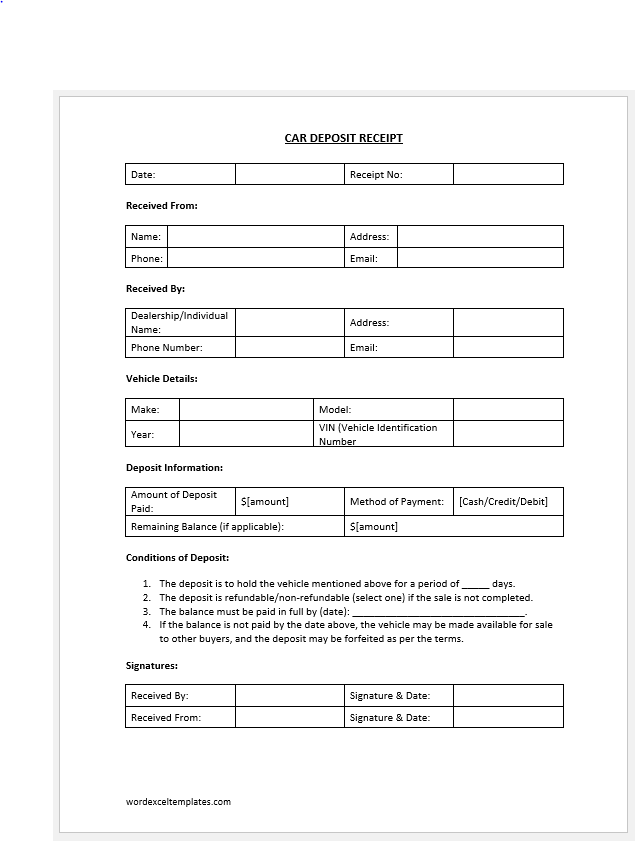
Receipt Template File for Word