Handyman Receipt Generator
Create a professional receipt for handyman services, labor, materials, tax, payments, and balance due.
Business Details
Customer & Receipt Details
Service Items
| Service Description | Labor Charges | Material Charges | Quantity | Rate | Line Total | Action |
|---|
Tax, Discount, Payment & Notes
Receipt Preview
Handyman Business Name
Business address
Phone | Email
Bill To
Customer name
Customer phone
Customer address
Payment Method
Cash
| Description | Labor | Materials | Qty | Rate | Total |
|---|
Notes
Thank you for your business.
A handyman provides a wide range of repair, maintenance, installation, and improvement services for homes, offices, and commercial properties. Whether the job involves repairing fixtures, installing equipment, painting walls, assembling furniture, or performing general maintenance tasks, it is important to maintain a clear record of the services provided and the payments received. A Handyman Receipt Template helps service providers create professional receipts quickly while ensuring that every transaction is properly documented.
A handyman receipt serves as proof that repair or maintenance work has been completed and payment has been requested or received. It provides a detailed breakdown of labor charges, materials used, taxes, discounts, and payment information. Both the handyman and the customer benefit from having an accurate receipt because it creates transparency and reduces the possibility of billing disputes.
What is a Handyman Receipt?
A handyman receipt is a professional document issued after repair or maintenance services have been completed. It records the details of the work performed, the labor hours involved, the materials used, and the total amount payable by the customer.
The receipt acts as an official financial record for both parties. Customers can use it for budgeting, reimbursement requests, warranty claims, or personal records, while service providers can use it for accounting, tax reporting, and customer management purposes.
Why Use a Handyman Receipt Template?
A professionally designed receipt helps present a trustworthy image to customers. Instead of creating receipts manually, a handyman can simply enter job information and allow the template to calculate totals automatically.
Benefits of using a handyman receipt include:
- Creates a professional record of completed work.
- Provides clear labor and material cost breakdowns.
- Helps track customer payments.
- Reduces billing errors through automatic calculations.
- Simplifies bookkeeping and tax preparation.
- Serves as proof of service for both parties.
- Improves customer confidence and transparency.
Information Included in a Handyman Receipt
A complete handyman receipt should contain all important transaction details. Typical information includes:
Business Information
- Business name
- Business address
- Phone number
- Email address
Customer Information
- Customer name
- Customer address
- Contact details
Receipt Details
- Receipt number
- Receipt date
- Unique transaction reference
Work Details
The receipt should include a detailed description of every service provided. Examples include:
- Plumbing repairs
- Electrical maintenance
- Furniture assembly
- Painting work
- Installation services
- Home maintenance tasks
Labor Charges
Each service entry can include:
- Description of work
- Hours worked or quantity
- Hourly rate
- Calculated subtotal
Material Costs
Materials used during the job can also be listed separately, allowing customers to see exactly what products were purchased and how much they cost.
Payment Information
The receipt should record:
- Payment method
- Amount paid
- Remaining balance due
- Transaction or reference number
Worker Information
Including the worker’s name and signature helps verify that the work was completed and approved.
Automatic Calculations
One of the most useful features of an Excel handyman receipt is its ability to perform calculations automatically. Instead of calculating totals manually, formulas generate accurate results instantly.
The template can automatically calculate:
- Service subtotals
- Total labor and material costs
- Tax amount
- Discount amount
- Direct discounts
- Grand total
- Amount paid
- Remaining balance due
These automated calculations save time and improve accuracy.
Online Editable Handyman Receipt
In addition to the downloadable Excel version, we also offer an Online Editable Handyman Receipt. This convenient tool allows users to create professional receipts directly from their web browser.
Simply enter the required information, including customer details, work descriptions, rates, and payment information. The receipt is generated automatically and can then be printed or downloaded for immediate use.
The online version eliminates the need for spreadsheet software and provides a fast solution for contractors, freelancers, and handyman businesses that need receipts on demand.
About This Handyman Receipt Template
This Handyman Receipt Template is designed for simplicity, professionalism, and accuracy. The template includes sections for business information, customer details, work descriptions, labor hours, hourly rates, material costs, taxes, discounts, payment tracking, worker details, and receipt notes.
A structured service table allows multiple work items to be entered, while built-in formulas automatically calculate subtotals, tax amounts, discounts, grand totals, and outstanding balances. The result is a professional receipt that can be customized, printed, and stored for future reference.
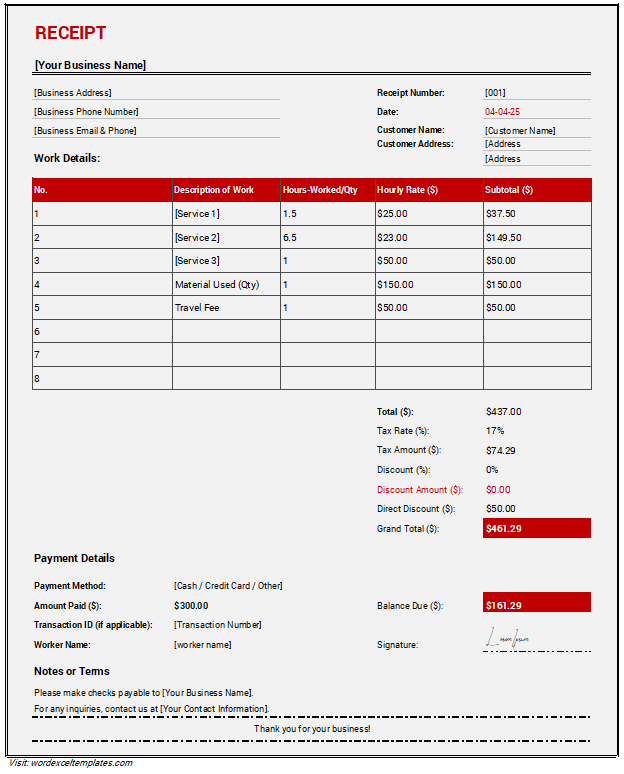
This Handyman Receipt serves as proof of payment for services rendered, detailing labor costs, materials used, and any additional charges for a transparent transaction.
MS Word File: 49 KB
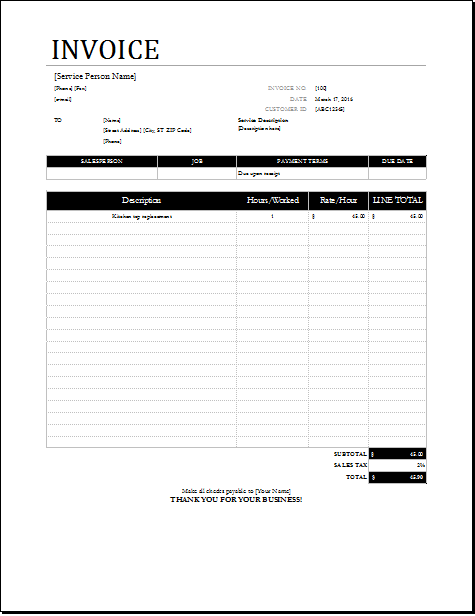
MS Word File: 49 KB
- Summer Holiday Assignment Cover Page Generator
- Salary and Overtime Calculator Template
- Summer Vacation Planner Generator
- Outlet Mall Shopping Planner
- Customer Information and Ranking Sheet
- Small Family Kitchen Design Planning Sheet
- Summer Party Budget Sheet Generator
- Payroll Register & Salary Sheet
- Employee Skill Development Tracker
- HR Budget & Expense Tracker
- Leave & Vacation Tracker Template
- Exit/Off-boarding Checklist
- Performance Evaluation Sheet
- New Year Goal Setting Worksheet
- Workforce Planning & Headcount Forecast Sheet