Managing employee reimbursements doesn’t have to be complicated. Our Employee Expense Report Generator allows employees, managers, freelancers, and business owners to create detailed and professional expense reports online within minutes. Whether you need to record travel expenses, office purchases, meals, accommodation, fuel costs, or miscellaneous business expenses, this free online tool simplifies the entire reporting process.
Unlike traditional spreadsheets, this generator automatically performs calculations while producing a neatly formatted report that is ready to print or download. It helps organizations maintain accurate financial records while making reimbursement requests faster and more transparent.
Employee Expense Report Generator
Fill in employee details, add expense items, calculate totals automatically, and print or download a professional expense report.
Company Information
Employee Information
Expense Period
Expense Items Table
| Date | Category | Description | Payment Method | Receipt | Non-Reimb. | Amount | Action |
|---|
Adjustments & Approval
FAQs
Can this employee expense report generator be used in WordPress?
Yes. Paste this complete HTML into a WordPress Custom HTML block. It is self-contained and uses scoped CSS and JavaScript.
Does the print button print only the report?
Yes. The print button prints only the live expense report preview, not the input form or webpage content.
Can I mark expenses as non-reimbursable?
Yes. Each expense row includes a non-reimbursable checkbox, and the final reimbursable amount updates automatically.
Does this tool work offline?
Yes. After the page loads, all calculations, preview updates, printing, and HTML download features work in the browser without internet access.
What Can This Generator Do?
The Employee Expense Report Generator is designed to collect all the information required for a complete expense reimbursement report.
It allows you to enter:
- Company information
- Employee details
- Expense report number
- Expense reporting period
- Business purpose
- Manager or supervisor information
- Reimbursement method
- Approval details
Everything is organized into easy-to-complete sections, making the report suitable for businesses of all sizes.
Record Unlimited Expense Items
The generator includes a dynamic expense table where you can add as many expense entries as needed.
Each expense entry can include:
- Expense date
- Expense category
- Description
- Payment method
- Receipt availability
- Expense amount
You can easily add new rows, edit existing entries, or remove unnecessary items without affecting the rest of the report.
Multiple Expense Categories
To keep expenses organized, the generator supports common business expense categories, including:
- Travel
- Fuel
- Meals
- Hotel & Accommodation
- Office Supplies
- Internet & Phone
- Client Meetings
- Training & Education
- Parking & Toll Fees
- Miscellaneous Expenses
This makes reporting easier while helping employers analyze spending patterns.
Automatic Expense Calculations
One of the biggest advantages of this generator is its built-in automatic calculations.
As you enter expense amounts, the system instantly calculates:
- Total expenses
- Category-wise totals
- Non-reimbursable expenses
- Advance received
- Tax or VAT amount
- Final reimbursable amount
- Remaining balance payable or refundable
These calculations eliminate manual errors and save valuable time.
Live Report Preview
The generator includes a live preview panel that updates instantly while you enter information. This allows you to review the finished report before printing or downloading it.
The preview is professionally formatted and designed to resemble a business expense report suitable for submission to finance or HR departments.
Print Only the Expense Report
Unlike many online tools that print the entire webpage, this generator prints only the completed expense report. Navigation menus, buttons, advertisements, and other webpage elements are automatically excluded from printing, resulting in a clean and professional document.
Download Your Report
After completing the report, you can download it for future reference or share it with your employer or accounting department. The generated report maintains a professional layout that is suitable for official business records.
Built-In Validation
The generator performs automatic validation to improve accuracy.
It can notify users if:
- Required information is missing.
- Expense amounts are invalid.
- Negative values are entered.
- The reporting end date occurs before the start date.
- Important fields have been left blank.
These checks help reduce mistakes before the report is submitted.
Professional Approval Section
Every report includes a dedicated approval section containing:
- Prepared by
- Employee signature
- Manager or supervisor name
- Approval status
- Approval date
- Additional remarks
This makes the generated report suitable for internal company approval processes.
Responsive Design
The Employee Expense Report Generator works seamlessly across desktops, laptops, tablets, and smartphones. The responsive layout automatically adjusts to different screen sizes, allowing users to prepare expense reports from virtually any device.
Ideal For
This generator is suitable for:
- Businesses
- Corporate offices
- HR departments
- Finance departments
- Small businesses
- Freelancers
- Consultants
- Contractors
- Sales teams
- Field employees
- Government organizations
- Educational institutions
- Non-profit organizations
Why Use Our Employee Expense Report Generator?
Our online generator provides a faster, smarter, and more professional way to prepare employee expense reports. With automatic calculations, live report preview, unlimited expense entries, approval tracking, printable formatting, and downloadable output, it eliminates the need for manual spreadsheets and significantly reduces reporting errors.
Simply fill in the required information, review the automatically generated report, and print or download it in just a few clicks.
Frequently Asked Questions
Is this Employee Expense Report Generator free to use?
Yes. You can create, edit, print, and download professional employee expense reports online without any cost.
Can I add multiple expense items?
Yes. You can add as many expense entries as required, and the totals will update automatically.
Does the generator calculate totals automatically?
Yes. It automatically calculates subtotals, category totals, taxes, advances, reimbursements, and the final balance.
Can I print only the report?
Yes. The Print feature is designed to print only the completed expense report, excluding the rest of the webpage.
Can I use this tool on my mobile phone?
Absolutely. The generator is fully responsive and works on desktops, tablets, and smartphones.
Is my information stored online?
No. The generator works within your browser and is intended to process your data locally during use. If you download or print the report, you control where it is saved.
Who can use this generator?
Anyone who needs to prepare employee reimbursement reports, including employees, managers, HR staff, accountants, freelancers, consultants, and business owners.
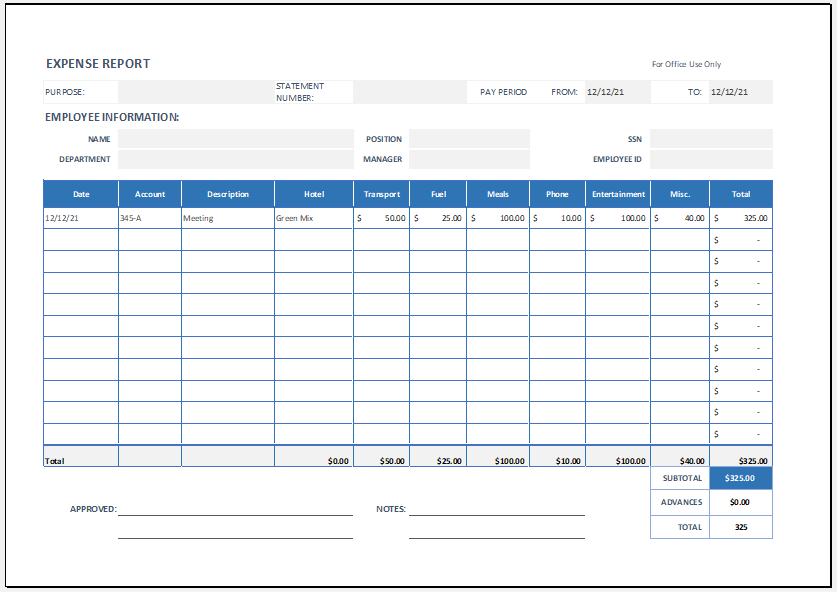
File: Excel (.xlsx)
Size 18 Kb
- Solar Panel Savings Calculator
- Air Conditioner Electricity Cost Calculator
- Recommendation Letter Generator
- Universal Work Order Generator
- Electricity Consumption Calculator
- Playland & Amusement Park Ticket Generator
- Independence Day Greeting Generator
- Independence Day Speech Generator
- Job Application Cover Letter
- All-in-One Medical Invoice Generator
- Office Asset Transfer Form Generator
- All-in-One Debit Note Generator
- Utility Cost Analysis Worksheet
- School Summer Camp Announcement Cards
- Summer Holiday Assignment Cover Page Generator