Understanding trends and patterns in data is essential for making informed business decisions. Whether you are monitoring product quality, tracking customer satisfaction, measuring operational performance, or evaluating process improvements, visualizing data over time can reveal valuable insights. A Run Chart is one of the simplest and most effective tools used for this purpose.
What is a Run Chart?
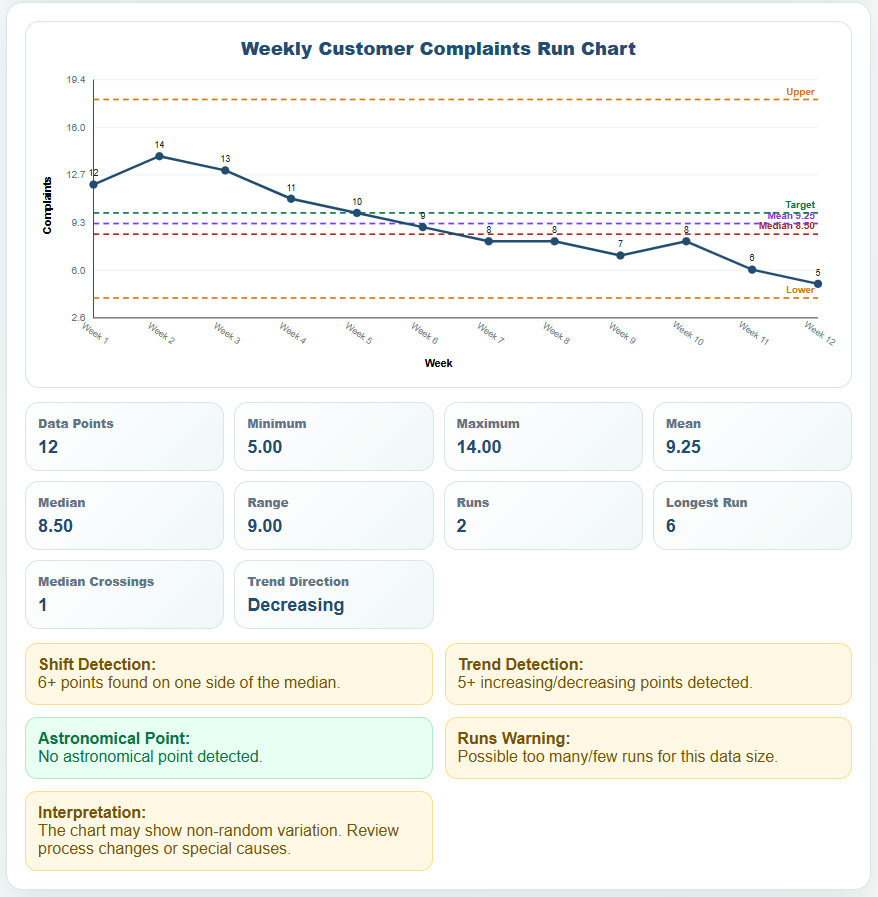
A Run Chart is a graphical representation of data points plotted over time. It helps users observe trends, shifts, cycles, and variations in a process by displaying measurements in chronological order. Businesses, healthcare organizations, manufacturers, educators, and service providers frequently use run charts to monitor performance and identify changes in processes.
By viewing data on a timeline, users can quickly determine whether a process is improving, declining, or remaining stable. This makes run charts an important tool for continuous improvement and quality management initiatives.
Introducing Our Run Chart Generator
Creating a run chart manually can be time-consuming, especially when working with large datasets. Our online Run Chart Generator simplifies the process by automatically converting your data into a professional run chart within seconds.
Simply enter your measurements, dates, or time-based observations into the generator, and it will instantly create a visual chart showing the progression of your data over time. The tool eliminates the need for complex spreadsheet formulas or manual chart creation, making data analysis faster and more accessible for everyone.
Whether you are tracking sales figures, production output, response times, defect rates, attendance records, or project performance, this generator provides a quick and efficient way to visualize your results.
Run Chart Generator
Create an SVG run chart with median, mean, target/reference lines, data labels, and basic run chart analysis.
Chart Settings
Paste CSV or Excel Data
Editable Data Table
| # | Label/Date | Value | Note | Action |
|---|
Actions
How the Run Chart Generator Works
The generator is designed to be simple and user-friendly. Users only need to enter their time-based data points into the provided fields. Once the data is entered, the system automatically plots the values on a chart and displays the trend over the selected period.
The chart updates instantly whenever values are modified, allowing users to experiment with different datasets and compare results. This makes the tool suitable for both routine reporting and detailed process analysis.
Benefits of Using a Run Chart
A run chart provides several advantages when analyzing performance data:
Identify Trends
The chart makes it easy to see whether performance is improving, declining, or remaining consistent over time.
Monitor Process Stability
By reviewing data patterns, users can determine whether a process is operating normally or experiencing unusual variation.
Support Better Decision-Making
Visual data is easier to interpret than raw numbers, helping managers and stakeholders make informed decisions more quickly.
Detect Process Changes
Run charts can highlight shifts, sudden increases, decreases, or recurring patterns that may require investigation.
Improve Reporting
Professional charts enhance presentations, reports, and performance reviews by presenting information in a clear and understandable format.
Best Practices for Accurate Results
To obtain meaningful insights from a run chart, it is recommended to:
- Collect data consistently over a reasonable period.
- Record measurements in chronological order.
- Use accurate and reliable data sources.
- Include sufficient data points to reveal meaningful patterns.
- Review trends regularly to identify changes early.
Many analysts recommend using at least 20 to 25 data points whenever possible to improve the reliability of trend analysis.
Why Use an Online Run Chart Generator?
Unlike traditional chart creation methods, an online generator automates the entire process. There is no need to build formulas, configure chart settings, or manually adjust graph elements. Users can focus on interpreting results rather than spending time creating charts.
The generator is particularly useful for business owners, managers, quality control teams, project coordinators, researchers, and students who need a quick and reliable way to visualize data.
Traditional Excel Worksheet Also Available
While our online Run Chart Generator provides the fastest and most convenient way to create run charts, we understand that many users still prefer working with spreadsheets. For that reason, we also provide the original Run Chart Worksheet Template for Microsoft Excel.
The Excel version allows users to maintain offline records, customize calculations, store historical datasets, and create charts directly within Excel. Users can choose whichever format best fits their workflow—either the automated online generator or the downloadable Excel worksheet.
Our goal is to provide flexible solutions that make data analysis easier, whether you prefer modern web-based tools or traditional spreadsheet templates.
File: Excel (.xlsx) and iPad
Size 26 KB
- Universal Work Order Generator
- Office Asset Transfer Form Generator
- Summer Holiday Assignment Cover Page Generator
- Salary and Overtime Calculator Template
- Summer Vacation Planner Generator
- Outlet Mall Shopping Planner
- Customer Information and Ranking Sheet
- Small Family Kitchen Design Planning Sheet
- Summer Party Budget Sheet Generator
- Payroll Register & Salary Sheet Generator
- Employee Skill Development Tracker
- HR Budget & Expense Tracker
- Leave & Vacation Tracker
- Exit/Off-boarding Checklist
- Performance Evaluation Sheet