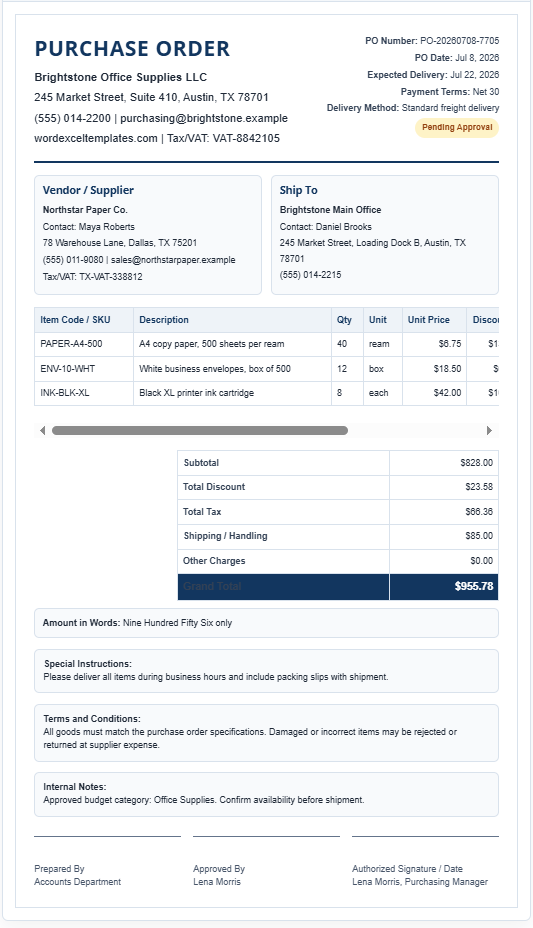
The Purchase Order Generator is a professional online tool designed to help businesses create accurate, organized, and print-ready purchase orders within minutes. Whether you are ordering office supplies, raw materials, equipment, or inventory, this generator simplifies the purchasing process by providing a structured document that can be customized to suit different business requirements. With its live preview functionality, every change you make is reflected instantly, allowing you to review the purchase order before printing or sharing it.
One of the most useful features of this generator is its dynamic item management system. Users can add or remove an unlimited number of products or services while automatically calculating quantities, unit prices, discounts, taxes, shipping charges, and the final payable amount. The tool also converts the grand total into words, reducing the possibility of manual errors.
The generator includes dedicated sections for company information, supplier details, shipping address, purchase order information, and payment terms, ensuring every essential detail is included in a professional format. An automatic Purchase Order Number Generator creates unique PO numbers, while the status selector allows users to mark orders as Draft, Pending Approval, Approved, Sent, Completed, or Cancelled.
Purchase Order Generator
Create a professional purchase order with supplier details, shipping details, itemized totals, status, signature area, and A4 print support.
Purchase Order Details
Live Preview
Frequently Asked Questions
What is a purchase order?
A purchase order is a formal business document sent by a buyer to a supplier to request goods or services at agreed prices and terms.
Can I edit the purchase order before printing?
Yes. Every field and item row is editable, and the preview updates instantly as you type.
Can I add multiple items?
Yes. Use the Add Item button to add unlimited products or services.
Does the generator calculate tax and totals automatically?
Yes. It calculates line totals, subtotal, discounts, tax, shipping, other charges, grand total, and amount in words.
Can I print the purchase order on A4 paper?
Yes. The print style is optimized for A4 paper and prints only the purchase order preview.
Can I upload a company logo?
Yes. You can upload a logo, and it will appear in the live preview for the current browser session.
Can I save a draft?
Yes. The Save Draft Locally button stores the current purchase order in your browser using localStorage.
Can I load a saved draft later?
Yes. Use the Load Saved Draft button in the same browser to restore your saved purchase order.
What does Copy PO Summary do?
It copies a short summary containing the PO number, supplier, status, item count, and grand total.
Can I use this in a WordPress Custom HTML block?
Yes. This is a self-contained HTML, CSS, and JavaScript tool designed for WordPress pages.
Key Features
- Professional A4 purchase order layout with live preview.
- Automatic Purchase Order number generation.
- Dynamic item table with unlimited product entries.
- Automatic calculations for subtotal, discounts, taxes, shipping, additional charges, and grand total.
- Amount in words generated automatically.
- Multiple international currency options.
- Company logo upload for branded purchase orders.
- Supplier and shipping information sections.
- Payment terms, delivery method, and expected delivery date fields.
- Special instructions, internal notes, and terms & conditions sections.
- Prepared By, Approved By, and Authorized Signature areas.
- Save Draft and Load Draft functionality using browser storage.
- Built-in validation for required fields.
- One-click Print button that produces a professional A4 purchase order.
- Responsive layout optimized for desktop, tablet, and mobile devices.
Whether you are a small business owner, purchasing officer, retailer, wholesaler, contractor, or procurement manager, this Purchase Order Generator helps standardize your purchasing process while reducing paperwork and manual calculations. Its clean interface, automatic calculations, and professionally formatted output make it an efficient solution for creating purchase orders quickly and accurately.
MS Excel Template
For users who prefer desktop-based document management, we also provide a Microsoft Excel Purchase Order Template. It offers a structured format with pre-built calculations, customizable fields, and a professional layout for creating purchase orders efficiently. Simply update the required information, review the totals, and print or save the completed document. It’s an excellent choice for businesses that want a reliable offline solution while maintaining accurate and organized purchasing records.
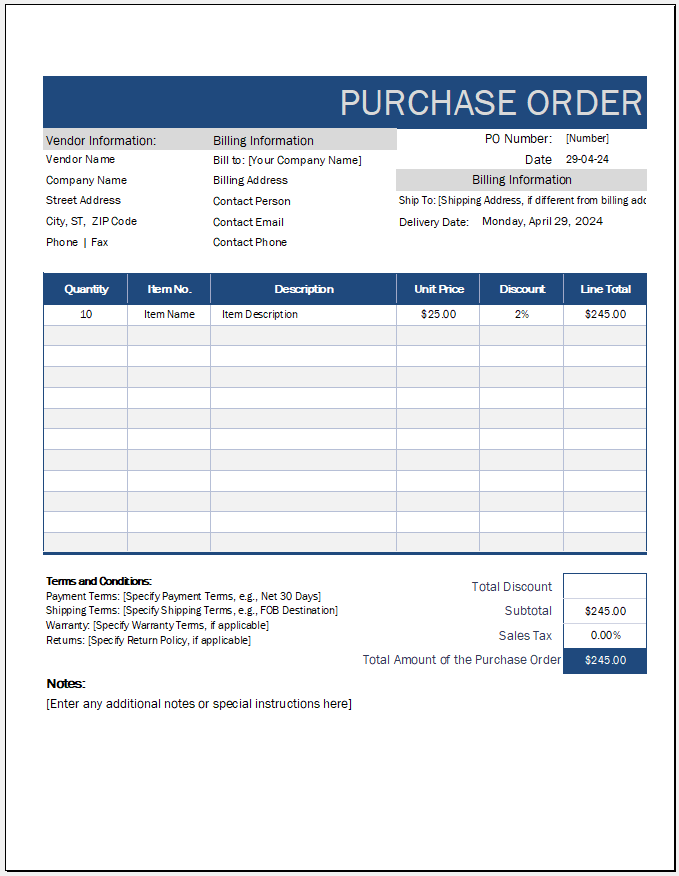
Purchase Order File
- Solar Panel Installation Cost Calculator
- Solar Panel Savings Calculator
- Air Conditioner Electricity Cost Calculator
- Recommendation Letter Generator
- Universal Work Order Generator
- Electricity Consumption Calculator
- Playland & Amusement Park Ticket Generator
- Independence Day Greeting Generator
- Independence Day Speech Generator
- Job Application Cover Letter
- All-in-One Medical Invoice Generator
- Office Asset Transfer Form Generator
- All-in-One Debit Note Generator
- Utility Cost Analysis Worksheet
- School Summer Camp Announcement Cards