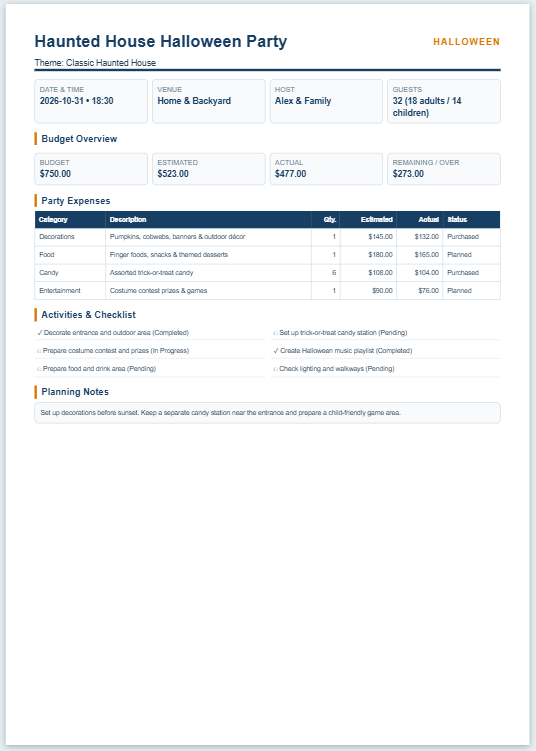
Halloween decorations can involve many separate expenses, from pumpkins and lighting to outdoor props, indoor décor, DIY supplies, table decorations, and special effects. Keeping quantities, estimated prices, actual costs, and setup tasks in one place makes it easier to control spending while preparing the final decoration plan.
Use the Halloween Decoration Budget Planner below to enter your total decoration budget and add individual items by area. For each decoration, record the quantity, estimated unit cost, and actual unit cost. The planner automatically calculates estimated and actual totals, remaining or over-budget amounts, average cost per unit, spending by decoration area, total planned units, and setup progress. You can also manage a decoration setup checklist and print or save the completed plan as a PDF.
Frequently Asked Questions
What does the Halloween Decoration Budget Planner do?
It helps plan Halloween decoration purchases, calculate estimated and actual costs, compare spending with a total decoration budget, group expenses by decoration area, and track setup tasks.
How is the estimated total for each decoration calculated?
Estimated Total equals Quantity multiplied by Estimated Unit Cost for that decoration row.
How is the actual total for each decoration calculated?
Actual Total equals Quantity multiplied by Actual Unit Cost for that decoration row.
What happens if I have not entered a total budget yet?
The planner shows Budget Not Set rather than incorrectly reporting that the decoration plan is over budget.
How does the planner show whether I am over budget?
Estimated Budget Status compares estimated spending with the entered budget, while Actual Budget Status compares actual spending with the budget. When spending exceeds the budget, the amount over budget is shown.
What is Avg. Estimated Cost per Unit?
It is the estimated cost divided by the number of units for decoration rows where an estimated unit cost has actually been entered.
What is Avg. Actual Cost per Unit?
It is the actual cost divided only by the units for decoration rows where an actual unit cost has been entered. This avoids understating the average when some actual prices are still blank.
Do blank decoration rows count as decoration items?
No. A blank row is not counted as a decoration item or planned unit unless an item name, estimated cost, or actual cost has been entered.
How does the spending breakdown by area work?
The planner groups entered decoration rows by areas such as Entrance & Porch, Pumpkins, Lighting, Indoor Decorations, Outdoor / Yard, Props, DIY Supplies, and other available categories, then totals estimated and actual spending for each area.
Can I add and remove decoration items?
Yes. Add Decoration creates another cost row, and the × control removes a row that is no longer needed.
How does the setup checklist work?
The default Halloween setup tasks begin unchecked. You can mark tasks complete, add custom tasks, or remove tasks. Progress is displayed as both the number completed and a percentage.
Can I use different currencies?
Yes. The planner supports USD, GBP, EUR, PKR, AED, SAR, and INR, and uses the selected currency throughout the cost calculations and Live Preview.
Can I load an example decoration plan?
Yes. Load Sample fills the planner with example decoration items, prices, and setup progress. Reset returns to a blank plan with one empty decoration row and the default checklist unchecked.
Can I print or save the Halloween decoration plan as a PDF?
Yes. Use Print / Save PDF in the Live Preview. The planner prepares an A4 portrait report that can be printed or saved as a PDF through the browser print interface.
Are the decoration costs guaranteed to match final prices?
No. The planner uses the quantities and prices entered by the user. Actual prices, availability, quantities, final decoration choices, and setup conditions may change.