Our Online Beneficiary Designation Form Generator makes it easy to create professional beneficiary designation forms directly from your browser without installing any software. Whether you need to designate beneficiaries for a life insurance policy, retirement account, pension plan, employee benefits program, investment account, or estate planning document, this tool provides a fast and convenient solution.
The generator allows you to enter all required information through a simple online form while simultaneously displaying a live preview of the completed document. As you type, the form updates automatically, allowing you to review the final layout before printing or downloading.
What Information Can Be Included?
The generator provides dedicated sections for recording:
- Organization or company information
- Account, policy, or plan details
- Participant or account owner information
- Contact details and mailing address
- Identification information
- Effective date of designation
In addition, the form allows you to designate both Primary Beneficiaries and Contingent Beneficiaries.
Here is the complete `.html` file content: ```htmlOnline Beneficiary Designation Form Generator
Create a printable beneficiary designation form for insurance, retirement accounts, employee benefits, bank accounts, and estate planning records.
Form and Participant Information
Primary Beneficiaries
| Name | Relationship | DOB | Phone / Email | Address | % Share | Notes | Action |
|---|
Contingent Beneficiaries
| Name | Relationship | DOB | Phone / Email | Address | % Share | Notes | Action |
|---|
Statements, Signatures and Notary
Primary Beneficiaries
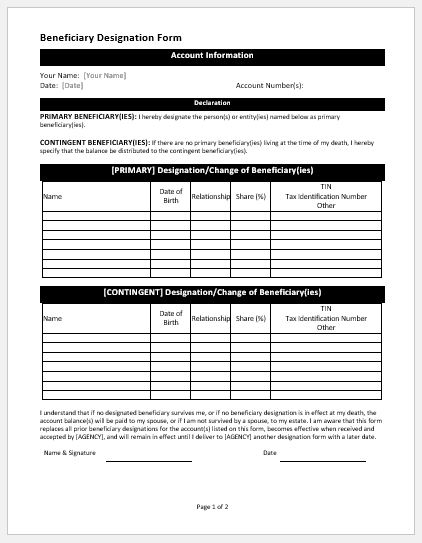
Primary beneficiaries are the individuals who will receive the benefits first. The generator allows you to add multiple beneficiaries and specify:
- Full name
- Relationship to the participant
- Date of birth
- Contact information
- Address
- Percentage allocation
- Additional notes
Contingent Beneficiaries
Contingent beneficiaries receive benefits if the primary beneficiaries are unable to receive them. The same detailed information can be entered for each contingent beneficiary.
Automatic Percentage Validation
One of the most useful features of this generator is its automatic percentage calculation system. As beneficiary percentages are entered, the tool instantly calculates the total allocation.
If the combined percentage does not equal 100%, the system displays a warning so corrections can be made before the form is finalized. This helps reduce errors and ensures accurate beneficiary distribution.
Live Form Preview
The generator includes a real-time document preview that updates automatically as information is entered. Users can immediately see how the final Beneficiary Designation Form will appear when printed or downloaded.
This feature helps eliminate formatting mistakes and saves time by removing the need to repeatedly generate new versions.
Professional Printable Layout
The completed form is formatted as a professional document suitable for personal, business, insurance, financial, retirement, and estate planning purposes.
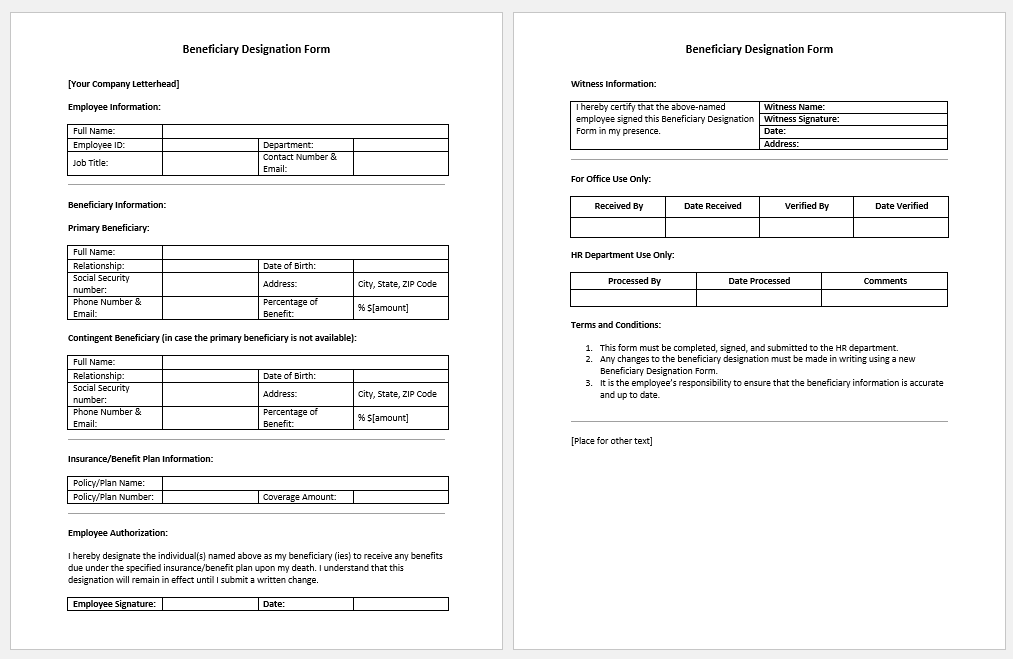
The form includes areas for:
- Participant signature
- Witness information
- Signature lines
- Date fields
- Special instructions
- Revocation statements
- Optional notary acknowledgment section
Save Time with Automatic Data Handling
To prevent accidental data loss, the generator can temporarily save information within your browser while you are working. This allows you to continue editing your form without re-entering information if the page is refreshed.
Print or Download Instantly
Once the form is complete, users can:
- Print the document directly
- Download a copy for their records
- Create a clean professional form ready for submission
- Copy the form text for use in other applications
Mobile-Friendly and Easy to Use
The Beneficiary Designation Form Generator is fully responsive and works smoothly on:
- Desktop computers
- Laptops
- Tablets
- Mobile phones
The interface is designed to be simple enough for first-time users while providing advanced functionality for professional use.
Important Notice
This tool is intended to assist in preparing beneficiary designation documents. Requirements may vary depending on insurance providers, financial institutions, retirement plans, employers, or local regulations. Users should review all information carefully and consult a qualified legal, financial, tax, or estate planning professional when necessary before submitting an official beneficiary designation form.
For MS Word Template
In addition to the online generator, we also provide a downloadable and fully editable MS Word Beneficiary Designation Form Template. This professionally designed template can be opened and customized in Microsoft Word, allowing users to enter beneficiary details, account information, percentage allocations, signatures, and other required information with ease.
The template is ideal for individuals, employers, financial planners, insurance agents, and organizations that prefer working with offline documents. Users can modify the layout, add company branding, save completed forms electronically, or print them for manual completion.
The editable Word format offers flexibility while maintaining a clean and professional appearance suitable for personal and business use.
Preview and Detail of MS Word Templates
File: Word (.docx)
Size 44.6 Kb
- Reimbursement Management Forms
- Forms Used for Workplace Ethics and Policies
- Forms used for Operations in an Organization
- Procurement/Supply Chain Forms
- Downloadable Forms for Unprofessional Behavior
- Commonly Downloaded Office Forms
- Employee Dispute & Grievance Forms
- Insurance & Protection Benefit Forms
- Employee Retirement & Pension Forms
- Employee Service & Tenure Forms
- Employee Health & Well-being Forms
- Employee Scrutiny & Evaluation Forms
- Employee Training and Development Forms
- Customer Service and Support Form Generator
- Commonly Used Forms for Payroll Correction