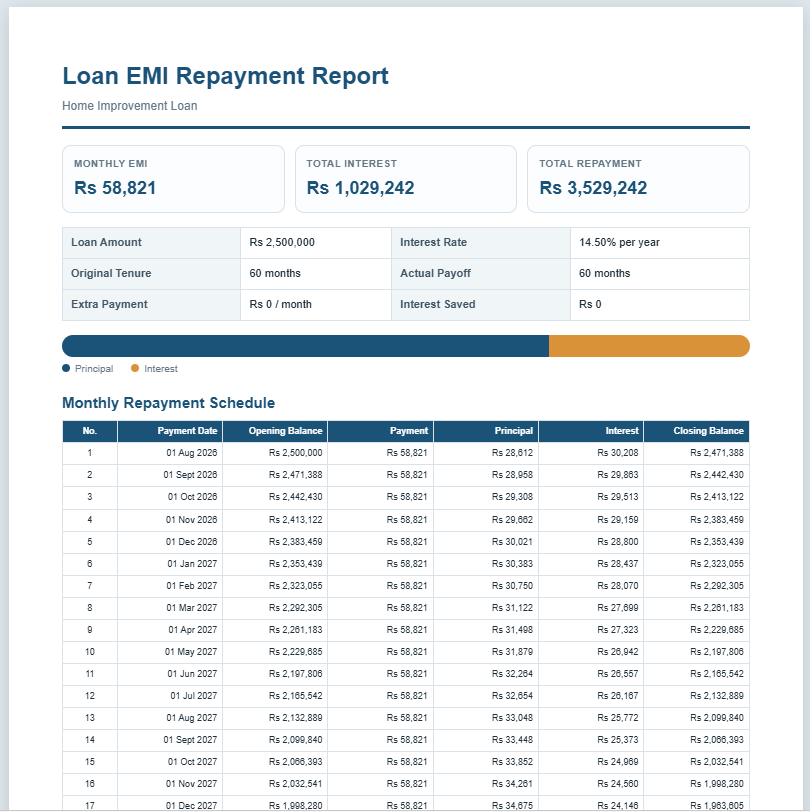
A Loan EMI Calculator is a simple online tool that helps you estimate your monthly loan payments (EMIs). By entering the loan amount, interest rate, and repayment period, you can instantly see how much you need to pay each month, along with the total interest and overall repayment amount.
How does this calculator work?
The calculator uses the standard Equated Monthly Installment (EMI) formula to determine your monthly payment. It automatically calculates the principal and interest portions of each installment and generates a complete repayment schedule.
Who can use this calculator?
Anyone planning to borrow money can use it. Whether you’re applying for a home loan, personal loan, car loan, education loan, or business loan, this calculator helps you understand your repayment obligations before making a financial commitment.
Loan EMI Calculator
Calculate monthly loan payments, total interest, total repayment, and a complete amortization schedule.
Frequently Asked Questions
Helpful answers about EMI calculations, interest, repayment schedules, and extra payments.
1. What is a loan EMI?
EMI stands for Equated Monthly Instalment. It is the fixed amount a borrower usually pays every month toward a loan. Each payment includes a portion of the principal amount and a portion of the interest charged by the lender.
2. How is the monthly EMI calculated?
The calculator uses the loan amount, annual interest rate, and repayment tenure to estimate the monthly payment. For reducing-balance loans, interest is calculated on the outstanding balance, so the interest portion gradually decreases while the principal portion increases.
3. What information do I need to use this calculator?
You need the loan amount, annual interest rate, repayment tenure, and first payment date. You may also select a currency, choose monthly or yearly schedule details, and enter an optional extra monthly payment.
4. What does total interest mean?
Total interest is the estimated amount paid to the lender above the original principal during the full repayment period. It does not include processing fees, insurance, taxes, late charges, or other lender costs unless those amounts are added to the loan balance.
5. What is an amortization schedule?
An amortization schedule is a payment-by-payment breakdown showing the opening balance, monthly payment, principal paid, interest charged, and closing balance. It helps you understand how the loan balance reduces over time.
6. How does an extra monthly payment affect my loan?
An extra payment is applied toward the outstanding principal in addition to the regular EMI. This can reduce the payoff period and lower the total interest paid, provided your lender permits early or additional repayments without a penalty.
7. Does a lower interest rate always reduce the EMI?
Generally, yes. When the loan amount and tenure remain the same, a lower interest rate normally produces a lower monthly EMI and lower total interest. However, lender fees and different compounding methods may affect the final cost.
8. Should I choose a shorter or longer loan tenure?
A shorter tenure usually creates a higher monthly payment but lowers total interest. A longer tenure reduces the monthly payment but normally increases the total interest paid. The suitable option depends on your monthly budget and repayment capacity.
9. Why may the lender's EMI differ from this estimate?
A lender may use different payment dates, daily interest, rounding rules, fees, insurance, taxes, variable rates, or compounding methods. This calculator is intended for planning and estimation, so the lender's official repayment schedule should be treated as final.
10. Can I print or save the repayment report as a PDF?
Yes. Use the Print / Save PDF button to print only the live repayment report. In the browser print window, select a printer or choose the Save as PDF option. Longer monthly schedules may continue onto additional A4 pages.
What information do I need to enter?
Simply provide the loan amount, annual interest rate, and loan tenure in months or years. If available, you can also include extra monthly payments to see how they reduce the total interest and shorten the repayment period.
Why should I use this calculator?
Using a Loan EMI Calculator helps you compare different loan options, plan your monthly budget, and avoid unexpected financial stress. It also allows you to experiment with different interest rates and loan terms to find the most affordable repayment plan.
Is this calculator free to use?
Yes. This Loan EMI Calculator is completely free and works directly in your browser. No registration or software installation is required, making it a quick and convenient financial planning tool for everyday use.