The Daily Inspection Checklist helps organizations perform routine inspections of facilities, equipment, and work areas in a consistent and organized way. It allows users to record inspection details, monitor equipment condition, identify safety hazards, and document corrective actions. The checklist automatically summarizes inspection results, making it easier to track passed, failed, and attention-required items.
It includes inspector information, inspection categories, remarks, and supervisor approval in a professional A4 printable format. Suitable for maintenance teams, facility managers, safety officers, and operations staff, this checklist improves workplace safety, supports preventive maintenance, and helps maintain accurate daily inspection records for compliance and operational efficiency.
Checklist Details
InputInspection Information
Add Inspection Item
Checklist Items
| # | Item | Status | Action |
|---|
Final Notes & Approval
Live Preview
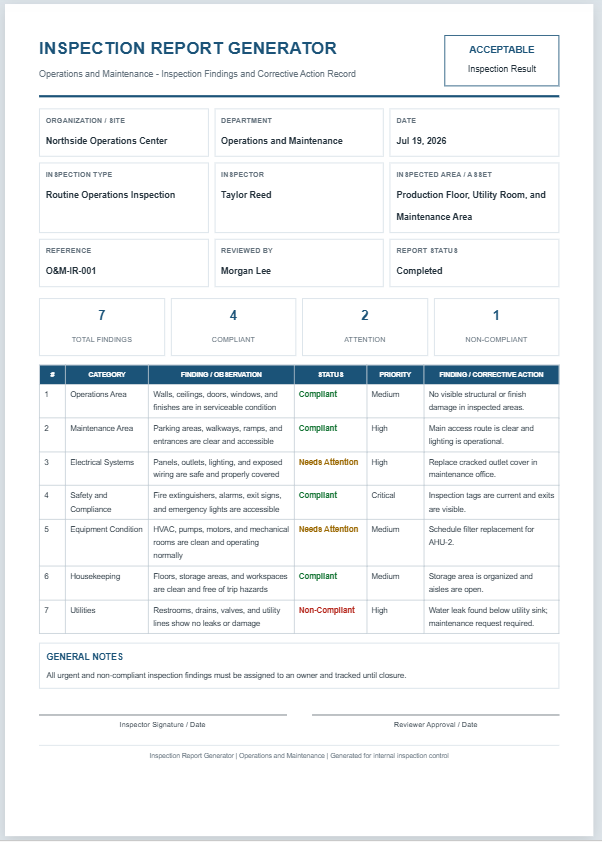
Daily Inspection Checklist
Operations & Maintenance - Routine Facility Inspection Record
| # | Category | Inspection Item | Status | Priority | Remarks / Corrective Action |
|---|
GENERAL NOTES
Frequently Asked Questions
1. What is a Daily Inspection Checklist?
A Daily Inspection Checklist is a structured record used to verify the condition, safety, cleanliness, and operational readiness of facilities, equipment, utilities, and work areas.
2. Who should use this checklist?
Operations managers, maintenance technicians, facility supervisors, safety officers, shift leaders, property managers, and inspection teams can use it.
3. What areas can be inspected?
The checklist can cover safety systems, machinery, electrical panels, HVAC equipment, utilities, housekeeping, building conditions, emergency exits, and other operational areas.
4. Can I add custom inspection items?
Yes. Enter any inspection item, choose its category, status, priority, and remarks, then add it to the checklist.
5. What do the inspection statuses mean?
Pass means the item meets requirements. Needs Attention means follow-up is required. Fail indicates a serious problem. N/A means the item does not apply.
6. How are checklist totals calculated?
The tool automatically counts all items and displays separate totals for passed, attention-required, and failed items.
7. Can I edit or remove an inspection item?
Yes. Use the Edit button to load an item back into the form or use Delete to remove it from the checklist.
8. Can the checklist be printed on A4 paper?
Yes. The Print Preview button prints only the professional live preview area using an A4 portrait layout.
9. Does the checklist work on mobile devices?
Yes. On smaller screens, use the Input and Live Preview tabs to switch between the form and printable report.
10. Can this checklist replace a legal or regulatory inspection?
No. It supports routine internal inspections but should be adapted to applicable laws, manufacturer instructions, safety standards, and organizational procedures.