Post-Trip Purchase Summary Sheet Generator
Fill in your trip details, enter purchases made after the trip, and generate a printable or downloadable post-trip purchase summary sheet.
Trip Information
Purchase Entry Table
| Purchase Date | Vendor/Supplier | Category | Item/Description | Payment Method | Receipt/Invoice No. | Amount | Tax | Total Amount | Reimbursable | Notes | Action |
|---|
Automatic Calculations
Category-wise Summary
Payment-method-wise Summary
Extra Summary Section
User Controls
Business trips often involve various purchases and expenses, including transportation, accommodation, meals, conference fees, office supplies, and other work-related costs. Keeping track of these expenses is important for budgeting, reimbursement, accounting, and financial reporting purposes. A Post-Trip Purchase Summary Sheet helps organize all trip-related purchases in a single location, making it easier to review, verify, and report expenses after returning from a trip.
What is a Post-Trip Purchase Summary Sheet and Generator?
A Post-Trip Purchase Summary Sheet is a document used to record and summarize purchases made during a business or professional trip. It provides a clear overview of travel-related expenses, helping employees and organizations organize receipts, verify expenditures, and process reimbursement requests efficiently.
To make this process faster and more convenient, our Post-Trip Purchase Summary Generator allows users to create these reports online using an AI-powered, editable interface. Instead of manually preparing records from scratch, users can enter purchase details, categorize expenses, and instantly generate a professional summary that can be printed, saved, or downloaded for future reference.
Whether you choose the interactive online generator or the traditional worksheet, both options help maintain accurate accounting records, support expense verification, simplify financial reporting, and ensure that all trip-related purchases are properly documented. For users who prefer offline editing and spreadsheet-based workflows, the original MS Excel Post-Trip Purchase Summary Template is also available for download.
Why Use a Post-Trip Purchase Summary Sheet?
Managing travel expenses can be challenging when multiple purchases are made over several days. A Post-Trip Purchase Summary Sheet helps keep all expense information organized and accessible.
Using this sheet allows users to:
- Track all trip-related purchases in one place.
- Monitor travel spending accurately.
- Simplify reimbursement requests.
- Maintain proper financial records.
- Verify expenses using supporting receipts.
- Reduce the risk of overlooking purchases.
- Improve accountability and expense transparency.
Information Included in the Sheet

A typical Post-Trip Purchase Summary Sheet may include:
Employee and Trip Information
- Employee Name
- Employee ID
- Department
- Destination
- Travel Dates
- Purpose of Trip
Purchase Details

- Purchase Date
- Vendor or Store Name
- Item or Service Description
- Amount Spent
- Payment Method
- Receipt Attached Status
- Business Purpose
- Remarks
Summary and Approval Information
- Total Expenses
- Total Reimbursable Expenses
- Receipt Count
- Employee Signature
- Manager Approval
- Submission Date
Benefits of Using the Template
Using a Post-Trip Purchase Summary Sheet Template offers several advantages:
- Saves time when preparing expense reports.
- Provides a structured format for recording purchases.
- Improves expense tracking accuracy.
- Helps ensure reimbursement claims are supported by receipts.
- Simplifies review and approval processes.
- Assists accounting teams with expense reconciliation.
- Creates a professional and organized expense record.
How to Use the Post-Trip Purchase Summary Sheet Template
- Enter employee and trip details at the top of the worksheet.
- Record each purchase made during the trip.
- Include the purchase date, vendor name, and item description.
- Enter the amount spent for each expense.
- Specify the payment method used.
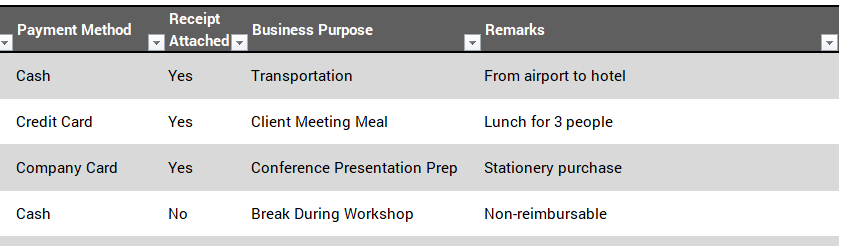
- Indicate whether a receipt is attached.
- Add the business purpose of the expense if required.
- Review the automatically calculated totals.
- Submit the completed sheet for reimbursement and approval.
About This Template

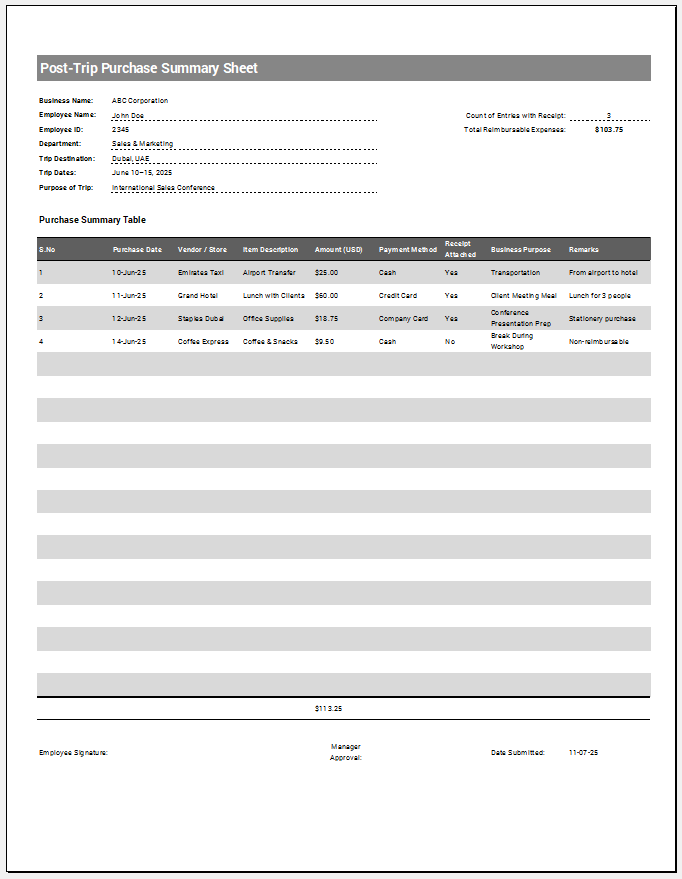
Our team has created a professionally designed Post-Trip Purchase Summary Sheet Template in Excel to help employees and organizations manage travel-related expenses efficiently. The template includes dedicated sections for employee information, trip details, purchase records, vendor information, payment methods, receipt tracking, business purpose descriptions, remarks, and approval signatures.
The worksheet automatically summarizes expenses and provides a clear overview of reimbursable costs. It also includes receipt tracking and approval sections that simplify expense verification and reimbursement processing. This makes the template an ideal solution for business travelers, managers, accounting departments, and organizations that need accurate travel expense documentation.
How this Template Helps
A Post-Trip Purchase Summary Sheet is an effective tool for organizing and reviewing travel-related purchases. It helps maintain accurate financial records, supports reimbursement requests, and improves expense management. By using a structured template, employees and organizations can save time, reduce errors, and ensure that all trip expenses are properly documented and accounted for.
MS Excel (.xlsx) Worksheet
File Size: 242 KB
- Summer Holiday Assignment Cover Page Generator
- Salary and Overtime Calculator Template
- Temporary Employee ID Badge Templates
- Construction Worker ID Cards
- Hospital Employee ID Card Templates
- School Staff ID Card Templates
- Corporate Employee Photo ID Cards
- Reimbursement Management Forms
- Financial and Assistance Benefits Forms
- Forms Used for Workplace Ethics and Policies
- Summer Vacation Planner Generator
- Outlet Mall Shopping Planner
- Customer Information and Ranking Sheet
- Small Family Kitchen Design Planning Sheet
- Summer Party Budget Sheet Generator