Warehouse Inventory Manager
Add, edit, search, and manage warehouse inventory records online.
Add Inventory Item
Inventory Records
| SKU | Item Name | Category | Location | Rack / Shelf | Supplier | Unit | Opening | Stock In | Stock Out | Available | Reorder | Unit Price | Total Value | Updated | Notes | Actions |
|---|
No inventory records found.
A warehouse inventory sheet is an essential tool used to track and monitor the stock stored in a warehouse. Businesses of all sizes rely on inventory records to maintain accurate stock levels, prevent shortages, reduce overstocking, and ensure smooth daily operations. Whether a company stores raw materials, supplies, or finished products, keeping an organized inventory record helps improve efficiency and supports better business decisions.
Warehouse inventory management does not always require expensive software. Many organizations use simple spreadsheet-based solutions to record inventory information and calculate stock values. A Warehouse Inventory Sheet Template provides a practical and cost-effective way to maintain these records while keeping inventory data organized and accessible.
What Is a Warehouse Inventory Sheet?
A Warehouse Inventory Sheet is a document used to record and monitor the items stored in a warehouse. It provides a centralized location where users can enter details about inventory items, their quantities, unit prices, and total inventory values.
The purpose of this sheet is to provide a clear overview of available stock and help warehouse personnel maintain accurate records. It can be used by warehouse managers, inventory clerks, retailers, wholesalers, manufacturers, and small business owners who need a simple inventory tracking solution.
Importance of Maintaining Warehouse Inventory Records
Accurate inventory records are essential for efficient warehouse operations. Without proper tracking, businesses may experience stock shortages, excess inventory, delayed orders, and financial losses.
Maintaining a warehouse inventory sheet offers several benefits:
- Keeps inventory information organized.
- Helps track available stock quantities.
- Assists with inventory valuation.
- Reduces the risk of stock shortages.
- Supports purchasing and replenishment decisions.
- Improves warehouse accountability.
- Provides a quick summary of inventory holdings.
- Helps identify slow-moving or frequently used items.
By regularly updating inventory records, businesses can ensure that stock information remains accurate and reliable.
Information Typically Included in a Warehouse Inventory Sheet
A warehouse inventory sheet generally contains important details about each inventory item. Common fields include:
- Item Number or SKU
- Product Description
- Category
- Quantity on Hand
- Unit of Measure
- Unit Price
- Inventory Value
- Warehouse Information
- Inventory Date
- Responsible Person
These details provide a complete snapshot of inventory status and help users monitor stock efficiently.
Benefits of Using an Excel-Based Warehouse Inventory Sheet
Excel remains one of the most popular tools for inventory tracking because it is flexible, easy to use, and widely available.
Some advantages include:
Easy Data Entry
Users can quickly enter inventory information without specialized training.
Automatic Calculations
Excel formulas automatically calculate inventory values based on quantity and unit price, reducing manual work and minimizing errors.
Cost-Effective Solution
Businesses can maintain inventory records without investing in expensive inventory management software.
Customizable Format
The template can be modified to meet the specific requirements of different industries and warehouse operations.
Improved Inventory Visibility
The sheet provides a clear overview of stock quantities and inventory value at a glance.
Best Practices for Warehouse Inventory Tracking
To get the most benefit from a warehouse inventory sheet:
- Update inventory records regularly.
- Verify physical stock through periodic counts.
- Assign responsibility for inventory maintenance.
- Review inventory values frequently.
- Remove outdated or discontinued items from records.
- Maintain backup copies of inventory files.
- Use consistent item descriptions and categories.
These practices help maintain accurate inventory information and improve warehouse efficiency.
About This Warehouse Inventory Sheet Template
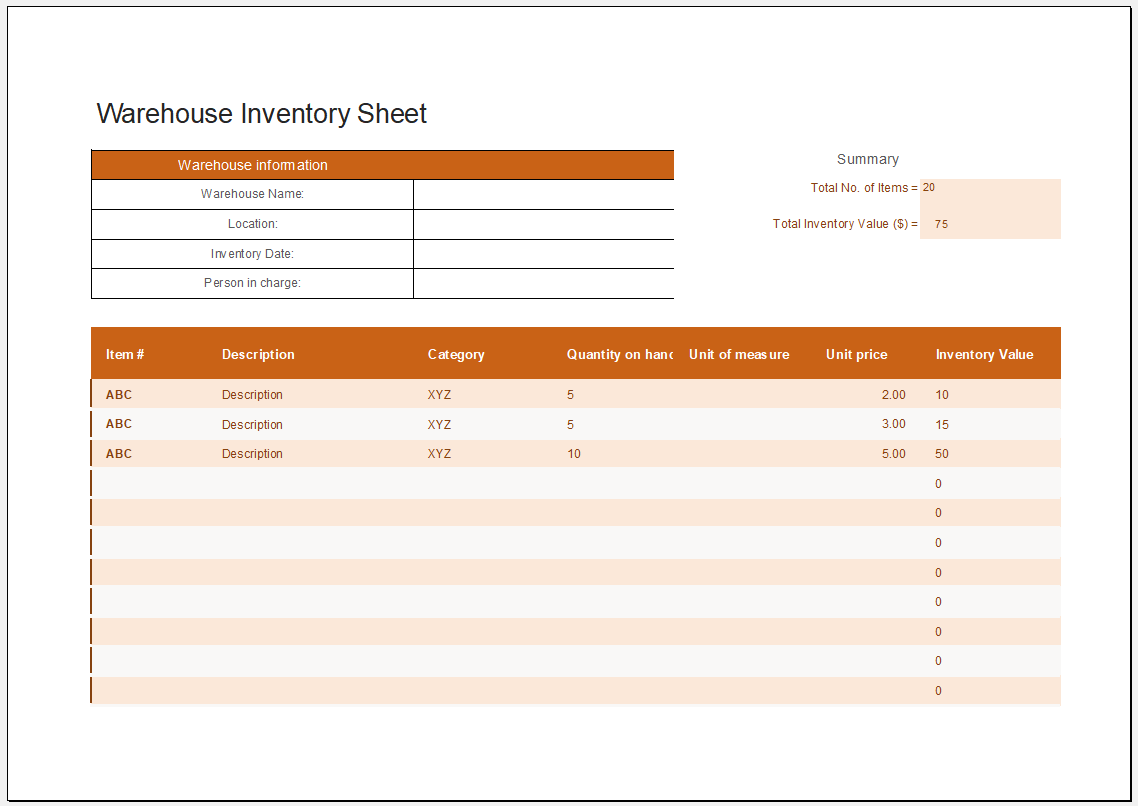
The attached Warehouse Inventory Sheet Template provides a simple yet effective solution for recording and monitoring warehouse stock. The template begins with a Warehouse Information section where users can enter the warehouse name, location, inventory date, and the person responsible for managing inventory.
Below the information section is a detailed inventory table that allows users to record:
- Item Number
- Description
- Category
- Quantity on Hand
- Unit of Measure
- Unit Price
- Inventory Value
The template includes built-in formulas that automatically calculate the Inventory Value for each item by multiplying the quantity on hand by the unit price. In addition, a summary section automatically calculates the Total Number of Items and the Total Inventory Value, providing a quick overview of warehouse stock.
Template
- Summer Holiday Assignment Cover Page Generator
- Salary and Overtime Calculator Template
- Summer Vacation Planner Generator
- Outlet Mall Shopping Planner
- Customer Information and Ranking Sheet
- Small Family Kitchen Design Planning Sheet
- Summer Party Budget Sheet Generator
- Payroll Register & Salary Sheet Generator
- Employee Skill Development Tracker
- HR Budget & Expense Tracker
- Leave & Vacation Tracker
- Exit/Off-boarding Checklist
- Performance Evaluation Sheet
- New Year Goal Setting Worksheet
- Workforce Planning & Headcount Forecast Sheet