Petty Cash Log Generator

Managing petty cash transactions can become difficult when expenses are recorded manually or scattered across multiple documents. Our Petty Cash Log Generator provides a simple and professional way to record, organize, monitor, and report petty cash activities in real time. Whether you are managing office expenses, departmental funds, school expenditures, retail operations, or small business cash transactions, this tool helps maintain accurate records while reducing paperwork and calculation errors.

The generator has been designed to serve as a complete petty cash management solution. Instead of creating logs manually in spreadsheets, users can enter transaction details directly into the form and instantly generate a professional petty cash record ready for printing or downloading.

Petty Cash Log Generator

Record, manage, calculate, print, and export a professional petty cash log for business use.

Opening Balance$0.00
Cash Received$0.00
Cash Paid$0.00
Closing Balance$0.00
Transactions0
Most Used Category-
Average Value$0.00

Petty Cash Information

Filters & Search

Transaction Entry Section

#DateVoucherCategoryDescriptionReceivedPaidEmployeeApproved ByMethodRemarksActions

Blue Harbor Trading Co.

Petty Cash Log

Administration

Log No:
Period:
Custodian:

Summary Totals

Opening Balance
Total Received
Total Paid
Closing Balance
Transactions
Net Cash Position
Most Used Category
Average Transaction

Transaction Table

#DateVoucherCategoryDescriptionReceivedPaidEmployeeApproved ByMethodRemarks

Category Summary

CategoryReceivedPaidNet

Expense Analysis

Top Expense CategoryTotal PaidMonthly SpendingRemarks

Notes

Prepared By
Verified By
Approved By
Date

Main features of the generator is:

Record Complete Petty Cash Information

The generator allows users to enter all essential petty cash details including company name, department, custodian name, reporting period, opening balance, currency selection, and additional notes. This information appears automatically in the generated petty cash log, ensuring that every report contains proper identification and reporting details.

Unlimited Transaction Entries

Users can add as many petty cash transactions as required. Each transaction includes important details such as:

  • Transaction Date
  • Voucher Number
  • Expense Category
  • Description
  • Cash Received
  • Cash Paid
  • Employee or Requestor
  • Approved By
  • Payment Method
  • Remarks

This structured format makes it easy to maintain a complete audit trail for every petty cash movement.

Automatic Calculations

One of the most useful features of this generator is its automatic calculation capability. As transactions are entered, the system instantly calculates:

  • Total Cash Received
  • Total Cash Paid
  • Current Cash Balance
  • Closing Balance
  • Number of Transactions
  • Category Totals
  • Net Cash Position

These calculations update automatically without requiring any manual formulas or spreadsheet knowledge.

Smart Expense Categorization

The generator includes predefined expense categories such as Office Supplies, Transportation, Utilities, Fuel, Refreshments, Maintenance, Printing, Cleaning, Staff Welfare, and Miscellaneous expenses.

Categorized transactions help organizations analyze spending patterns and identify areas where expenses can be controlled more effectively.

Live Preview System

A live preview panel updates instantly as information is entered. Users can see exactly how the final petty cash log will appear before printing or downloading it.

This feature eliminates guesswork and helps ensure that all information is accurate before the final report is generated.

Search, Filter, and Sort Records

For organizations handling multiple petty cash transactions, finding specific entries can become time-consuming. The generator includes advanced search and filtering tools that allow users to locate transactions by:

  • Date Range
  • Category
  • Employee Name
  • Payment Method
  • Voucher Number
  • Description
  • Approver Name

Sorting options make it easy to arrange records by date, amount, voucher number, or category.

Expense Reporting and Analysis

The tool automatically generates useful summaries and reports including:

  • Category-Wise Expense Summary
  • Expense Analysis Report
  • Monthly Spending Summary
  • Top Expense Categories
  • Average Transaction Value

These reports provide valuable insights into petty cash usage and support better financial decision-making.

Print and Download Options

Once the log has been completed, users can generate a professional report and choose from multiple output options:

  • Print Petty Cash Log
  • Download PDF
  • Download CSV
  • Download Excel-Compatible File

The print feature is specially designed to print only the petty cash report area rather than the entire webpage, resulting in a clean and professional document.

Automatic Saving and Data Recovery

The generator includes built-in browser storage functionality. Data entered into the form is automatically saved, allowing users to continue their work even after refreshing the page.

Additional options include:

  • Auto Save
  • Restore Saved Data
  • Clear Saved Data

These features help prevent accidental data loss.

Professional Summary Dashboard

A dynamic summary dashboard displays key financial figures at a glance, including opening balance, cash received, cash paid, closing balance, transaction count, most frequently used category, and average transaction value.

This dashboard provides an instant overview of petty cash activity without requiring users to review individual entries.

Mobile-Friendly and Easy to Use

The Petty Cash Log Generator is fully responsive and works smoothly on desktop computers, tablets, and smartphones. Users can manage petty cash records from virtually any device without installing additional software.

Why Use This Generator?

Compared to traditional spreadsheets and handwritten records, this generator offers greater accuracy, improved organization, automatic calculations, professional reporting, and significant time savings. It is ideal for offices, schools, retail stores, workshops, non-profit organizations, and small businesses that need an efficient way to manage petty cash transactions.

Simply enter your petty cash details, add transactions, review the live preview, and print or download your completed report within minutes.

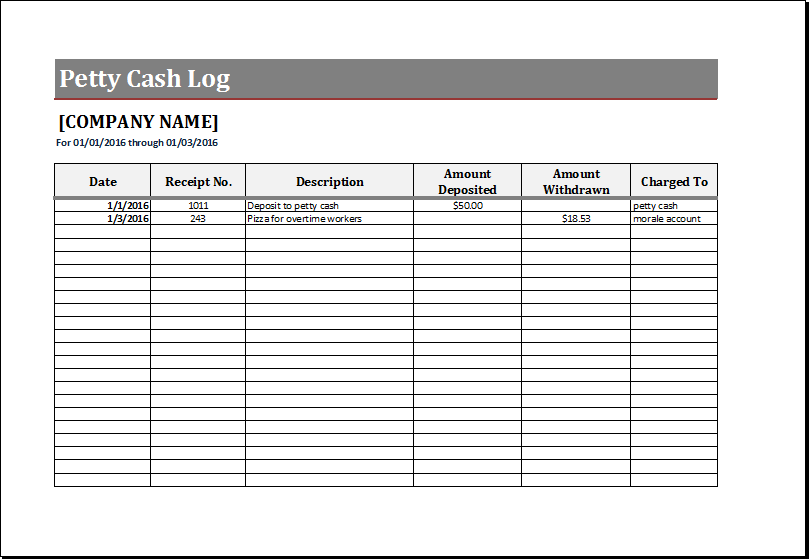
MS Excel Petty Cash Log Template

For users who prefer working offline, we also provide a professionally designed MS Excel Petty Cash Log Template that can be downloaded, customized, and used without an internet connection. The template includes preformatted worksheets and built-in formulas to help track petty cash transactions accurately and efficiently. Simply download the file, enter your company information, record cash receipts and payments, and let the spreadsheet automatically calculate balances and totals.

The Excel template allows you to maintain organized records of petty cash activities, monitor expenses by category, and generate accurate financial summaries. Once completed, the log can be saved for future reference, shared with management, or printed for accounting and audit purposes. It is an ideal solution for businesses, schools, offices, and organizations that prefer the flexibility and familiarity of Microsoft Excel while maintaining professional petty cash records.
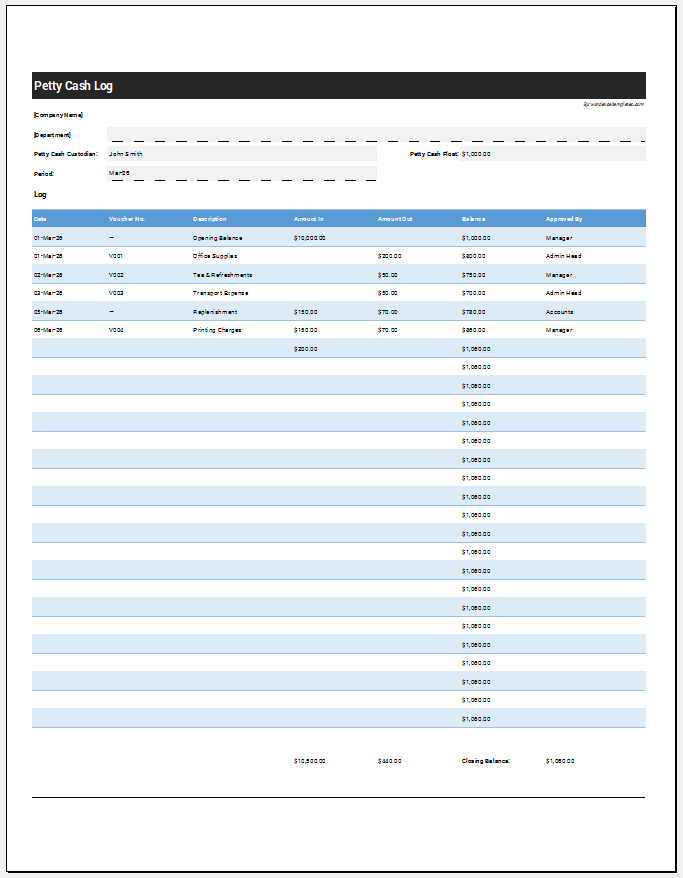
Petty Cash Log Template for Excel

File: MS Excel (.xlsx)

Option #2

Petty cash log

File: MS Excel (.xlsx)