A Safety Audit Checklist is a practical tool used to evaluate workplace safety, identify hazards, and ensure that equipment, facilities, and work areas meet established safety standards. It helps organizations perform regular audits in a structured way while maintaining accurate records of findings, corrective actions, and compliance status. The checklist is suitable for factories, warehouses, offices, construction sites, schools, hospitals, and other workplaces where safety inspections are part of daily operations.
This checklist allows users to record facility details, audit dates, departments, inspectors, and inspection areas. Individual audit items can be added with categories, compliance status, risk levels, and corrective action notes. Automatic summaries provide a clear overview of compliant items, areas requiring attention, and non-compliant findings, making it easier to prioritize improvements and monitor safety performance.
Regular use of this checklist promotes a safer work environment by encouraging consistent inspections and timely corrective actions. It supports better documentation, improves accountability, and helps organizations reduce workplace risks while maintaining high operational and safety standards. Its simple layout makes it suitable for both experienced safety professionals and routine inspection teams.
Audit Details
InputAudit Information
Add Safety Audit Item
Safety Audit Items
| # | Item | Status | Action |
|---|
Final Notes & Approval
Live Preview
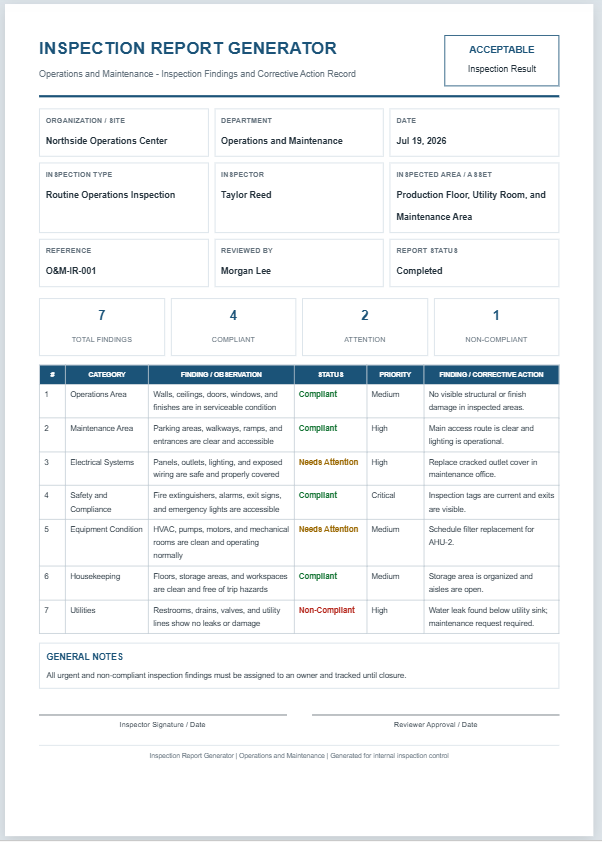
Safety Audit Checklist
Maintenance and Inspection - Workplace Safety Audit Record
| # | Category | Audit Item | Status | Risk | Finding / Corrective Action |
|---|
GENERAL NOTES
Frequently Asked Questions
1. What is a Safety Audit Checklist?
A Safety Audit Checklist is a structured tool used to review workplace hazards, maintenance controls, inspection readiness, and compliance with internal safety procedures.
2. Who should use this checklist?
Maintenance supervisors, safety officers, facility managers, inspection teams, contractors, and operations leaders can use it during routine or special audits.
3. What areas does this checklist cover?
It can cover PPE, electrical safety, fire protection, machine guarding, housekeeping, chemicals, emergency access, permits, tools, and maintenance work areas.
4. Can I add custom audit items?
Yes. Enter any audit item, select a category, choose the status and risk level, and add findings or corrective action details.
5. What do the audit statuses mean?
Compliant means the item meets requirements. Needs Attention means improvement is required. Non-Compliant indicates a failed requirement. N/A means the item does not apply.
6. How are audit totals calculated?
The tool automatically counts all audit items and displays separate totals for compliant, attention-required, and non-compliant items.
7. Can I edit or remove an audit item?
Yes. Use Edit to load an item back into the form, or Delete to remove it from the audit checklist.
8. Can the audit report be printed on A4 paper?
Yes. The Print Preview button prints the live preview section as an A4 portrait report.
9. Does the checklist work on mobile devices?
Yes. On smaller screens, use the Input and Live Preview tabs, and use Zoom+, Zoom-, or Fit to control the preview scale.
10. Can this replace a regulatory safety inspection?
No. It supports internal safety audits and maintenance inspections, but it should be adapted to applicable regulations, standards, permits, and company policies.