A Facility Inspection Form is an essential document for recording the condition of buildings, equipment, utilities, and surrounding areas during routine maintenance and inspection activities. It provides a planned way to evaluate facilities, identify maintenance needs, and document observations in one organized report. This form is suitable for factories, warehouses, offices, schools, hospitals, commercial buildings, and residential properties.
The form allows users to enter facility information, inspection dates, departments, inspection types, and inspector details. Individual inspection items can be categorized by building condition, electrical systems, plumbing, fire safety, housekeeping, security, and other maintenance areas. Each item can be assigned a status, priority level, and maintenance action, helping teams track issues efficiently and plan corrective work. Automatic summaries provide a quick overview of inspection results and highlight areas requiring immediate attention.
Using this Facility Inspection Form regularly helps organizations maintain safe, clean, and reliable facilities. It improves maintenance planning, supports preventive maintenance programs, enhances workplace safety, and creates accurate inspection records for future reference. Its user-friendly design makes inspections faster, more consistent, and easier to manage for maintenance professionals and facility managers.
Inspection Details
InputFacility Information
Add Facility Inspection Item
Facility Inspection Items
| # | Item | Status | Action |
|---|
Final Notes & Approval
Live Preview
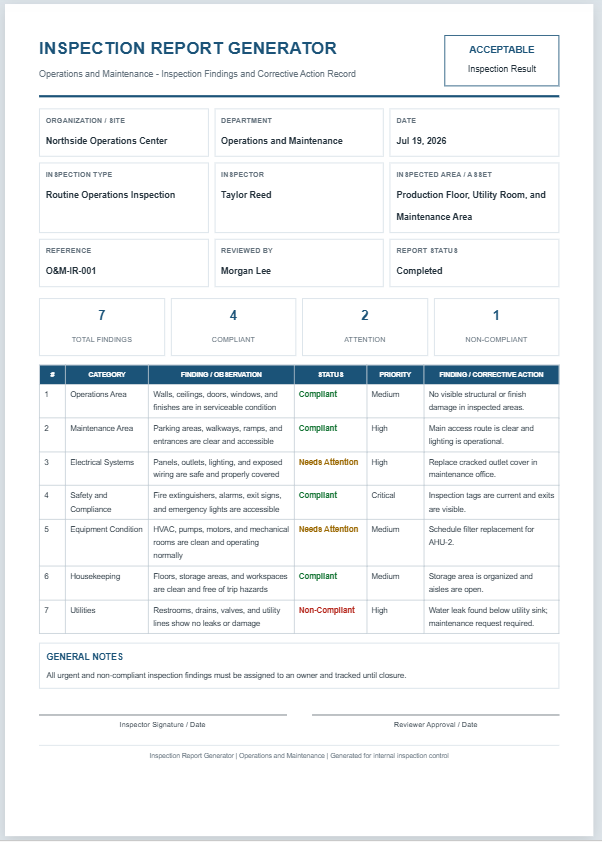
Facility Inspection Form
Maintenance and Inspection - Facility Condition Inspection Record
| # | Category | Inspection Item | Status | Priority | Finding / Maintenance Action |
|---|
GENERAL NOTES
Frequently Asked Questions
1. What is a Facility Inspection Form?
A Facility Inspection Form is a structured record used to check the condition, safety, cleanliness, and maintenance needs of buildings, utilities, grounds, and work areas.
2. Who should use this facility inspection form?
Facility managers, maintenance supervisors, inspection teams, property managers, safety officers, and operations staff can use it for routine or follow-up inspections.
3. What areas can be inspected?
The form can cover building condition, access routes, electrical systems, fire and life safety, mechanical equipment, housekeeping, plumbing, utilities, and emergency readiness.
4. Can I add custom inspection items?
Yes. Enter any inspection item, select a category, choose the compliance status and priority, and add maintenance action notes.
5. What do the inspection statuses mean?
Compliant means the item meets requirements. Needs Attention means follow-up is required. Non-Compliant means the item fails expectations. N/A means the item does not apply.
6. How are inspection totals calculated?
The form automatically counts all inspection items and displays totals for compliant, attention-required, and non-compliant findings.
7. Can I edit or remove an inspection item?
Yes. Use Edit to load an item back into the form, or Delete to remove it from the facility inspection list.
8. Can the facility inspection report be printed on A4 paper?
Yes. The Print Preview button prints the live preview section as an A4 portrait report.
9. Does the form work on mobile devices?
Yes. On smaller screens, use the Input and Live Preview tabs, and use Zoom+, Zoom-, or Fit to control the preview scale.
10. Can this replace a code or regulatory inspection?
No. It supports routine internal facility inspections, but it should be adapted to applicable codes, regulations, standards, lease requirements, and company policies.