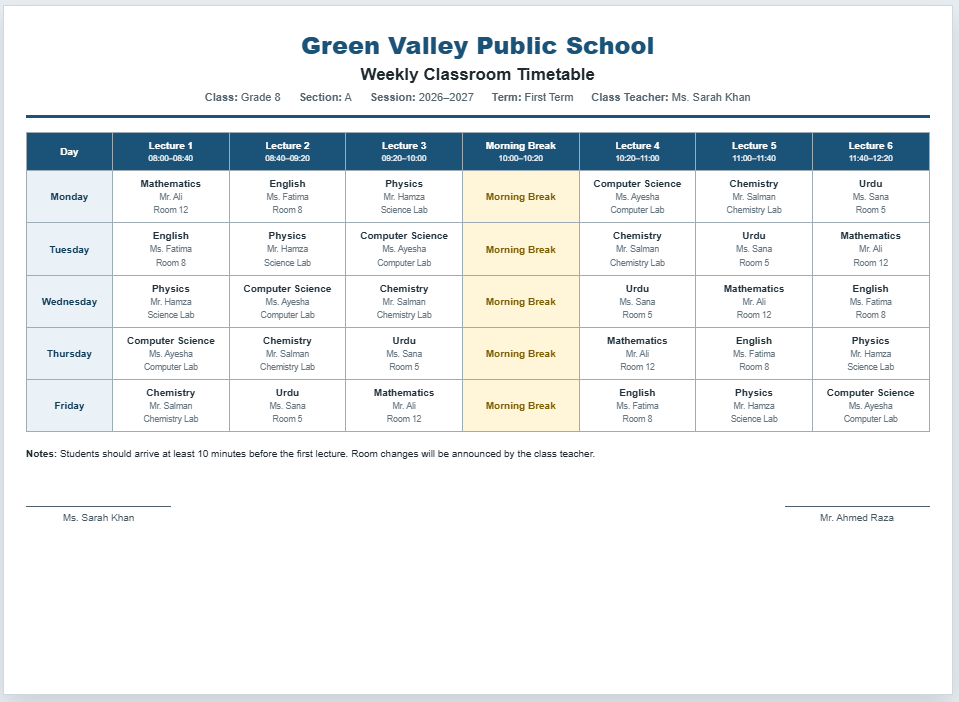
A Classroom Timetable Generator is an easy-to-use online tool that helps schools, colleges, academies, and training institutes create professional weekly class schedules in just a few minutes. Instead of manually designing timetables in spreadsheets or on paper, this generator allows you to organize lecture periods, subjects, teachers, classrooms, and school days through a simple interface with a live preview. It saves valuable administrative time while ensuring every timetable is neat, accurate, and easy to read.
What is a Classroom Timetable Generator?
A Classroom Timetable Generator is designed to simplify timetable planning for educational institutions. It enables users to create structured schedules by entering school information, class details, lecture timings, teacher names, classroom numbers, and subject allocations. The generator instantly formats everything into a clean timetable that is ready for printing or saving as a PDF.
Classroom Timetable Generator
Create a complete weekly timetable by class, lecture, teacher, subject, room, and break period. Update the live preview instantly and print the final schedule on an A4 landscape sheet.
School and Timetable Details
School Days
You can rename days or remove any day that is not part of the school week.
Lecture Periods
Lecture Assignments
Enter subject, teacher, and room for each lecture. Break periods are shown automatically.
Notes and Footer
Frequently Asked Questions
1. What is a Classroom Timetable Generator?
It is an online tool that helps schools create a weekly timetable organized by school day and lecture period. Each timetable cell can include the subject, teacher, and classroom.
2. Can I add or remove lecture periods?
Yes. Use the Add Lecture and Add Break buttons to create new periods. Individual lectures can also be removed when they are no longer needed.
3. Can I create a timetable for a six-day school week?
Yes. The generator supports custom school days, so you can add Saturday or any other day and remove days that your school does not use.
4. Can I include break or lunch periods?
Yes. Add a break period and enter its starting and ending times. The timetable will display it with a separate break style across all school days.
5. Does the timetable update automatically?
Yes. The live preview updates immediately when you change school information, lecture times, subjects, teacher names, rooms, or notes.
6. Can I print the timetable on one A4 sheet?
Yes. The Print Timetable button prints only the live timetable preview in A4 landscape format with clean margins and without the input controls.
7. Is this generator mobile friendly?
Yes. On smaller screens, separate Input Details and Live Preview tabs make it easier to edit and review the timetable without horizontal shifting.
8. Can I create separate timetables for different classes?
Yes. Create one timetable, print or save it as a PDF, then change the class and section details to prepare another timetable.
9. Can I show teacher and classroom information?
Yes. Every lecture assignment includes fields for subject, teacher, and room, helping students and staff understand the complete daily schedule.
10. Does the generator save information permanently?
This version works directly in the browser and does not permanently store timetable information. Print or save the completed timetable as a PDF before leaving the page.
How Does It Work?
Simply enter your school name, class, section, academic session, and lecture periods. You can customize the number of school days, add or remove lecture periods, create break or lunch sessions, and assign different subjects, teachers, and rooms for each lecture. As you make changes, the live preview updates automatically, allowing you to review the timetable before printing.
When Should You Use It?
This generator is useful at the beginning of every academic session, new semester, or term. It is also ideal whenever class schedules need to be revised because of teacher changes, examination timetables, special events, curriculum updates, or classroom adjustments. Schools can quickly generate separate timetables for multiple grades and sections without repeating manual formatting work.
Features
The Classroom Timetable Generator includes customizable school days, editable lecture periods, subject and teacher assignments, classroom allocation, automatic live preview, mobile-friendly design, zoom controls, and professional A4 landscape printing. It also supports break periods and produces a clean timetable that is suitable for classroom display, staff rooms, and student notice boards.
Why Use This Generator?
Preparing classroom schedules manually often takes considerable time and increases the chance of errors. This generator helps educational institutions produce organized and professional timetables with minimal effort. Because everything is displayed in real time, users can quickly verify schedules before printing, reducing mistakes and improving communication between administrators, teachers, and students. Whether you’re planning a timetable for a single classroom or an entire school, this tool provides a fast, reliable, and professional solution.