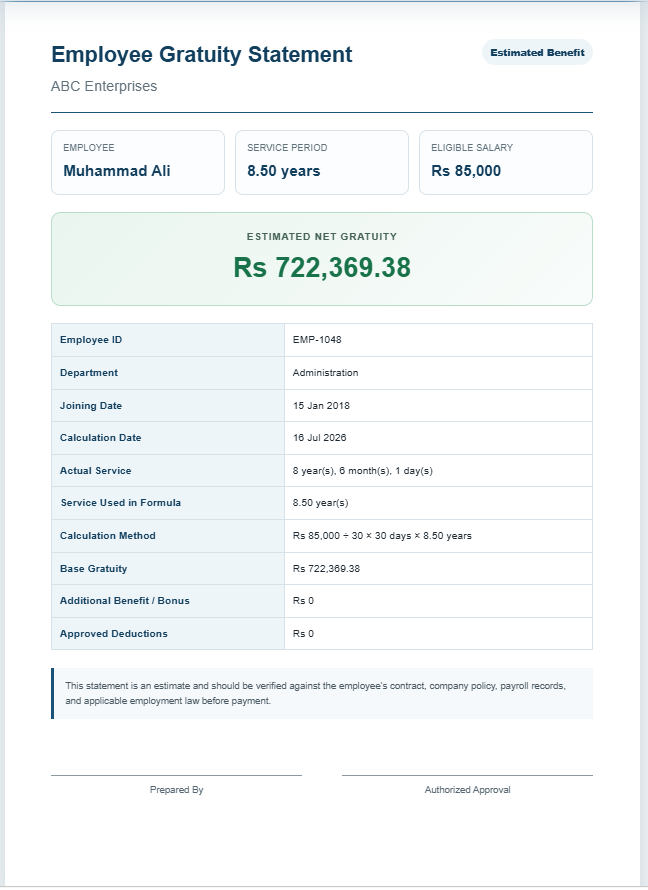
An Employee Gratuity Calculator is a practical financial tool that helps employees and employers estimate the gratuity amount payable at the end of an employee’s service. Gratuity is a lump-sum benefit provided as a reward for long-term service and is commonly governed by employment laws, company policies, or employment contracts. Instead of performing lengthy manual calculations, this calculator provides accurate results within seconds using the information you enter.
What is an Employee Gratuity Calculator?
An Employee Gratuity Calculator determines the estimated gratuity payable based on factors such as the employee’s salary, length of service, gratuity formula, and other adjustments like bonuses or deductions. Different countries and organizations follow different gratuity rules, so this calculator supports multiple calculation methods to suit various company policies.
The calculator also generates a professional gratuity statement that can be printed or saved as a PDF for future reference.
Employee Gratuity Calculator
Estimate an employee’s gratuity using service period, salary basis, and a flexible benefit formula.
Employee Information
Salary & Formula
Gratuity rules vary by country, organization, contract, and applicable law. Adjust the formula to match your policy.
Adjustments
Employee Gratuity Statement
ABC Enterprises
| Employee ID | EMP-1048 |
|---|---|
| Department | Administration |
| Joining Date | — |
| Calculation Date | — |
| Actual Service | — |
| Service Used in Formula | — |
| Calculation Method | — |
| Base Gratuity | — |
| Additional Benefit / Bonus | — |
| Approved Deductions | — |
Frequently Asked Questions
1. What is employee gratuity?
Employee gratuity is a lump-sum benefit that may be paid when an employee leaves an organization after meeting the required service conditions. Its availability and formula depend on law, contract, and company policy.
2. How does this gratuity calculator work?
The calculator combines eligible monthly salary, service period, the selected formula, bonuses, and deductions to estimate the final gratuity amount.
3. Which salary should I enter?
Enter the salary component considered eligible under your employment policy or applicable law. This may be basic salary, gross salary, or another defined wage amount.
4. Can I calculate gratuity using days per year?
Yes. Select “Salary days per completed year,” enter the number of gratuity days allowed for each service year, and specify the monthly salary divisor.
5. What does the salary divisor mean?
The salary divisor converts monthly salary into a daily rate. A divisor of 30 uses monthly salary divided by 30, while some policies may use 26 or another number.
6. Are partial years included?
You can use the exact service period, completed years only, nearest half-year, or nearest full year. Choose the option that matches your policy.
7. What happens if minimum service is not completed?
The calculator shows the employee as not eligible and sets the base gratuity to zero when service is below the minimum eligibility period you entered.
8. Can bonuses and deductions be added?
Yes. Add any approved extra benefit or bonus and subtract authorized deductions to calculate the estimated net gratuity.
9. Can I print or save the gratuity statement?
Yes. Use the Print / Save PDF button to print only the professional live preview on an A4 page or save it as a PDF through your browser.
10. Is this calculator a substitute for legal or payroll advice?
No. It provides an estimate only. Always confirm the final payment with qualified HR, payroll, accounting, or legal professionals and the rules applicable to the employee.
How Does It Work?
Using the calculator is simple and requires only a few details:
- Enter the employee’s name and organization (optional).
- Select the joining date and the gratuity calculation date.
- Enter the employee’s current monthly salary.
- Choose the gratuity calculation method.
- Specify the number of salary days or applicable percentage if required.
- Add any bonus amount or deductions.
- Click Calculate to instantly view the gratuity amount.
The calculator automatically determines the employee’s years of service, applies the selected calculation method, and displays the estimated gratuity along with a detailed breakdown.
When Should You Use This Calculator?
This calculator is useful in many employment situations, including:
- Employee resignation.
- Retirement planning.
- End-of-service settlements.
- Human resource payroll processing.
- Contract completion.
- Financial planning before leaving a job.
- Estimating future gratuity benefits.
- Verifying gratuity calculations prepared by employers.
HR professionals can also use it while preparing final settlement documents and employee exit reports.
Why Use an Employee Gratuity Calculator?
Calculating gratuity manually can be time-consuming and prone to mistakes, especially when service periods, salary structures, and company rules vary. This calculator eliminates complex calculations by providing quick and reliable estimates.
Some of its key benefits include:
- Fast and accurate gratuity estimation.
- Eliminates manual calculation errors.
- Supports different gratuity formulas.
- Automatically calculates completed years of service.
- Includes bonuses and deductions.
- Generates a professional printable gratuity statement.
- Mobile-friendly and easy to use.
- Saves time for employees, HR departments, payroll teams, and business owners.
Whether you are an employee planning your finances or an employer preparing an end-of-service settlement, the Employee Gratuity Calculator offers a convenient and reliable way to estimate gratuity payments. It simplifies the entire process, improves accuracy, and helps both employees and organizations make informed financial decisions with confidence.