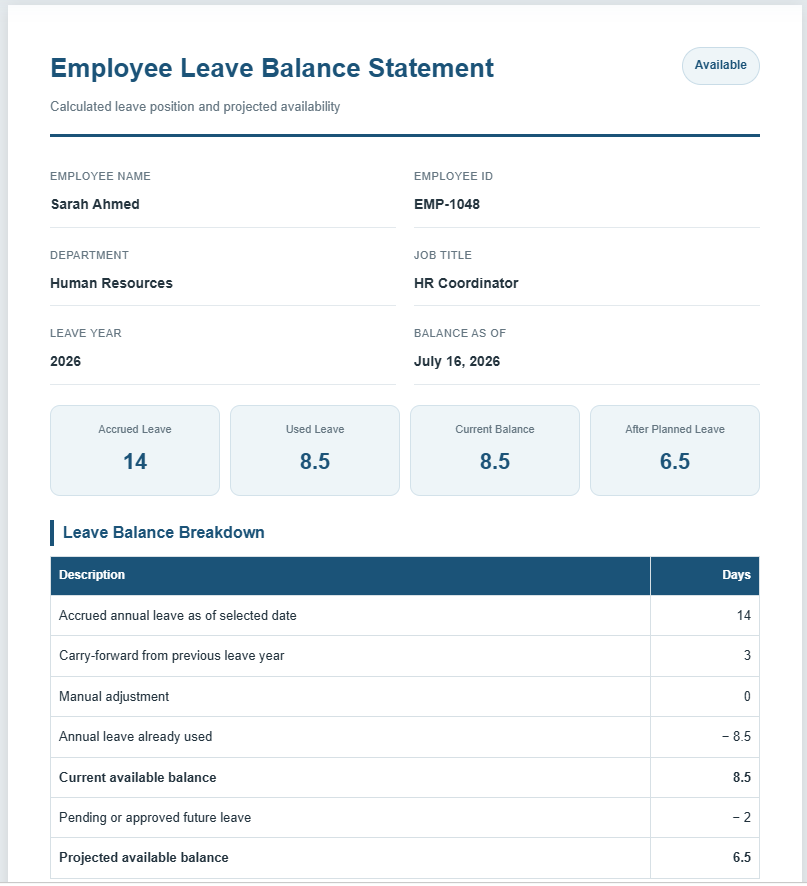
Managing employee leave manually can become difficult as leave accruals, carry-forward balances, adjustments, and leave usage increase throughout the year. The Employee Leave Balance Calculator is designed to simplify this process by providing an accurate and instant calculation of an employee’s remaining leave balance. Whether you are an HR professional, payroll officer, manager, or employee, this calculator helps you keep leave records organized and error-free.
What is an Employee Leave Balance Calculator?
An Employee Leave Balance Calculator is an online tool that calculates the total leave available to an employee after considering annual leave entitlement, leave accrued, leave taken, carry-forward leave, manual adjustments, and future planned leave. Instead of performing calculations manually in spreadsheets, users simply enter the required information and receive accurate results instantly.
The calculator is suitable for businesses of all sizes, educational institutions, healthcare organizations, government departments, and non-profit organizations. It supports various leave policies and can be adapted for annual leave, paid time off (PTO), vacation leave, earned leave, and other leave management systems.
How Does It Work?
Using the calculator is quick and straightforward. Users enter details such as annual leave entitlement, accrued leave, carried-forward balance, leave already used, planned leave, and any manual adjustments. The calculator automatically processes the information and displays the current leave balance in real time.
The live preview updates instantly as values are entered, allowing users to verify all information before printing or saving the report as a PDF. This makes the calculator ideal for preparing leave summaries for HR records, payroll processing, or employee reference.
Key Functionality
The Employee Leave Balance Calculator performs several calculations automatically to save time and reduce errors. It calculates total leave earned, current available leave, remaining leave after planned absences, projected year-end leave balance, and estimated monetary value of remaining leave based on the employee’s daily salary. It also supports different leave accrual methods, making it suitable for organizations with varying leave policies.
The calculator includes a professional live preview that displays the final report exactly as it will appear when printed. Users can review the document before generating a clean A4-sized print or PDF copy.
Features
This calculator includes a wide range of useful features to improve leave management:
- Automatic leave balance calculations
- Annual, monthly, and daily leave accrual support
- Carry-forward leave tracking
- Manual leave adjustments
- Leave taken and planned leave calculations
- Estimated leave value based on daily salary
- Professional live preview with real-time updates
- Responsive design for desktop, tablet, and mobile devices
- One-click A4 print and PDF-ready report
- Clean, professional layout suitable for HR documentation
Why Use This Calculator?
Keeping accurate leave records improves workforce planning, payroll accuracy, and employee satisfaction. This Employee Leave Balance Calculator eliminates manual calculations, reduces administrative workload, and provides reliable results within seconds. Its user-friendly interface, professional report layout, and instant calculations make it an excellent solution for HR departments, managers, and employees who need a fast and dependable way to monitor leave balances throughout the year.
Employee Leave Balance Calculator
Calculate available leave, accrued entitlement, leave used, carry-forward, projected year-end balance, and estimated leave value.
Employee & Leave Details
Employee Information
Leave Entitlement
Leave Taken & Planned
Payroll Value (Optional)
Live Preview
Employee Leave Balance Statement
Calculated leave position and projected availability
Leave Balance Breakdown
| Description | Days |
|---|---|
| Accrued annual leave as of selected date | 0 |
| Carry-forward from previous leave year | 0 |
| Manual adjustment | 0 |
| Annual leave already used | 0 |
| Current available balance | 0 |
| Pending or approved future leave | 0 |
| Projected available balance | 0 |
Utilization
Additional Leave Information
| Category | Days |
|---|---|
| Sick leave used | 0 |
| Other paid leave used | 0 |
| Estimated daily salary | — |
| Estimated value of current annual leave balance | — |
| Projected year-end annual leave balance | 0 |
Frequently Asked Questions
1. What is an employee leave balance?
An employee leave balance is the number of paid leave days currently available after considering accrued entitlement, carry-forward, adjustments, and leave already used.
2. How does monthly leave accrual work?
Monthly accrual divides the yearly leave entitlement by 12 and credits leave according to the number of completed or elapsed months in the leave year.
3. What is carry-forward leave?
Carry-forward leave is unused leave from a previous leave year that an employer permits an employee to use in the current year, usually subject to a limit or expiry date.
4. Can this calculator handle half-day leave?
Yes. The calculator accepts decimal values such as 0.5, 1.5, or 2.5 days, making it suitable for half-day leave records.
5. What does projected leave balance mean?
The projected balance is the current available leave minus any pending or approved future leave entered in the calculator.
6. Does sick leave reduce annual leave?
Normally, sick leave is tracked separately and does not reduce annual leave unless the employer’s policy combines both categories into one paid time off balance.
7. How is the estimated leave value calculated?
The calculator divides monthly salary by average workdays per month to estimate a daily rate, then multiplies that rate by the current annual leave balance.
8. Can new employees use prorated leave entitlement?
Yes. Select monthly or daily accrual and enter the employment start date so the estimated entitlement reflects the employee’s service period within the selected year.
9. Why might the HR system show a different balance?
Differences may result from company-specific rounding, probation rules, unpaid absence, weekends, holidays, accrual cut-off dates, or leave transactions not yet posted.
10. Can I print or save the leave balance statement?
Yes. Use the Print Preview button to print only the completed live preview or save it as a PDF on an A4 page.